Epson DTG Printer or Sublimation? A Beginner’s Guide
As Amazon Associates, we earn from qualifying purchases. This means we may receive a small commission at no extra cost to you if you click through and make a purchase.
Epson is one of the biggest names in inkjet printing, and many people searching for an “Epson DTG printer” want a way to put their own designs on T-shirts at home. Here is the honest answer up front: none of the six printers in this guide is a DTG printer. DTG stands for direct-to-garment, a method where a special printer sprays ink straight onto the fabric of a shirt. The Epson models here are either sublimation printers, which print onto transfer paper that you then heat-press onto a shirt, or regular EcoTank and wide-format printers built for photos, documents and posters.
That still leaves good options for beginners. The two SureColor sublimation printers (the compact F170 and the 24-inch F570) are the ones actually designed for shirt transfers, the EcoTank ET-8550, ET-4800 and ET-2800 are home printers for photos and paperwork, and the SureColor T5170 is a large office printer for blueprints. We compared the listings and intended uses rather than printing shirts ourselves.
Epson Printers for Shirt Printing Compared
| Model | Printer type | Largest print size named | Made for shirt transfers | Weight |
|---|---|---|---|---|
| Epson EcoTank Photo ET-8550 | Inkjet, refillable tanks | 13 x 19 in | No | 24.5 lb |
| Epson SureColor F170 | Dye sublimation | 8.5 x 11 in | Yes | 16 lb |
| Epson EcoTank ET-4800 | Inkjet, refillable tanks | Not listed | No | 11 lb |
| Epson EcoTank ET-2800 | Inkjet, refillable tanks | Not listed | No | 11.4 lb |
| Epson SureColor F570 | Dye sublimation | 24 in wide | Yes | 151 lb |
| Epson SureColor T5170 | Wide-format inkjet | 36 in wide | No | 101 lb |
DTG vs Sublimation Printing in Plain Words
With DTG, the printer puts ink directly into the cotton of the shirt, and dedicated DTG machines usually include white ink so designs show up on dark shirts. With sublimation, you print a mirror image of your design on special sublimation paper, lay it on the shirt and use a heat press. The heat turns the ink into a gas that bonds with polyester fibers, so the design becomes part of the fabric rather than sitting on top. As general guidance, sublimation works best on white or light-colored shirts with a high polyester content, and it is not suited to 100% cotton or dark garments.
Regular home inkjet printers, like the EcoTank models here, print on paper. Some crafters print iron-on transfer paper with a normal inkjet, which is another basic way to decorate a shirt, but the listings below do not mention that use, so check the transfer paper’s own instructions.
Epson EcoTank Photo ET-8550 for Wide Photo and Craft Prints
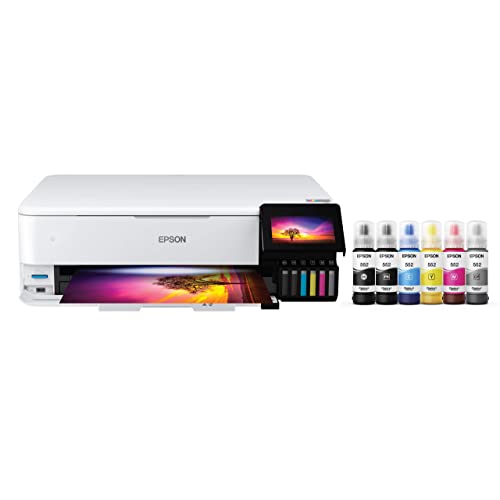
Epson
Epson EcoTank Photo ET-8550 Wireless Wide-Format All-in-One Tank Printer
Price and specifications are read from the Amazon product page and can change.
Epson EcoTank Photo ET-8550 Wireless Wide-Format
Best for: Photo crafters wanting wide 13×19 prints
Pros
- 6-color Claria ET Premium inks
- Borderless prints up to 13 x 19
- Refillable ink tanks
- Print, scan and copy
Cons
- Not a sublimation or DTG printer
- Large 29.8 inch depth
The Epson EcoTank Photo ET-8550 Wireless Wide-Format printer is a photo-focused all-in-one that prints, scans and copies. It uses refillable ink tanks instead of cartridges, with six Claria ET Premium ink colors for vivid photos and graphics. The description says it can print borderless photos up to 13 x 19 inches and even customized CDs and DVDs.
The listing says it includes up to 2 years of ink in the box and can print up to 6,200 color pages, and each replacement ink bottle set equals about 100 cartridges. It weighs 24.5 pounds and works with iOS and Android. One odd spec lists the ink color as “white”, but nothing in the features describes white ink, so we would not rely on it.
This suits photographers and crafters who want large, rich prints of their designs to mock up shirts or frame. It is not a sublimation or DTG printer, so for actual shirt transfers the F170 below is the correct Epson choice. If you mainly print tabloid-size sheets, our Epson 11×17 printer guide is worth a look.
Epson SureColor F170 Dye-Sublimation Printer for Beginners at Home

Johnson Plastics Plus
Epson SureColor F170 Dye-Sublimation Printer – Compact 8.5" x 11" Format – Includes Genuine Epson Ink, User Guide & Power Cable – Original OEM Product with Full Manufacturer Support
Price and specifications are read from the Amazon product page and can change.
Epson SureColor F170 Dye-Sublimation Printer
Best for: Beginners starting shirt sublimation at home
Pros
- Genuine Epson sublimation inks included
- OEKO-TEX ECO PASSPORT certified inks
- 150-sheet closed paper tray
- Compact letter-size format
Cons
- No mobile device printing
- Cannot be returned once inked
The Epson SureColor F170 Dye-Sublimation Printer is the most direct answer for someone who wants to print custom shirts at home. It is a compact letter-size (8.5 x 11 inch) sublimation printer, sold by JohnsonPlasticsPlus, which the listing says is an Epson authorized partner shipping factory-sealed units with Epson’s full warranty.
A full set of genuine Epson sublimation inks is included, certified ECO PASSPORT by OEKO-TEX for use on textiles; the listing also names mugs and mousepads as uses. The PrecisionCore printhead uses Precision Droplet Control for sharp images, and a 150-sheet auto-feed tray keeps paper in a closed, dust-resistant compartment. Bottles have auto-stop technology for mess-free refills. It works with macOS and Windows but does not support mobile devices, weighs 16 pounds and measures about 13.7 by 14.8 by 7.4 inches.
Important: the listing warns that once inks are loaded the printer cannot be returned. You will also need a heat press, sublimation paper and polyester blanks, which are not listed as included. This suits hobbyists, crafters and small shops starting out. If your designs need to be bigger than a letter sheet, the F570 gives way to 24-inch prints.
Epson EcoTank ET-4800 for Everyday Home Printing

Epson
Epson EcoTank ET-4800 Wireless Color All-in-One Supertank Printer
Price and specifications are read from the Amazon product page and can change.
Epson EcoTank ET-4800 Wireless Color All-in-One
Best for: Everyday home documents and copies
Pros
- Cartridge-free EcoFit bottles
- Flatbed scanner and color display
- Heat-free printhead
Cons
- Not built for shirt printing
- Description describes another product
The Epson EcoTank ET-4800 Wireless Color All-in-One is a supertank home printer, meaning it uses large refillable ink tanks rather than cartridges. EcoFit bottles are designed for easy filling, and Micro Piezo Heat-Free Technology prints sharp text and color on many paper types. It includes a flatbed scanner, copier and color display, weighs 11 pounds and copies up to 10 pages per minute.
Be aware that the description on this listing talks about a small portable document scanner rather than this printer, so rely on the title and feature list. Nothing in the listing mentions sublimation. Some hobbyists convert EcoTank printers with non-Epson sublimation inks, but that is outside what this listing supports, and Epson warns on its sister model that non-genuine ink can cause damage not covered by warranty.
This suits households that need a reliable document printer with scanning. For shirt transfers, choose the F170 instead. See our broader look at wireless all-in-one ink tank printers for more choices.
Epson EcoTank ET-2800 for Families on a Simple Setup

Epson
Epson EcoTank ET-2800 Wireless Color All-in-One Supertank Printer – Black
Price and specifications are read from the Amazon product page and can change.
Epson EcoTank ET-2800 Wireless Color All-in-One
Best for: Families printing homework and photos
Pros
- Up to 7,500 color pages
- Voice-activated printing
- Up to 2 years of ink
Cons
- Not a sublimation printer
- Non-genuine ink may void warranty
The Epson EcoTank ET-2800 Wireless Color All-in-One is an entry-level supertank printer, scanner and copier. Each ink bottle set equals about 90 cartridges, and the listing says you can print up to 4,500 black or 7,500 color pages, with up to 2 years of ink in the box. It prints 10 ISO pages per minute using Micro Piezo Heat-Free Technology.
It supports wireless and voice-activated printing, works with Android, and handles plain paper, glossy photo paper and envelopes. It uses black, cyan, magenta and yellow ink. The listing clearly states that Epson strongly recommends genuine ink and that non-genuine ink could cause damage not covered by the limited warranty.
This suits families printing homework, forms and the occasional photo. It is not a shirt printer; the sublimation models are the ones for that job.
Epson SureColor F570 24″ Desktop Sublimation for Growing Businesses
Best for: Small businesses printing larger shirt transfers
Pros
- Rolls and sheets up to 24 inches
- Two full ink sets included
- Built-in cutter
- Epson Edge Print Pro software
Cons
- 151 pounds, freight delivery
- Too big for most hobbyists
The Epson Surecolor F570 24″ Desktop Sublimation printer is a professional step up. It accepts rolls and sheets up to 24 inches wide, has a 50-sheet auto-feed tray and a built-in cutter, and uses a PrecisionCore MicroTFP printhead with Nozzle Verification Technology for reliability.
The bundle, sold by JohnsonPlasticsPlus, includes two full ink sets, sublimation paper, a user guide and free remote installation. Epson Edge Print Pro software with Adobe PostScript 3 and Adobe PDF Print Engine handles layout, nesting and pattern repeats. The T49M inks are listed for polyester fabrics and coated ceramics. It weighs 151 pounds, ships by LTL freight (a truck delivery that needs a phone number to schedule) and uses a touch control.
This suits small businesses printing large or many transfers at once. For most home hobbyists, the F170 is far easier to fit and learn.
Epson SureColor T5170 36 in Wide for Blueprints and Posters
Best for: Offices printing blueprints and posters
Pros
- 36 inch wide format
- A1 print in 31 seconds
- Wi-Fi Direct printing
Cons
- Not for shirt printing
- Floor-standing, 101 pounds
The Epson SureColor T5170 36 in Wide printer is a floor-standing wide-format printer for blueprints, line drawings, graphics and posters up to 36 inches. It produces A1/D-size prints in 31 seconds, has a 4.3-inch color touchscreen, uses UltraChrome XD2 pigment inks in high-capacity cartridges and supports wireless and Wi-Fi Direct printing from phones and tablets.
It weighs 101 pounds and comes with a standard 1-year warranty. Nothing in the listing mentions fabric or sublimation, so it is not a shirt printer.
It suits offices and designers who print large technical drawings. Shirt makers should look at the F170 or F570.
How to Choose the Right Epson Printer for Shirts
Decide on the method. If you want to print shirts, sublimation is the Epson route in this list. True DTG printers are a different class of machine and none is included here.
Match size to your designs. Letter-size designs suit the F170. Large or all-over prints suit the 24-inch F570.
Budget for extras. Sublimation needs a heat press, sublimation paper and polyester blanks in addition to the printer.
Use EcoTank models for their real job. The ET-8550 is best for photos, while the ET-4800 and ET-2800 handle documents.
FAQ
Does Epson make a DTG printer in this list?
No. The shirt-ready models here are sublimation printers; the rest are photo, document and wide-format printers.
Can I use the SureColor F170 on cotton shirts?
Sublimation generally needs polyester or polyester-coated items and light colors. The listing names textiles and apparel without detailing fabrics.
Can the EcoTank ET-2800 print sublimation?
The listing does not mention sublimation and warns that non-genuine ink may cause damage not covered by warranty.
Does the F170 work with my phone?
No. The listing says mobile devices are not supported; it works with macOS and Windows.
What else do I need to start sublimation?
A heat press, sublimation paper and polyester blanks. The F570 bundle includes paper; the F170 listing does not.


