eufy Smart Lock Guide: Fingerprint, Video or Palm Vein for Your Door?
As Amazon Associates, we earn from qualifying purchases. This means we may receive a small commission at no extra cost to you if you click through and make a purchase.
eufy Security is best known for home cameras and video doorbells that save footage locally, and its smart locks carry the same idea to the front door: keyless entry, built-in Wi-Fi so you do not need a separate hub, and tight pairing with other eufy devices in one app. A smart lock simply replaces the thumb-turn side and outside keypad of your deadbolt with a motorized version you can open by fingerprint, code, phone or voice, while most models still accept a physical key as backup.
The six eufy models here differ mainly in how you unlock them and what else they do: the C220 and C30 are straightforward keypad locks, the E330 and E40 add a camera, the FamiLock C32 is a handle lock for interior doors, and the FamiLock E34 reads the vein pattern in your palm.
eufy Security Smart Locks Compared
Best for: Privacy-minded households wanting palm entry
Pros
- Palm vein recognition
- Up to 8 months rechargeable
- Matter support
Cons
- No camera
- Backup battery is non-removable

eufy Security
eufy Security Smart Lock FamiLock C32, Fingerprint Keyless Lock with Handle
Price and specifications are read from the Amazon product page and can change.
eufy Security Smart Lock FamiLock C32
Best for: Bedrooms, offices and interior doors
Pros
- 3-second fingerprint unlock
- USB-C emergency power
- Lever handle design
Cons
- Not recommended for front doors
- 4 GHz Wi-Fi only

Best for: Simple keypad lock for first-timers
Pros
- Built-in Wi-Fi, no hub
- Auto-lock with custom timer
- No drilling install
Cons
- No fingerprint reader listed
- About 5 months per battery set
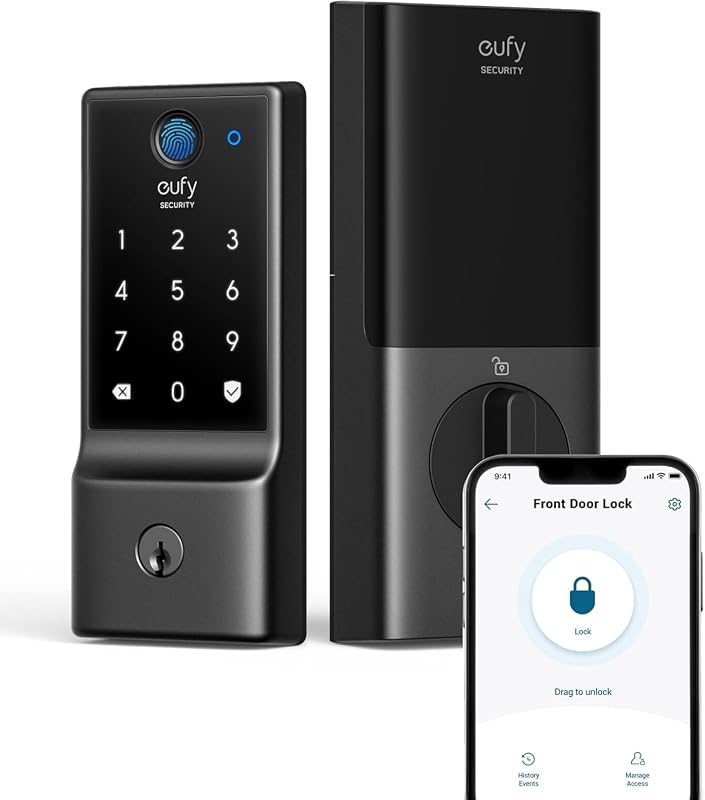
Best for: Fingerprint entry with long AA battery life
Pros
- Six ways to unlock
- About 8 months on AA batteries
- Built-in Wi-Fi, no bridge
Cons
- Needs 8 AA batteries
- No camera
| Model | Main unlock method | Power | Camera | Weather rating |
|---|---|---|---|---|
| eufy Security Smart Lock C220 | Fingerprint | 8 AA batteries, about 8 months | No | IP53 |
| eufy Security Smart Lock C30 | Keypad | 4 AA batteries, up to 5 months | No | IP53 |
| eufy Security Video Smart Lock E330 | Fingerprint | 10,000mAh rechargeable | 2K | IP65 |
| eufy Security Smart Lock FamiLock C32 | Fingerprint | 4 AA batteries, over 5 months | No | Not listed |
| eufy Security Video Smart Lock E40 | Facial recognition | 15,000mAh rechargeable, up to 6 months | 2K with doorbell | IP65 |
| eufy Security Smart Lock FamiLock E34 | Palm vein | 10,000mAh rechargeable, up to 8 months | No | Not listed |
eufy Security Smart Lock C220 for Fingerprint Entry on a Budget of Effort
The eufy Security Smart Lock C220 is a fingerprint deadbolt with six ways in: fingerprint, the eufy Security app, the keypad, a physical key, Apple Watch, and voice through Alexa or Google Assistant. The listing says a touch unlocks it in under a second and that its self-learning fingerprint reader gets more precise with use, which helps if the first few tries feel fussy.
It runs on 8 AA batteries for around 8 months, depending on how often the door is used, and has built-in Wi-Fi, so no bridge (a small plug-in hub some locks need) is required. It fits most standard deadbolts and bores under 54mm once you remove a spacer, installs in about 15 minutes without drilling, carries BHMA Grade 3 certification (a basic residential durability standard from the Builders Hardware Manufacturers Association), and is IP53 rated for splashes and dust. It can also sound an alarm after unusual opening attempts.
This suits a first-time buyer who wants fingerprint access and Apple Watch unlocking without a rechargeable battery to manage. If you want to see who is at the door, the E330 adds a camera.
eufy Security Smart Lock C30 for a Simple Keypad Upgrade
The eufy Security Smart Lock C30 is the most basic model in this group. You can unlock it by keypad, app, Alexa or Google Assistant voice, or physical key. The listing does not mention a fingerprint reader. Built-in Wi-Fi gives remote control with no hub, and it pairs with a eufy doorbell for keyless entry routines.
It runs on 4 AA batteries for up to 5 months with a low battery indicator, fits most standard deadbolts without drilling, and matches the C220 with IP53 weather resistance, a -22°F to 158°F operating range and BHMA Grade 3 certification. It adds auto-lock with a countdown timer you can customize, physical buttons, no monthly fee, and 18-month protection.
The C30 is a good gift for someone who just wants to stop carrying keys and share door codes with guests. If fingerprint entry matters, step up to the C220.
eufy Security Video Smart Lock E330 for Seeing Who Is at the Door
Best for: All-in-one front door with face unlock
Pros
- Facial recognition unlocking
- Camera, doorbell and lock combined
- 32GB local storage, no fee
Cons
- Not for mortise or round faceplates

eufy Security
eufy Security Video Smart Lock E330, Fingerprint Keyless Entry Door Lock
Price and specifications are read from the Amazon product page and can change.
eufy Security Video Smart Lock E330
Best for: Seeing visitors plus fingerprint entry
Pros
- 2K camera with f/1.6 lens
- 10,000mAh rechargeable battery
- IP65 weather resistance
Cons
- Battery life not stated
- Thumbnails briefly stored in cloud
The eufy Security Video Smart Lock E330 combines a fingerprint deadbolt with a 2K HD camera and an f/1.6 lens, a wide aperture that lets in more light for clearer video after dark. You can also unlock by app, voice assistant, keypad or physical key, and the app sends real-time visitor notifications. The listing notes that thumbnail preview images in notifications are temporarily stored in the cloud.
Power comes from a 10,000mAh rechargeable battery, though the listing does not state how many months it lasts. It installs in about 15 minutes on most standard US deadbolts, has BHMA Grade 3 certification and IP65 weather resistance, and works with eufy Chime, Chime 2, HomeBase 3 and compatible eufy cameras and doorbells, sold separately. If you are building a full porch setup, our guide to a eufy front door camera covers the camera side in more detail.
Pick the E330 if you want fingerprint entry and video in one device. The E40 goes further with face unlock and a built-in doorbell.
eufy Security Smart Lock FamiLock C32 for Interior Doors
The eufy Security Smart Lock FamiLock C32 is different from the others: it is a fingerprint lock with a handle, and the listing clearly says it is not recommended for front doors. It is meant for bedrooms, home offices, storerooms, side doors and garage entries.
A large-area fingerprint sensor unlocks in 0.3 seconds with 360-degree recognition, so a finger at any angle works, which the listing highlights for children and seniors. It has a built-in 2.4 GHz Wi-Fi module for remote access, works with Alexa and Google Assistant, and runs on four AA batteries for over five months. If the batteries die, you can plug a power bank in by USB-C and still unlock by fingerprint or PIN. Installation takes about 15 minutes with a screwdriver.
This is the right choice for a home office, a teen’s room or a storage room you want to track. For the main entrance, choose any of the deadbolt models instead.
eufy Security Video Smart Lock E40 for an All-in-One Front Door
The eufy Security Video Smart Lock E40 unlocks with facial recognition and combines a 2K HD camera, a doorbell and a smart lock in one device. Its 135-degree head-to-toe view helps you see packages on the ground as well as visitors’ faces. A 60 GHz radar sensor detects human motion while filtering out pets, small objects and wind, which the listing says reduces false alerts and saves battery.
It has a 15,000mAh rechargeable battery rated for up to 6 months, plus an 800mAh backup battery that kicks in when power runs low. Video is kept on 32GB of built-in storage with no monthly subscription. It supports Matter, a shared smart home standard, so it can connect with Apple Home, Google Home, Alexa and SmartThings, and it works with HomeBase 3. It fits most standard US and Canadian single-cylinder deadbolts but not round or non-standard faceplates or mortise locks, and it is IP65 rated. The listing’s model name reads “eufy FamiLock E40” while the title calls it the Video Smart Lock E40.
Choose the E40 if you want to replace a separate doorbell and lock with one device. If you only want a face-free biometric option without a camera, the FamiLock E34 is simpler.
eufy Security Smart Lock FamiLock E34 for Palm Vein Entry
The eufy Security Smart Lock FamiLock E34 reads palm veins, the pattern of blood vessels under your skin, rather than a fingerprint. The listing describes recognition in 0.6 seconds, calls the technology forgery-proof, and says all data is stored locally on the lock rather than online.
A 10,000mAh rechargeable battery provides up to 8 months of use, backed by a 750mAh non-removable backup battery for outages or while you recharge the main pack. Built-in Wi-Fi gives remote control without a bridge, and Matter support connects it to Apple Home, Google Home, Alexa and SmartThings. It installs without drilling on standard US and Canada doors and comes with 18 months of electronic protection, 36 months of mechanical coverage and 24/7 support.
This fits households that want hands-free biometric entry and Apple Home support without a camera. If video matters more, look at the E330 or E40.
How to Choose the Right eufy Security Smart Lock
Pick the door first. The FamiLock C32 is for interior doors only. All other models here are deadbolt locks for entry doors. If you are still weighing a traditional mechanical option, our look at a classic keyed deadbolt lock explains the basics.
Choose an unlock method. Keypad only suits the C30. Fingerprint suits the C220, E330 and C32. Face unlock is the E40, and palm vein is the E34.
Decide on AA or rechargeable. The C220, C30 and C32 use AA batteries you swap out. The E330, E40 and E34 use large rechargeable packs, and the E40 and E34 add a backup battery.
Decide if you want video. The E330 has a 2K camera, and the E40 adds a doorbell, radar and local storage. Anyone planning more cameras around the house may also like our guide to a eufy outdoor camera.
Check your smart home. The E40 and E34 list Matter support for Apple Home. The C220 lists Apple Watch unlocking. The rest list Alexa and Google Assistant.
FAQ
Do eufy smart locks need a hub?
The C220, C30, E34 and C32 listings describe built-in Wi-Fi with no bridge or hub needed. The E330 and E40 can optionally connect to HomeBase 3 for extra features.
Can I install a eufy smart lock myself?
Yes, the listings describe DIY installation in about 15 minutes with no drilling on most standard deadbolts. The C32 installs on interior doors with a screwdriver.
What happens if the battery runs out?
Most models include physical keys. The C32 can be powered from a power bank through USB-C, and the E40 and E34 have backup batteries that take over when the main battery is low.
Which eufy smart lock works with Apple Home?
The E40 and E34 list Matter support with Apple Home. The C220 lists Apple Watch unlocking. The other listings do not mention Apple Home.
Is there a monthly fee?
The C30 and E40 listings say no monthly fee is required, and the E40 stores video locally on 32GB. The other listings do not mention subscriptions.
Which eufy smart lock is best as a gift?
For a first smart lock, the C30 or C220 is the easiest to understand. For a tech lover who wants everything at the front door, the E40 is the most complete.


