Small HP Wireless Printers That Scan and Copy, Explained
As Amazon Associates, we earn from qualifying purchases. This means we may receive a small commission at no extra cost to you if you click through and make a purchase.
HP is one of the most familiar printer brands in homes and dorm rooms, and its DeskJet line is built for exactly the search behind this guide: an HP small compact wireless all-in-one color printer scanner copier. “All-in-one” simply means one machine that prints, scans and copies. “Wireless” means it connects to your Wi-Fi so you can print from a laptop or phone without a cable. HP pairs many of these printers with Instant Ink, an optional subscription that ships ink to your door before you run out.
The six printers below differ mainly in scanning convenience, Wi-Fi support and ink plan: four are compact HP DeskJet all-in-one models, one is a larger HP color laser printer for offices, and one, the Canon PIXMA TS4320, is included as an honest non-HP alternative for comparison.
HP Compact All-in-One Printers Compared
| Model | Print Technology | Listed Speed | Wi-Fi | Document Feeder |
|---|---|---|---|---|
| Canon PIXMA TS4320 (non-HP) | Inkjet | 11 ppm black copy | Dual-band | No |
| HP DeskJet 2955 | Thermal inkjet | 7.5 ppm black, 5.5 ppm color | Dual-band | No |
| HP DeskJet 4355 | Inkjet | 8.5 ppm black, 5.5 ppm color | Dual-band | 35-sheet |
| HP DeskJet 2923 | Thermal inkjet | 7.5 ppm black, 5.5 ppm color | Dual-band | No |
| HP DeskJet 2855e | Inkjet | 7.5 ppm black, 5.5 ppm color | 2.4 GHz only | No |
| HP Color LaserJet Pro MFP 3301sdw | Color laser | 26 ppm black and color | Wireless and ethernet | Yes |
Canon PIXMA TS4320 as a Simple Non-HP Alternative

Canon
Canon PIXMA TS4320 – Wireless Color Inkjet Printer with Print, Copy, Scan
Price and specifications are read from the Amazon product page and can change.
Canon PIXMA TS4320
Best for: Shoppers open to a non-HP alternative
Pros
- Auto 2-sided printing
- Dual-band Wi-Fi
- Borderless prints up to letter size
Cons
- Canon, not HP
- No display or document feeder
To be upfront, the Canon PIXMA TS4320 is made by Canon, not HP. We include it because shoppers comparing small wireless printers often weigh it against HP’s DeskJet models, and it has one feature the compact HPs here do not list: automatic 2-sided printing, also called auto duplex, which prints on both sides of the page without you flipping it.
The listing describes a 2-cartridge hybrid ink system, dual-band Wi-Fi (2.4 GHz or 5 GHz), a flatbed scanner, and borderless printing up to 8.5 x 11 inches on plain paper, glossy photo paper, card stock, envelopes and labels. It lists a black-and-white copy speed of 11 pages per minute and dimensions of 14.8 x 14 x 6.7 inches. The description notes it has no OLED display and no automatic document feeder.
It suits someone printing recipes, homework and the occasional photo who wants duplex printing. If you specifically want HP and Instant Ink, the DeskJet models below are the ones to compare.
HP DeskJet 2955 Wireless All-in-One Color for Everyday Home Printing
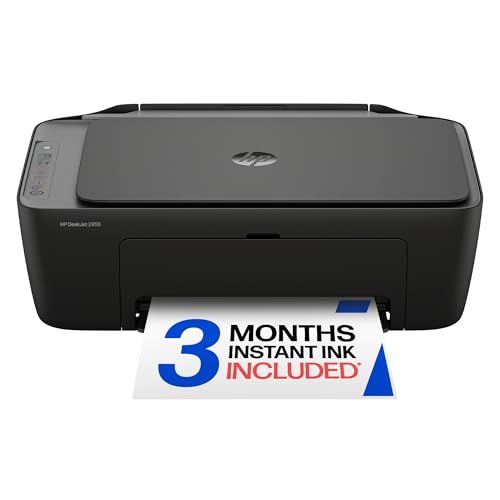
HP
HP DeskJet 2955 Wireless All-in-One Color Inkjet Printer, Scanner, Copier, Best-for-Home, 3 Month Trial of Instant Ink Included, AI-Capable (A24HJA)
Price and specifications are read from the Amazon product page and can change.
HP DeskJet 2955 Wireless All-in-One Color
Best for: Students printing homework and letters
Pros
- Dual-band Wi-Fi
- HP AI print formatting
- 3-month Instant Ink trial
Cons
- Up to 7.5 ppm black
- No document feeder
The HP DeskJet 2955 Wireless All-in-One Color printer covers the basics: color printing, copying and scanning with a flatbed scanner, a 60-sheet input tray, and printing from a phone or tablet. A flatbed scanner is the glass surface under the lid where you place one page or a book at a time.
HP lists speeds up to 7.5 pages per minute (ppm) in black and 5.5 ppm in color, dual-band Wi-Fi that detects and resolves connection issues, and an icon LCD control panel. HP AI formatting helps remove unwanted content when printing web pages and emails, so you do not waste paper on ads. It includes a 3-month Instant Ink trial; HP says the service can save up to 50% on ink, and after the trial a monthly fee applies unless you cancel. The listed weight is 7.6 pounds, and it measures 11.97 x 16.73 x 6.06 inches.
This suits students and families with light printing needs. If you scan multi-page documents often, the DeskJet 4355 adds a document feeder.
HP DeskJet 4355 Wireless All-in-One Color for Easier Scanning

HP
HP DeskJet 4355 Wireless All-in-One Color Inkjet Printer, Scanner, Copier, Best-for-Home, 3 Month Trial of Instant Ink Included, AI-Capable (AJ4Y0A)
Price and specifications are read from the Amazon product page and can change.
HP DeskJet 4355 Wireless All-in-One Color
Best for: Home users scanning multi-page documents
Pros
- 35-sheet auto document feeder
- Up to 8.5 ppm black
- Dual-band Wi-Fi
Cons
- Ink spec listed as black only
- Short Instant Ink trial
The HP DeskJet 4355 Wireless All-in-One Color printer adds the most useful upgrade in this group: a 35-sheet automatic document feeder (ADF). An ADF is a tray on top that pulls pages through one by one, so you can scan or copy a stack without lifting the lid for each sheet.
It prints up to 8.5 ppm black and 5.5 ppm color, has a 60-sheet input tray, dual-band Wi-Fi, an icon LCD, HP AI formatting and HP app support. It includes a 3-month Instant Ink trial. The listing gives a 6-pound weight and a 2-year warranty. Two details are unclear: the specifications list ink color as “Black” only, although the printer is described as color, and the listed dimensions of 16.85 x 7.87 x 13.07 inches look different from the other DeskJets, so check the product page for exact size.
This is the best HP pick here for anyone handling school forms, tax papers or multi-page contracts. Light users who only print may not need the feeder.
HP DeskJet 2923 Wireless All-in-One Color for a Longer Ink Trial

HP
HP DeskJet 2923 Wireless All-in-One Color Inkjet Printer, Scanner, Copier, 6 Month Trial of Instant Ink Included, AI-Capable (B18JWA)
Price and specifications are read from the Amazon product page and can change.
HP DeskJet 2923 Wireless All-in-One Color
Best for: New Instant Ink users wanting longer trial
Pros
- 6-month Instant Ink trial
- Dual-band Wi-Fi
- HP AI print formatting
Cons
- No document feeder
- Up to 5.5 ppm color
The HP DeskJet 2923 Wireless All-in-One Color printer shares its listed specs with the DeskJet 2955: 7.5 ppm black and 5.5 ppm color, a 60-sheet input tray, a flatbed scanner, dual-band Wi-Fi, an icon LCD, HP AI formatting, 7.6 pounds and 11.97 x 16.73 x 6.06 inches.
The key difference in the listing is the Instant Ink trial, which runs 6 months instead of 3. HP says Instant Ink can save up to 50% on ink, and a monthly fee applies after the trial unless you cancel. For a first-time buyer, a longer trial gives you more time to decide whether a subscription suits your printing habits.
Pick this if you want the basic DeskJet experience and plan to try Instant Ink. If you need a document feeder, choose the 4355 instead.
HP DeskJet 2855e Wireless All-in-One Color for 2.4 GHz Home Networks
Best for: Homes with 2.4 GHz routers
Pros
- Prints on glossy photo paper
- HP app printing
- 60-sheet input tray
Cons
- 4 GHz Wi-Fi only
- Instant Ink needs HP+ activation
The HP DeskJet 2855e Wireless All-in-One Color printer offers the same core functions: color printing, copying and flatbed scanning, a 60-sheet input tray, up to 7.5 ppm black and 5.5 ppm color, HP AI formatting and HP app printing from a phone, PC or tablet. The listed print media include envelopes, plain paper and glossy photo paper.
The important difference is Wi-Fi. HP states clearly that this printer is only 2.4 GHz capable. Most home routers broadcast a 2.4 GHz band, but if yours only uses 5 GHz you will need to change a setting. The 3-month Instant Ink trial requires HP+ activation at setup, which is an HP account-based program. The listed weight is 10 pounds, more than the 7.6 pounds given for the similar-sized 2955 and 2923, and the listing does not explain why.
This suits homes with a standard router and light printing needs. The 2955 or 2923 is the better pick if you want dual-band Wi-Fi.
HP Color LaserJet Pro MFP 3301sdw for Small Offices
Best for: Small offices printing high volume
Pros
- Up to 26 ppm color laser
- Auto duplex and ADF
- 250-sheet input tray
Cons
- 7 pounds, not compact
- Blocks non-HP-chip cartridges
The HP Color LaserJet Pro MFP 3301sdw is not a small printer. It weighs 37.7 pounds and measures 16.46 x 13.44 x 16.5 inches. We include it because some shoppers searching for a color all-in-one really need office-level speed. MFP means multifunction printer, another term for all-in-one.
It prints up to 26 ppm in black and color using toner rather than ink. Toner is a fine powder fused onto paper with heat, and it suits frequent printing. It adds auto 2-sided printing, an automatic document feeder, a 250-sheet input tray, wireless and ethernet connections, and HP Wolf Pro security. It uses Original HP 218A and 218X toner cartridges, and HP states it will block cartridges with non-HP chips or circuitry.
This suits small teams and home businesses printing reports every day. For a student desk or occasional home use, a compact DeskJet makes more sense. If you are comparing color laser options more broadly, our color laser all-in-one printer guide covers another route.
How to Choose the Right HP Compact All-in-One Printer
Start with how much you print. For occasional homework, recipes and letters, any of the DeskJet 2955, 2923 or 2855e covers the basics. For daily, high-volume office printing, the Color LaserJet Pro MFP 3301sdw is built for that work.
Next, think about scanning. If you scan single pages, a flatbed is enough. If you scan stacks, the DeskJet 4355’s 35-sheet document feeder saves real time.
Then check your Wi-Fi. The 2955, 4355 and 2923 list dual-band Wi-Fi. The 2855e works only on 2.4 GHz.
Finally, decide how you want to buy ink. The DeskJets come with Instant Ink trials of 3 or 6 months, after which a monthly fee applies unless cancelled. If you would rather avoid cartridges and subscriptions, our ink tank all-in-one printer guide explains refillable tank printers.
FAQ
What is HP Instant Ink?
It is an optional HP subscription that ships ink before you run out. The DeskJets here include 3- or 6-month trials, and a monthly fee applies afterward unless cancelled.
Which small HP printer has a document feeder?
Among the compact DeskJets, only the 4355 lists one, with 35 sheets. The Color LaserJet Pro MFP 3301sdw also has one.
Can I print from my phone?
Yes. The DeskJet listings describe printing, scanning and copying from a smartphone with the HP app, and the LaserJet listing mentions the HP app too.
What is the difference between the DeskJet 2955 and 2923?
Their listed specs match. The 2923 includes a 6-month Instant Ink trial, while the 2955 includes 3 months.
Do any compact HP models print on both sides automatically?
The compact DeskJet listings here do not mention auto duplex. The LaserJet Pro MFP 3301sdw and the Canon PIXMA TS4320 both list it.
Will the DeskJet 2855e work with my router?
It works on 2.4 GHz Wi-Fi only. Most routers offer that band, but check your router settings first.
Related reading: brother color printer scanner copier all in one.


