Kwikset Keyless Entry Door Lock with Z-Wave: Which Model Fits Your Hub?
As Amazon Associates, we earn from qualifying purchases. This means we may receive a small commission at no extra cost to you if you click through and make a purchase.
Kwikset is one of the most familiar names in home door hardware, and its keypad deadbolts range from simple code locks to smart locks you can control from a phone. If you are shopping for a Kwikset keyless entry door lock with Z-Wave, the key thing to understand is that not every Kwikset keypad lock talks to a smart home. Z-Wave is a wireless language used by smart home hubs; a Z-Wave lock needs a hub, such as a Ring Alarm base station or a SmartThings hub, to be controlled remotely.
Of the six locks below, three are Z-Wave (HomeConnect 620, HomeConnect 918 and the 912 lever set), one is Wi-Fi and needs no hub (Halo), and two are standalone keypads with no wireless connection at all (Powerbolt 250 and SmartCode 270).
Kwikset Keyless Entry Door Locks Compared
| Model | Connection | User codes | Keypad type | Batteries |
|---|---|---|---|---|
| Kwikset HomeConnect 620 | Z-Wave 700 Long Range (hub required) | Up to 250 | Button keypad | 4x AA, included |
| Kwikset Powerbolt 250 | None (standalone) | 25 plus 5 one-time | 10-button light-up keypad | 4x AA, not included |
| Kwikset SmartCode 270 | None (standalone) | 50 plus 10 one-time | Light-up touchpad | 4x AA, not included |
| Kwikset Halo Wi-Fi Smart Lock | Wi-Fi (no hub) | Up to 250 | Backlit touchscreen | Not listed |
| Kwikset HomeConnect 918 | Z-Wave 700 Long Range (hub required) | Up to 250 | Touchscreen | 4x AA, included |
| Kwikset 912 Tustin Lever Z-Wave | Z-Wave, 500 chipset (hub required) | Up to 30 | Not listed | 4 AA |
Kwikset HomeConnect 620 Z-Wave Long Range for Hub Owners
Kwikset
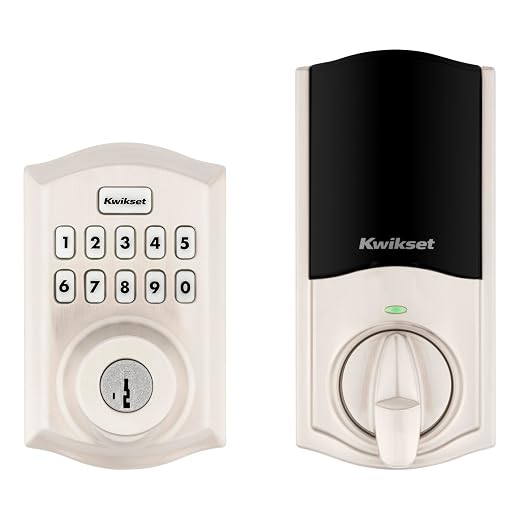
Kwikset HomeConnect 620 Z-Wave Long Range Enabled Keypad Smart Lock Convenient Keyless Entry, Customizable User Codes, Ring Alarm Compatible, Hub Required, Sold Separately Satin Nickel Traditional
Price and specifications are read from the Amazon product page and can change.
Kwikset HomeConnect 620 Z-Wave Long Range
Best for: Z-Wave hub owners wanting a keypad
Pros
- Z-Wave 700 Long Range
- Up to 250 user codes
- Batteries included
Cons
- Needs a separate Z-Wave hub
The Kwikset HomeConnect 620 Z-Wave Long Range lock is a keypad deadbolt built for Z-Wave smart homes. It uses Z-Wave 700 Long Range, which the listing says provides a direct connection to your hub and coverage throughout the home. Standard Z-Wave devices pass signals from one device to the next; Long Range lets the lock talk straight to a compatible hub over a longer distance. It also supports S2 encryption, the current Z-Wave security standard, and SmartStart, which simplifies pairing with a compatible hub. A hub is required and sold separately.
The listing highlights Ring Alarm compatibility, so you can check and control the lock in the Ring app when you have a Ring Alarm hub, and the description also names SmartThings. You can store up to 250 user codes plus one programming code, and set auto-lock at 30 seconds, 1, 3, 5 or 10 minutes. It runs on four AA batteries (included) with a listed life of at least 12 months, and it fits doors 1-3/8 to 2 inches thick with an adjustable backset of 2-3/8 to 2-3/4 inches. The backset is the distance from the door edge to the center of the lock hole. This version is the Traditional style in Satin Nickel.
Pick this if you already run a Ring Alarm or another Z-Wave hub and prefer a classic look with physical buttons. If you want a touchscreen or a darker, modern style, the HomeConnect 918 is the sister model.
Kwikset Powerbolt 250 10-Button Keypad Satin for Simple Keyless Entry
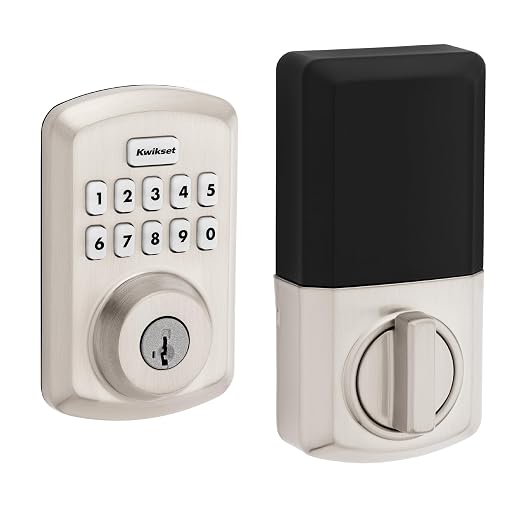
Kwikset
Kwikset Powerbolt 250 10-Button Keypad Satin Nickel Transitional Electronic Deadbolt Door Lock, Featuring Convenient Keyless Entry, Customizable User Codes, and Auto-Locking
Price and specifications are read from the Amazon product page and can change.
Kwikset Powerbolt 250 10-Button Keypad Satin
Best for: Simple keypad lock without smart home
Pros
- No hub or app needed
- SmartKey re-keying
- Vacation mode and intrusion alert
Cons
- No Z-Wave or Wi-Fi
- Batteries not included
The Kwikset Powerbolt 250 10-Button Keypad Satin Nickel deadbolt is a standalone electronic lock. It has no Z-Wave, Wi-Fi or app connection, so everything is done at the keypad. That makes it simple: no hub, no network and no account to set up.
It stores up to 25 user codes, 5 one-time codes and a programming code. One-time codes work once and then expire, which is handy for a delivery or a repair visit. Auto-lock can be set from 30 seconds to 10 minutes, and after three wrong codes in a row the lock sounds an alarm and disables the keypad for one minute. Vacation Mode turns the keypad off while you are away, and bright LED lights help at night. It includes SmartKey Security, which lets you re-key the lock yourself to any KW1 key. It uses four AA batteries (not included) with at least 12 months of life.
This suits renters, side doors, garages and sheds, or anyone who wants keyless entry without smart home setup. If you later want remote control, you would need to move to one of the Z-Wave or Wi-Fi models.
Kwikset SmartCode 270 Keyless Entry Electronic for Stronger Standalone Security

Kwikset
Kwikset SmartCode 270 Keyless Entry Electronic Touchpad Deadbolt Door Lock
Price and specifications are read from the Amazon product page and can change.
Kwikset SmartCode 270 Keyless Entry Electronic
Best for: Standalone lock with stronger certification
Pros
- Grade 2 BHMA certified
- 50 user codes plus 10 one-time
- BILT app install guidance
Cons
- No Z-Wave or Wi-Fi
- Batteries not included
The Kwikset SmartCode 270 Keyless Entry Electronic touchpad deadbolt is also standalone, with no wireless connection. It steps up from the Powerbolt 250 with a Grade 2 BHMA certification for security, durability and finish. BHMA grades are a U.S. standard for lock strength, and the listing says Grade 2 is up to 2.5 times stronger than Grade 3 lock sets.
It holds up to 50 user codes, 10 one-time codes and a programming code. You also get auto-lock with the same time options, intrusion alert, Vacation Mode and a light-up touchpad. The box includes a SmartKey tool, and the listing mentions the BILT app, which offers 3D voice, text and animation instructions for installation. Four AA batteries are required but not included.
Choose this if you want the most capable non-connected lock in this group, for example for a front door where you do not want a smart home system. For remote access, look at the Halo or the HomeConnect models.
Kwikset Halo Wi-Fi Smart Lock for Hub-Free App Control

Kwikset
Kwikset Halo Wi-Fi Smart Lock, Keyless Entry Front Door Touchscreen Deadbolt, Matte Black Finish, Grade AAA Certified, UL Listed, Easy Install No Hub, App Control
Price and specifications are read from the Amazon product page and can change.
Kwikset Halo Wi-Fi Smart Lock
Best for: App control without buying a hub
Pros
- Built-in Wi-Fi, no hub
- Geofencing auto-unlock
- Works with Alexa and Google Home
Cons
- Not Z-Wave
- One-year electronics warranty
The Kwikset Halo Wi-Fi Smart Lock is not a Z-Wave lock, and that is exactly its appeal for some buyers. It connects directly to your home Wi-Fi, so no hub is required. The Kwikset app lets you lock and unlock remotely, share temporary, scheduled or permanent codes, view activity history and get alerts about invalid code attempts or tampering. Geofencing can unlock the door as you approach, using your phone’s location.
The backlit touchscreen supports up to 250 codes, it works with Amazon Alexa and Google Home for voice control, and it has adjustable auto-lock. The title lists it as Grade AAA certified and UL listed. It fits doors 1-3/8 to 1-3/4 inches thick with a backset of 2-1/8 to 2-3/4 inches. The warranty is lifetime mechanical and finish plus one year on electronics. The listing does not specify battery type or life. This version is Matte Black.
Pick this if you do not own a Z-Wave hub and do not want to buy one. Our Kwikset keyless entry door lock Wi-Fi guide goes deeper into the connected options.
Kwikset HomeConnect 918 Contemporary Z-Wave Long for Modern Doors
Best for: Modern doors on a Z-Wave system
Pros
- Touchscreen keypad
- Z-Wave 700 Long Range
- Up to 250 user codes
Cons
- Needs a separate Z-Wave hub
The Kwikset HomeConnect 918 Contemporary Z-Wave Long Range lock shares the core features of the HomeConnect 620: Z-Wave 700 Long Range, S2 encryption, SmartStart pairing, Ring Alarm compatibility and up to 250 user codes. The description adds that Long Range extends coverage throughout your property, including outbuildings, and names SmartThings as another compatible system. A hub is required and sold separately.
The main differences are the touchscreen keypad and the Contemporary style in Matte Black. Auto-lock settings, four AA batteries (included) with at least 12 months of life, and the door fit of 1-3/8 to 2 inches thick with a 2-3/8 to 2-3/4 inch backset match the 620.
Choose the 918 if you want Z-Wave and a sleek touchscreen look. If you prefer tactile buttons and a traditional finish, the 620 is the better match.
Kwikset CP912TNLZW500-11PS Clear Pack Z-Wave Enabled for a Matching Lever
Best for: Z-Wave homes wanting a lever handle
Pros
- Includes Tustin lever handle
- Z-Wave enabled
- Venetian Bronze finish
Cons
- Older Z-Wave 500 chipset
- Only 30 user codes
The Kwikset CP912TNLZW500-11PS Clear Pack Z-Wave Enabled set combines a SmartCode deadbolt with a Tustin lever handle in Venetian Bronze. It connects to Z-Wave security and smart home systems (hub required), and the listing says it works with Alexa, Google Assistant and more. It uses a Z-Wave 500 chipset, an older generation than the 700 series in the HomeConnect locks, although the spec table lists the style as “Z-Wave Plus”. The listing does not mention S2 or Long Range.
It supports up to 30 user codes and a 30-second auto-lock, fits doors 1-3/8 to 1-3/4 inches thick, and runs on four AA batteries rated for 12 months or longer. It includes an RCAL latch and RCS strike, which are Kwikset’s adjustable latch and strike parts. The weight is 3.6 pounds.
This suits someone who wants a Z-Wave deadbolt and a matching lever handle in one package, in a warm bronze finish. For newer Z-Wave features and more codes, the HomeConnect models are ahead.
How to Choose the Right Kwikset Keyless Entry Door Lock
First, decide Z-Wave vs Wi-Fi vs standalone. If you already have a Z-Wave hub such as Ring Alarm, pick the HomeConnect 620, HomeConnect 918 or the 912 lever set. If you have no hub and want app control, the Halo Wi-Fi is simpler. If you only want codes instead of keys, the Powerbolt 250 or SmartCode 270 do the job without any setup.
Second, count your users. The HomeConnect and Halo models store up to 250 codes, the SmartCode 270 stores 50 plus 10 one-time codes, the 912 stores 30, and the Powerbolt 250 stores 25 plus 5 one-time codes.
Third, measure your door. The HomeConnect locks fit doors up to 2 inches thick, while the Halo and 912 fit up to 1-3/4 inches. Check the backset range too.
Finally, choose a style. Traditional buttons, touchscreens, matte black, satin nickel and bronze are all represented. Our Kwikset keyless deadbolt guide covers more finishes.
FAQ
Which Kwikset locks work with Z-Wave?
In this lineup, the HomeConnect 620, HomeConnect 918 and the 912 Tustin lever set are Z-Wave enabled. All three need a separate Z-Wave hub.
Does the Kwikset Halo need a hub?
No. The Halo connects over Wi-Fi and is controlled through the Kwikset app, with no hub required.
Do the Kwikset HomeConnect locks work with Ring Alarm?
Yes. Both HomeConnect listings say you can control and check the lock through the Ring Alarm app, with a Ring Alarm hub.
Can I add the Powerbolt 250 or SmartCode 270 to a smart home later?
Their listings do not mention any wireless connection, so they work as standalone keypads only.
What is Z-Wave Long Range?
It lets the lock connect directly to a compatible hub over a longer distance, instead of relaying through other devices. The HomeConnect 620 and 918 list it.