Kwikset Z-Wave Deadbolt Guide: Do You Need a Hub?
As Amazon Associates, we earn from qualifying purchases. This means we may receive a small commission at no extra cost to you if you click through and make a purchase.
Kwikset is one of the best-known American lock makers, and its SmartKey deadbolts are found on front doors across the country. Its electronic range now covers three kinds of lock that look alike but work very differently. Z-Wave locks talk to a smart home hub (a small box that links your devices together) using a low-power radio signal. Wi-Fi locks connect straight to your home internet and need no hub. Keypad-only locks let you type a code at the door but do not connect to anything at all.
Of the six locks below, three are Z-Wave models that need a compatible hub (the Home Connect 620, the SmartCode 888 and the 620TRL-ZW), one is the Wi-Fi Halo that works through an app with no hub, and two are keypad-only SmartCode locks (260 and 270) for people who just want to ditch their keys.
Kwikset Z-Wave Deadbolts Compared
| Model | Connection | Hub needed | User codes | Batteries |
|---|---|---|---|---|
| Kwikset Home Connect 620 Smart Lock | Z-Wave | Yes, Z-Wave hub | Not listed | 4 AA, included |
| Kwikset Halo Wi-Fi Smart Lock | Wi-Fi | No | Up to 250 | Included (type not listed) |
| Kwikset SmartCode 260 | None (keypad only) | No | 50 plus 10 one-time | 4 AA, not included |
| Kwikset SmartCode 270 | None (touchpad only) | No | 50 plus 10 one-time | 4 AA, not included |
| Kwikset SmartCode 888 (98880-004) | Z-Wave Plus | Yes, compatible home automation system | Up to 30 | 4 AA, not included |
| Kwikset 620TRL-ZW SmartCode | Z-Wave | Not spelled out in listing | 250 | 4 AA, included |
Kwikset Home Connect 620 Smart Lock for Z-Wave Security Systems

Kwikset
Kwikset Home Connect 620 Smart Lock Deadbolt with Z-Wave Technology, Works with Ring Alarm, Samsung Smartthings and More, Z-Wave Hub Required, Traditional Design in Satin Nickel
Price and specifications are read from the Amazon product page and can change.
Kwikset Home Connect 620 Smart Lock
Best for: Z-Wave hub owners wanting auto-lock
Pros
- Z-Wave Home Connect
- Ring app control with Z-Wave hub
- Auto-lock with time options
- 4 AA batteries included
Cons
- Z-Wave hub required
- Code count not listed
The Kwikset Home Connect 620 Smart Lock is a motorized deadbolt with an illuminated keypad and Z-Wave Home Connect. “Motorized” means the bolt slides by itself when you enter a code, and one-touch locking lets you lock it with a single press on your way out. The listing states plainly that a Z-Wave hub is required for the smart features.
Once connected, it can talk to security and home automation systems, and the listing says you can control it through the Ring app if you have a Ring-compatible Z-Wave hub. Auto-lock can be set to lock after entry or exit using several time settings. It installs with a screwdriver, fits doors 1-3/8 to 1-3/4 inches thick, and includes 4 AA batteries that should last 12 months or longer. SmartKey security guards against advanced break-in techniques and lets you re-key the lock yourself in seconds. The warranty is lifetime mechanical and finish plus 1 year on electronics. The listing does not say how many user codes it stores.
This suits someone who already has a Z-Wave security system and wants the lock to join it. If you have no hub and do not want one, the Halo Wi-Fi is the simpler route.
Kwikset Halo Wi-Fi Smart Lock for No-Hub Beginners
Kwikset
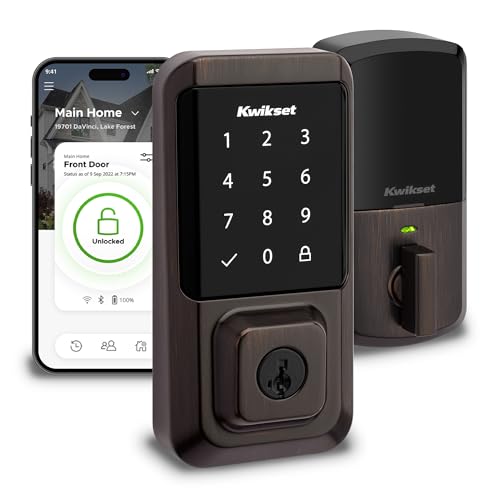
Kwikset Halo Wi-Fi Smart Lock, Keyless Entry Front Door Touchscreen Deadbolt, App Control, Grade AAA Certified, Easy Install No Hub, Venetian Bronze Finish
Price and specifications are read from the Amazon product page and can change.
Kwikset Halo Wi-Fi Smart Lock
Best for: Beginners with no smart home hub
Pros
- Wi-Fi, no hub required
- Up to 250 access codes
- Geofencing auto-unlock
- Tamper and invalid-code alerts
Cons
- Not a Z-Wave lock
The Kwikset Halo Wi-Fi Smart Lock is not a Z-Wave lock, but it is the easiest smart option for beginners because it needs no hub. It connects to your home Wi-Fi, and you use the Kwikset app to lock and unlock from anywhere, share guest access and view activity history. The title describes it as Grade AAA certified.
Its backlit touchscreen supports up to 250 access codes, and you can make them temporary, scheduled or permanent, which is handy for dog walkers or house sitters. Geofencing can unlock the door as you approach home, using your phone’s location. It works with Amazon Alexa or Google Home for voice control, sends instant alerts for invalid code attempts or tampering, and offers auto-lock. It fits doors 1-3/8 to 1-3/4 inches thick with an adjustable backset from 2-1/8 to 2-3/4 inches, and carries a lifetime mechanical and finish warranty with 1 year on electronics.
Choose the Halo if you want phone control without buying extra equipment. If your home already runs on a Z-Wave hub, one of the Z-Wave models will fit your system better.
Kwikset SmartCode 260 for Simple Keypad Entry
Kwikset
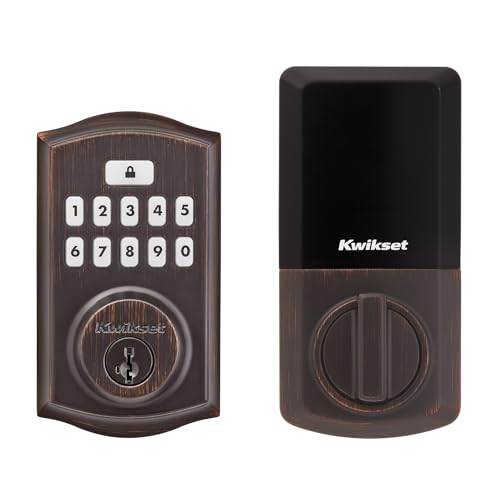
Kwikset SmartCode 260 Keyless Entry Electronic Keypad Deadbolt Door Lock with Auto-Lock, Custom User Codes, Advanced Security in Venetian Bronze Traditional
Price and specifications are read from the Amazon product page and can change.
Kwikset SmartCode 260 Keyless Entry Electronic
Best for: Keypad-only entry without apps
Pros
- Grade 2 BHMA certified
- 50 user codes plus one-time codes
- Vacation mode
- Intrusion alarm
Cons
- No remote or app control
- Batteries not included
The Kwikset SmartCode 260 Keyless Entry Electronic Keypad Deadbolt is a keypad-only lock. It has no Wi-Fi or Z-Wave, so there is no app and no remote control, but you also have nothing to set up beyond your codes. The listing describes a Microban-protected keypad.
It is Grade 2 BHMA certified for security, durability and finish, which the listing says is up to 2.5 times stronger than Grade 3 locks. BHMA is an industry group that grades lock strength. You can store 50 user codes, 10 one-time codes and 1 programming code. Auto-lock can be set to 30 seconds or 1, 3, 5 or 10 minutes. After 3 wrong codes in a row, it sounds an alarm and disables the keypad for a minute, and vacation mode switches the keypad off while you are away. It uses 4 AA batteries (not included) that last at least 12 months, and the BILT app offers 3D installation guidance.
This is a smart gift for a parent or neighbor who wants keyless entry without learning an app. Anyone who wants remote access should look at the Z-Wave or Wi-Fi models.
Kwikset SmartCode 270 for a Light-Up Touchpad

Kwikset
Kwikset SmartCode 270 Keyless Entry Electronic Touchpad Deadbolt Door Lock with Auto-Lock, Custom User Codes, Advanced Security in Satin Nickel Traditional
Price and specifications are read from the Amazon product page and can change.
Kwikset SmartCode 270 Keyless Entry Electronic
Best for: Simple light-up touchpad lock
Pros
- Light-up touchpad
- Grade 2 BHMA certified
- Auto-lock 30 sec to 10 min
- BILT app install guidance
Cons
- No remote or app control
- Batteries not included
The Kwikset SmartCode 270 Keyless Entry Electronic Touchpad Deadbolt shares nearly every feature with the 260, including Grade 2 BHMA certification, 50 user codes plus 10 one-time codes, auto-lock from 30 seconds to 10 minutes, the 3-strike intrusion alarm, vacation mode, 4 AA batteries (not included) and BILT app instructions.
The difference is the entry surface: the 270 uses a light-up touchpad instead of physical keypad buttons. A lit touchpad is easier to see at night, and its smooth surface has a more modern look. It also has no smart connection, so it works entirely at the door.
Pick the 270 over the 260 if you prefer a touchpad and want to see the numbers in the dark. For app or hub control, move up to the Halo or a Z-Wave lock. For more keypad-only options, our guide to a Kwikset keyless deadbolt covers them.
Kwikset SmartCode 888 for Z-Wave Plus Homes
The Kwikset 98880-004 SmartCode 888 Smart Lock is a Z-Wave Plus touchpad deadbolt. Z-Wave Plus is a newer generation of Z-Wave. The description is clear that it requires a compatible home automation system for remote access. Once connected, you can lock or unlock from your phone, get notifications when someone locks or unlocks the door, and check whether it is locked.
It stores up to 30 access codes, fewer than the other smart locks here, and offers one-touch motorized locking, a backlit keypad and automatic locking after 30 seconds. It fits standard doors from 1-3/8 to 2 inches thick, a wider range than the others list, and includes a round corner latch. SmartKey re-keying takes 3 easy steps. It needs 4 AA batteries, not included, and the warranty is lifetime mechanical with 1 year on electronics.
This suits someone with a Z-Wave Plus hub or a slightly thicker door. Households that need many codes should consider the 620TRL-ZW instead.
Kwikset 620TRL-ZW SmartCode for Many User Codes
Best for: Households needing many user codes
Pros
- Z-Wave technology
- 250 user codes
- BHMA Grade 2 certified
- 4 AA batteries included
Cons
- Short listing, few details
- Hub needs not spelled out
The Kwikset 620TRL-ZW SmartCode Traditional Single Cylinder Touchpad Deadbolt is a Z-Wave lock in Venetian Bronze. Its listing is short, and much of what we know comes from the description. It stores 250 user codes, uses a 10-digit backlit keypad with a dedicated locking button, and includes a SmartKey backup cylinder.
It is BHMA Grade 2 certified, installs with a screwdriver with no hard wiring, and has a reduced interior size with a tamper-resistant design. It uses 4 AA batteries, included, that should last about a year. The listing does not spell out hub requirements, but as a Z-Wave lock it will need a compatible Z-Wave hub for remote control.
Pick this for a busy home or rental where lots of people need their own codes. If you want clear Ring app support stated in the listing, the Home Connect 620 is the one that says so.
How to Choose the Right Kwikset Z-Wave Deadbolt
First, check whether you own a Z-Wave hub. If you do, the Home Connect 620, SmartCode 888 and 620TRL-ZW can join your system. If you do not, the Halo Wi-Fi gives you app control with nothing extra to buy. Our guide to a Kwikset smart lock deadbolt goes deeper on connected models.
Second, decide whether you need remote control at all. The SmartCode 260 and 270 handle codes, auto-lock and vacation mode with no connection.
Third, count your users. The Halo and 620TRL-ZW list 250 codes, the 260 and 270 list 50, and the 888 lists 30.
Finally, measure your door. Most listings fit 1-3/8 to 1-3/4-inch doors, while the 888 lists up to 2 inches.
FAQ
Does a Kwikset Z-Wave deadbolt need a hub?
Yes. The Home Connect 620 listing says a Z-Wave hub is required, and the SmartCode 888 needs a compatible home automation system.
Which Kwikset lock works without a hub?
The Halo Wi-Fi Smart Lock connects to home Wi-Fi with no hub. The SmartCode 260 and 270 work on their own at the door without any connection.
Can I use the Kwikset Home Connect 620 with Ring?
The listing says you can control it through the Ring app with a Ring-compatible Z-Wave hub.
What is SmartKey?
SmartKey is Kwikset’s re-keying technology, which lets you change which key opens the lock yourself in seconds.
How long do the batteries last?
Several listings estimate about 12 months on 4 AA batteries.
Which lock is best for beginners?
The Halo Wi-Fi is the easiest smart lock because it needs no hub. The SmartCode 260 or 270 is easiest overall for people who do not want an app.


