NETGEAR Smart Managed Switch Guide: Picking the Right Port Count
As Amazon Associates, we earn from qualifying purchases. This means we may receive a small commission at no extra cost to you if you click through and make a purchase.
NETGEAR is one of the best-known names in small networking gear, and its smart managed switches sit in a comfortable middle ground. They cost more effort to set up than a plain plug-and-play switch, but far less than enterprise equipment. A “smart managed” switch simply means it has a small settings page, reached through a web browser, where you can split your network into groups, give video calls priority over downloads, and switch power on or off for individual ports. That is exactly the kind of control a home office, a small shop or a curious first-time networker tends to want once the network grows past a single router.
The six models below differ mainly in three things: how many ports they have, how much Power over Ethernet (PoE) they can hand out to cameras and access points, and whether they run at regular gigabit speed or the faster 2.5 gigabit “multi-gig” standard. Pick the port count first, then the power budget, and the right model usually becomes obvious.
NETGEAR Smart Managed Switches Compared
| Model | Ethernet ports | PoE+ ports and budget | SFP fiber ports | Mounting |
|---|---|---|---|---|
| GS308EP (8 Port PoE) | 8 x 1Gbps | 8 ports, 62W | None listed | Desktop or wall |
| GS724TP (26-Port PoE) | 24 x 1Gbps | 24 ports, 190W | 2 x 1G | Desktop or rack |
| GS316EP (16-Port PoE) | 15 x 1Gbps | 15 ports, 180W | 1 x 1G | Desktop or wall |
| GS110TP (10-Port PoE) | 8 x 1Gbps | 8 ports, 55W | 2 x 1G | Desktop or wall |
| MS308E (8-Port 2.5G) | 8 x 2.5Gbps | Not listed | Not listed | Desktop or wall |
| GS305EP (5 Port PoE) | 5 x 1Gbps | 4 ports, 63W | None listed | Desktop or wall |
NETGEAR 8 Port PoE Gigabit Ethernet for Home Offices With Cameras

Netgear
NETGEAR 8 Port PoE Gigabit Ethernet Easy Smart Managed Switch (GS308EP)
Price and specifications are read from the Amazon product page and can change.
NETGEAR 8 Port PoE Gigabit Ethernet
Best for: Home offices with several PoE cameras
Pros
- 8 PoE+ ports
- 62W PoE budget
- Fanless and silent
- Per-port PoE controls
Cons
- No SFP fiber port
- Case material listed inconsistently
The NETGEAR 8 Port PoE Gigabit Ethernet switch, model GS308EP, is an Easy Smart Managed switch with eight gigabit ports, and every one of them is a PoE+ port. PoE means the same Ethernet cable that carries data also carries power, so an IP camera, a VoIP desk phone or a ceiling Wi-Fi access point does not need its own wall plug. The switch shares a total of 62 watts across those ports, and the listing mentions uninterrupted PoE and per-port PoE controls, which let you restart a frozen camera from the settings page instead of climbing a ladder.
On the management side, the listing names VLANs (separate virtual networks on one switch), QoS traffic priority, port monitoring and basic security settings. It is fanless, so it runs silently, and it supports the IEEE 802.3az Energy Efficient Ethernet standard for lower power draw when ports are idle. One listing quirk to note: the features describe a compact metal design, while the specifications list the case as plastic, and the voltage field reads “2 volts”, which is clearly not a meaningful figure. Treat those details as unconfirmed.
This is the model to consider if you have four to eight powered devices and want all of them on one quiet box on a shelf or wall. If you need a fiber connection to another building, the GS110TP further down is the better fit, and if you only have two or three cameras, the smaller GS305EP will do the same job in less space.
NETGEAR 26-Port PoE Gigabit Ethernet Smart for Growing Offices

Netgear
NETGEAR 26-Port PoE Gigabit Ethernet Smart Managed Network Switch (GS724TP)
Price and specifications are read from the Amazon product page and can change.
NETGEAR 26-Port PoE Gigabit Ethernet Smart
Best for: Growing offices with a network rack
Pros
- 24 PoE+ ports
- 190W PoE budget
- 2 SFP fiber ports
- 1 year Insight cloud management
Cons
- Large footprint
- Listing weight looks unreliable
The NETGEAR 26-Port PoE Gigabit Ethernet Smart switch, model GS724TP, is the largest switch in this group. The “26 ports” in the name are 24 gigabit Ethernet ports plus 2 SFP slots. An SFP slot is a small socket that accepts a plug-in module, usually for fiber optic cable, which is handy for linking two floors or two buildings over long distances. All 24 copper ports are PoE+, sharing a large 190 watt budget.
This is a Smart Managed Pro model rather than an Easy Smart one. The listing highlights SNMP support (a standard way for network monitoring software, including NETGEAR’s NMS 300, to keep an eye on the switch) and includes one year of NETGEAR Insight, a cloud service for managing the network remotely. It can sit on a desk or be mounted in a standard equipment rack. The listing gives dimensions of 21 by 13.6 by 4 inches, which may describe the shipping box, and a weight of 400 grams, which looks far too light for a 24-port metal switch, so do not plan your rack around those numbers.
Choose it if you are wiring a whole office, a small school room or a larger home with many cameras and access points. For most households it is more switch than needed, and the GS316EP offers a big power budget in a smaller body.
NETGEAR 16-Port PoE Gigabit Ethernet Easy for Camera-Heavy Setups
Netgear
NETGEAR 16-Port PoE Gigabit Ethernet Easy Smart Managed Switch (GS316EP)
Price and specifications are read from the Amazon product page and can change.
NETGEAR 16-Port PoE Gigabit Ethernet Easy
Best for: Camera-heavy homes and small shops
Pros
- 15 PoE+ ports
- 180W PoE budget
- 1 SFP fiber port
- Metal case
Cons
- Only 15 copper ports, not 16
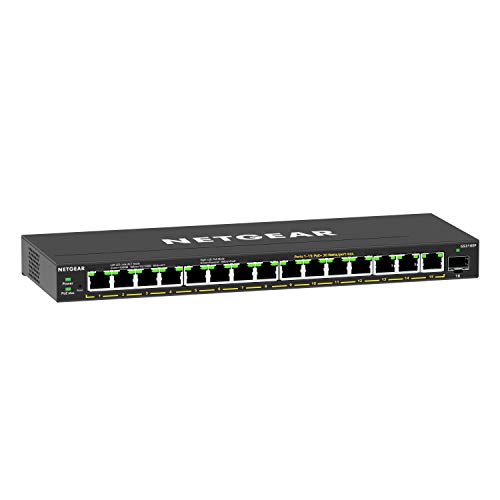
The NETGEAR 16-Port PoE Gigabit Ethernet Easy switch, model GS316EP, is where the naming needs a quick explanation. The title says 16 ports, but the listing breaks that down as 15 gigabit Ethernet ports plus 1 SFP fiber port. All 15 copper ports are PoE+, with a generous 180 watt total budget, uninterrupted PoE and per-port power controls.
The description lists VLANs, a management VLAN, QoS and IGMP Snooping, which helps keep multicast traffic such as some video streams from flooding every port. Management works through a web browser and, according to the description, a responsive mobile interface. The case is metal and it mounts on a desk or wall. For anyone building out a home security system, for example pairing wired cameras with a front door camera setup, this much power per switch leaves room to grow.
It suits buyers who have outgrown eight PoE ports but do not need a rack. If you want two fiber ports or the SNMP and Insight features of the Pro line, look at the GS724TP instead.
NETGEAR 10-Port PoE Gigabit Ethernet Smart for Fiber Uplinks

Netgear
NETGEAR 10-Port PoE Gigabit Ethernet Smart Managed Network Switch (GS110TP)
Price and specifications are read from the Amazon product page and can change.
NETGEAR 10-Port PoE Gigabit Ethernet Smart
Best for: Small offices needing fiber uplinks
Pros
- 8 PoE+ ports
- 2 SFP fiber ports
- SNMP and Insight management
Cons
- Smallest PoE budget at 55W
The NETGEAR 10-Port PoE Gigabit Ethernet Smart switch, model GS110TP, counts its ten ports as eight gigabit PoE+ copper ports and two SFP fiber ports. The description says each PoE port can provide up to 30 watts, but the total budget is 55 watts, the smallest in this group. In practice, that means a couple of power-hungry devices or several light ones, not eight fully loaded access points at once.
Like the GS724TP, it is a Smart Managed Pro model with SNMP support and one year of NETGEAR Insight included. The description adds PoE operation scheduling, so you could, for instance, switch off office access points overnight. It is fanless, has a metal case and mounts on a desk or wall. The listed dimensions are 9.3 by 4 by 1.1 inches.
This model makes sense when the two fiber ports matter more than raw PoE power, such as linking a detached garage or a second office. If you mostly need more power for cameras, the GS308EP gives a slightly larger budget without the SFP slots.
NETGEAR 8-Port 2.5G Multi-Gig Ethernet Easy for Faster Home Networks
Best for: Faster-than-gigabit home and gaming networks
Pros
- 8 ports at 2.5Gbps
- Fanless metal case
- Works with Cat5e or Cat6
Cons
- No PoE listed
- No inter-VLAN routing
The NETGEAR 8-Port 2.5G Multi-Gig Ethernet Easy switch, model MS308E, is the speed pick. All eight ports run at up to 2.5Gbps, two and a half times regular gigabit, and they still work with existing Cat5e or Cat6 cable. The description aims it at high-performance workstations, Wi-Fi 6 access points, IP cameras and lag-free gaming. The listing does not mention PoE, so plan on powering connected devices separately.
It offers the same Easy Smart Managed Essentials tools as the other Easy models: VLANs, QoS, port monitoring and security settings. The description is refreshingly honest that it is a Layer 2 switch only and cannot route traffic between VLANs; you need a router or a Layer 3 switch for that. It is fanless, has a metal case, weighs 14.4 ounces and ships with an installation guide, a power adapter and rubber feet. The listing states it is made for use in the U.S. and Canada only.
Pick it if your internet plan, NAS or computers can go faster than one gigabit. If you need to power cameras or phones over the cable, the PoE models above are the better match.
NETGEAR 5 Port PoE Gigabit Ethernet for First-Time Buyers
Best for: First-time buyers powering a few devices
Pros
- 4 PoE+ ports
- 63W PoE budget
- Compact footprint
- Fanless design
Cons
- Only 5 ports total
- Odd switch type and weight in listing
The NETGEAR 5 Port PoE Gigabit Ethernet switch, model GS305EP, is the smallest and simplest entry point. It has five gigabit ports, four of which are PoE+, sharing a 63 watt budget, plus uninterrupted PoE and per-port PoE controls. The listed dimensions are 6.2 by 4 by 1.1 inches, small enough to tuck behind a TV or next to a router.
Management covers VLANs, QoS and IGMP Snooping through a browser-based interface, and it is fanless with Energy Efficient Ethernet. The listing does contradict itself in places: it describes a metal design but lists a plastic case, calls it a “Limit Switch” type, and gives a 1 kilogram weight that seems high for its size. If you want a broader overview of the brand’s managed range, our netgear managed switch guide covers more background.
This suits a gift for someone starting out with a couple of PoE cameras, a desk phone or one access point. Once you need more than four powered devices, step up to the GS308EP.
How to Choose the Right NETGEAR Smart Managed Switch
Count your wired devices, then add room. List everything that will plug in, add the cable back to your router, and leave two or three spare ports. Five ports (GS305EP) fills up quickly; eight (GS308EP, GS110TP, MS308E) is a comfortable home size; 15 or 24 (GS316EP, GS724TP) is office territory.
Match the PoE budget to your devices. The budget is the total power shared across all PoE ports. Add up the power needs of your cameras, phones and access points from their own manuals. The GS110TP at 55 watts is the tightest, the GS305EP and GS308EP sit in the low 60s, and the GS316EP and GS724TP at 180 and 190 watts handle many devices at once.
Decide whether speed or power matters more. The MS308E is the only model here with 2.5Gbps ports, but its listing does not mention PoE. Every other model runs at regular gigabit speed with PoE+.
Think about fiber and management depth. SFP ports appear on the GS724TP, GS110TP and GS316EP. The two Pro models (GS724TP and GS110TP) add SNMP monitoring and a year of Insight cloud management, while the Easy Smart models keep things simple through a browser.
FAQ
What does “Easy Smart Managed” mean on a NETGEAR switch?
It is NETGEAR’s simpler managed tier. You get a browser settings page for VLANs, QoS, port monitoring and PoE controls, without the heavier monitoring tools found in the Smart Managed Pro models like the GS724TP and GS110TP.
Why does the 16-port GS316EP only list 15 Ethernet ports?
The 16th port is an SFP slot for a fiber module. The same logic explains the GS724TP (24 copper plus 2 SFP) and the GS110TP (8 copper plus 2 SFP).
Do I need a PoE switch for security cameras?
Only if your cameras are PoE cameras. PoE lets one cable carry both data and power, which saves running power outlets to every camera position. Check your camera’s manual for how many watts it draws.
Which NETGEAR switch should I buy for a small home?
For a few PoE devices, the GS305EP is the simplest start and the GS308EP gives more room. If you want faster wired speeds rather than power, the MS308E is the one to look at.
Can the MS308E route traffic between VLANs?
No. Its description states it is a Layer 2 switch and a separate router or Layer 3 switch is needed to route between VLANs.
Will these switches work with my existing Ethernet cables?
The listings say the ports auto-negotiate and work with existing Cat5e or Cat6 cable, including the 2.5Gbps ports on the MS308E.


