Samsung Smart Door Locks for Homes: What to Know Before You Buy
As Amazon Associates, we earn from qualifying purchases. This means we may receive a small commission at no extra cost to you if you click through and make a purchase.
Samsung has made digital door locks for years, and names like the SHP-DS510, SHP-DP728, SHP-DP739 and SHS-P718 still show up whenever someone searches for a Samsung smart lock for home use. The catch for a first-time buyer is that many listings using the Samsung name are not made by Samsung at all. Some are third-party locks or parts sold as “compatible for” a Samsung model, and some are other brands that simply work with Samsung SmartThings, the company’s smart home system.
Of the five options here, only one is a genuine Samsung lock (the SHP-DS510 keyless deadbolt); three are third-party fingerprint locks labeled compatible with Samsung push-pull models, and one is a Kwikset touchscreen deadbolt that connects to a SmartThings hub. We explain each honestly so you know exactly what you are buying.
Samsung Smart Door Locks Compared
| Lock | Made By | Ways to Unlock | User Capacity | Door Thickness |
|---|---|---|---|---|
| Compatible for Samsung SHP-DP728 Smart Home | Third party (aqinsfai) | Fingerprint, password, other methods | Not listed | Not listed |
| Push Pull Smart Door Lock, Compatible with SHS-P718 | Third party (FPAIZTRJ) | Fingerprint, keypad code, RFID card, mechanical key | 100 fingerprints, 30 codes and cards | Not listed |
| Compatible for Samsung Smart Digital Fingerprint (SHP-DP739) | Third party (pjcmt) | Fingerprint, password | Not listed | 40-100 mm |
| Samsung SHP-DS510MK Digital Door Lock SHP-DS510 | Samsung | Code, Samsung KeyTag or SmartTag, emergency key | 70 users | 35-55 mm |
| Kwikset HomeConnect 918 Traditional Z-Wave Long Range | Kwikset | Touchscreen code, key | 250 user codes | 1-3/8″ to 2″ |
Compatible for Samsung SHP-DP728 Smart Home for Replacing a DP728

Pjcmt
Compatible for Samsung Smart Digital Fingerprint Lock SHP-DP739 Home Automatic Push Pull Handle Anti-Theft Door Electronic Password Doorlock(SHP-DP739 Pull)
Price and specifications are read from the Amazon product page and can change.
Compatible for Samsung Smart Digital Fingerprint
Best for: Shoppers matching an SHP-DP739 pull handle
Pros
- Fits 40-100 mm doors
- Password and fingerprint listed
- Zinc alloy build
Cons
- Listing names DP139 and DP739
- Tiny listed size and weight

Best for: Owners of an existing Samsung SHP-DP728
Pros
- Fingerprint unlocking
- Listed for SHP-DP728 fit
- Mounting hardware included
Cons
- Third-party seller, not Samsung
- Few concrete specs in listing
The Compatible for Samsung SHP-DP728 Smart Home lock is sold by a third-party brand called aqinsfai, and its listing says it is designed to be compatible with the Samsung SHP-DP728. It is not a Samsung product. The listing describes fingerprint unlocking, “multiple unlocking methods” such as fingerprint and password, a gold finish and a push handle direction, and it names residential doors and offices as intended uses. Mounting hardware is included.
That is about as far as the listing goes. It does not specify how many fingerprints or codes it stores, which batteries it uses, whether it has an emergency key, or which door thickness it fits. Oddly, the description also lists its type as “Power Tool Parts,” and the manufacturer and model fields just say “qian qian shop.” A push-pull lock (sometimes called a mortise-style digital lock) replaces the whole handle: you push the handle to go out and pull it to come in, instead of turning a knob.
This option only makes sense if you already own a Samsung SHP-DP728 setup and want to match that style, and you are comfortable confirming the fit with the seller first. Buyers who want clear specs will be better served by the Samsung SHP-DS510 below.
Push Pull Smart Door Lock, Compatible with Samsung SHS-P718, for Large Households

Fpaiztrj
Push Pull Smart Door Lock,Compatible with Samsung SHS-P718 Fingerprint RFID
Price and specifications are read from the Amazon product page and can change.
Push Pull Smart Door Lock,Compatible
Best for: Busy households needing many user codes
Pros
- Fingerprint, code, RFID card, key
- Up to 100 fingerprints
- Auto lock and low-battery reminder
- Anti-peep virtual password
Cons
- Third-party brand, not Samsung
- SHS-P718 fit not detailed
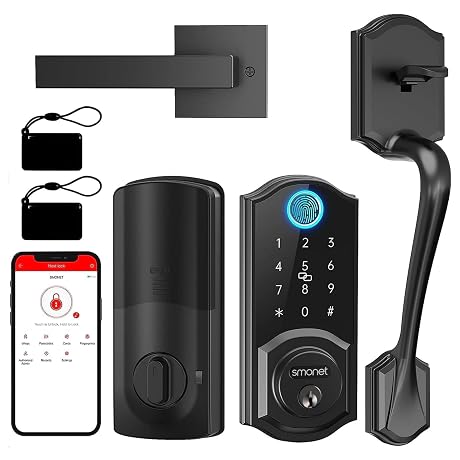
The Push Pull Smart Door Lock,Compatible listing comes from a third-party brand called FPAIZTRJ and says it is compatible with the Samsung SHS-P718. Of the three compatible locks, this one has the most detailed listing. It offers four ways in: fingerprint, a touch keypad passcode, an RFID card (a small card you tap on the lock) and an emergency mechanical key.
Security features include dual authentication (requiring two methods together), an anti-peep virtual password (you can type random digits around your real code so onlookers cannot learn it) and an anti-tamper alarm. It stores up to 100 fingerprints and 30 groups of passcodes and RFID cards, locks automatically after the door closes and warns you when the batteries run low. The housing is heavy-duty alloy, and the description says it fits standard wooden and metal front doors, supports different opening directions and includes mounting hardware to replace an old mechanical lock. It does not list exact door thickness or battery type.
This suits a big family or a rental with many people coming and going. Keep in mind the “compatible with SHS-P718” wording does not explain which parts match, so ask the seller before buying it as a direct swap. For more detail on fingerprint-style locks in general, see our fingerprint smart lock guide.
Compatible for Samsung Smart Digital Fingerprint for DP739-Style Doors
The Compatible for Samsung Smart Digital Fingerprint item is sold under the pjcmt brand in the “SHP-DP739 Pull” variant. The title calls it compatible with the Samsung SHP-DP739, but the first feature line names the SHP-DP139 instead, so the model match is not clear from the listing itself. It is described as an electronic password and fingerprint lock with an automatic sliding handle, made of zinc alloy, for doors 40-100 millimeters thick in steel, wood, brass or stainless steel.
There is a second red flag: the specifications list the item as 0.39 x 0.39 x 0.39 inches and 1.76 ounces, which is far too small for a complete door lock. It may be a listing error, or the item may be a part rather than a whole lock. The listing does not specify user capacity, battery type or unlock methods beyond fingerprint and password.
Consider it only if you are replacing a matching DP739-style lock and have confirmed with the seller exactly what arrives in the box. For most first-time buyers, the genuine Samsung SHP-DS510 or the SmartThings-ready Kwikset is the clearer choice.
Samsung SHP-DS510MK Digital Door Lock SHP-DS510 for a Genuine Samsung Deadbolt

Samsung
Samsung SHP-DS510MK Digital Door Lock SHP-DS510 Black Keyless Electronic Deadbolt + Emergency Keys FIT Most Doors
Price and specifications are read from the Amazon product page and can change.
Samsung SHP-DS510MK Digital Door Lock SHP-DS510
Best for: Buyers who want a genuine Samsung deadbolt
Pros
- Genuine Samsung brand
- Voice guided programming
- 70 users with codes or tags
- Emergency keys and 9V backup
Cons
- Door must be 35-55 mm thick
- No app features listed
The Samsung SHP-DS510MK Digital Door Lock SHP-DS510 is the one genuine Samsung lock in this list. It is a black keyless deadbolt, meaning it replaces the separate bolt lock above your handle rather than the handle itself. Samsung highlights Voice Guided Programming: the lock talks you through setting up users, cards and settings, which is very helpful if you have never programmed a lock before.
It holds 70 users, each with their own code, Samsung KeyTag or SmartTag, so giving access to guests or tradespeople is simple. Automatic locking can lock the door behind you, or you can switch it to manual. The description adds a random security code, double authentication mode, anti-theft mode, volume control and a 9V battery backup, and emergency keys come in the box. Retrofitting an existing deadbolt is described as simple; a new install needs a door 35-55 mm thick with at least a 90 mm lock stile (the solid vertical strip of the door where the lock sits). The listing does not mention app or Wi-Fi control.
This is the pick for anyone who specifically wants the Samsung name on the door and a lock that explains itself. If you want phone and hub control, the Kwikset below connects to SmartThings. You can also compare it with other code-based options in our keyless entry deadbolt guide.
Kwikset HomeConnect 918 Traditional Z-Wave Long Range for SmartThings Homes
Best for: SmartThings or Ring Alarm homes
Pros
- Works with SmartThings hub
- Up to 250 user codes
- Z-Wave Long Range, S2 security
- Batteries included, 12-month life
Cons
- Made by Kwikset, not Samsung
- Hub required, sold separately
The Kwikset HomeConnect 918 Traditional Z-Wave Long Range lock is made by Kwikset, not Samsung. It appears in Samsung searches because it works with a Samsung SmartThings hub, which is required and sold separately, and it also works with Ring Alarm. Z-Wave is a wireless language smart home devices use to talk to a hub; the Z-Wave 700 Long Range version here aims to cover the whole property, including outbuildings.
It is a touchscreen deadbolt with S2 encryption for security and SmartStart for easier pairing. It stores up to 250 user codes plus one programming code, auto-locks on a schedule you choose (30 seconds, 1, 3, 5 or 10 minutes), and runs at least 12 months on four AA batteries, which are included. It installs with a screwdriver on doors 1-3/8″ to 2″ thick with an adjustable backset of 2-3/8″ to 2-3/4″. This one comes in Venetian Bronze.
Choose it if your home already runs on SmartThings and you want lock status in the app. If you do not have or want a hub, the Samsung SHP-DS510 works on its own.
How to Choose the Right Samsung Smart Door Lock
Decide whether the Samsung name matters. Only the SHP-DS510 is made by Samsung. The three “compatible” locks come from third-party sellers, and the Kwikset connects to Samsung SmartThings rather than being a Samsung product.
Pick a lock style. A deadbolt (the SHP-DS510 and Kwikset) replaces the bolt above your handle. A push-pull lock (the three compatible models) replaces the whole handle. Look at your door before you shop.
Measure the door. The Samsung SHP-DS510 fits 35-55 mm doors, the Kwikset fits 1-3/8″ to 2″, and the DP739-style lock lists 40-100 mm. The other two do not give a thickness, so ask first.
Count your users and choose how they enter. The FPAIZTRJ lock stores 100 fingerprints, the Kwikset 250 codes and the Samsung 70 users. For smart home control, only the Kwikset names hub compatibility. If you want more app-based choices, our app-controlled smart lock guide is a good next read.
FAQ
Which Samsung lock should I buy for my home?
If you want a genuine Samsung lock, choose the SHP-DS510 keyless deadbolt. If you want a lock that works inside a SmartThings setup, the Kwikset HomeConnect 918 is the listed option.
Are the “compatible for Samsung” locks made by Samsung?
No. They are sold by third-party brands (aqinsfai, FPAIZTRJ and pjcmt) and say they are compatible with specific Samsung models. Their listings leave out several key details, so confirm the fit with the seller.
Does the Samsung SHP-DS510 work with SmartThings?
The listing does not mention SmartThings, Wi-Fi or app control. It works as a standalone keyless deadbolt with codes and tags.
What do I need for the Kwikset HomeConnect 918 to work with SmartThings?
A compatible Samsung SmartThings hub, sold separately. It can also connect to Ring Alarm through a Ring Alarm smart hub.
What happens if the batteries die?
The Samsung SHP-DS510 has a 9V battery backup and emergency keys, and the FPAIZTRJ lock has a low-battery reminder and a mechanical key. The Kwikset lists at least 12 months of battery life on four AA batteries.