Studio Monitors Buying Guide (2026): What Matters and 8 Picks
As Amazon Associates, we earn from qualifying purchases. This means we may receive a small commission at no extra cost to you if you click through and make a purchase.
As an Amazon Associate we earn from qualifying purchases. Links on this page are affiliate links.
This studio monitor buying guide helps you choose the right speakers for your workspace. You will learn how driver size, connectivity, and design affect your mixing accuracy. We explain what each specification means in practice so you can match gear to your room and workflow. The list includes 8 options selected strictly from their published specifications. You will see how powered designs, woofer dimensions, and input types like Bluetooth or XLR suit different setups. Some models prioritize compact desktop footprints, while others offer extended low-end or ribbon tweeter clarity. By comparing these technical details, you can decide which monitors deliver the reference sound you need. Whether you require near-field precision or subwoofer expansion, the data shows which features matter most for your specific production environment.
Key Specs for Studio Monitors
Speaker Type and Design
Most monitors on this list are powered, meaning they have built-in amplifiers. This simplifies your setup because you only need one power cable and an audio connection. You do not need a separate receiver. Some models use a 2-way design, while others, like the Edifier MR5, use a 3-way design. A 3-way system adds a dedicated mid-range driver. This can improve clarity in the vocal range. However, it increases weight and size. You should choose a powered speaker for ease of use. Avoid passive speakers unless you already own an amplifier. The design also affects how sound projects. A dedicated studio monitor focuses on flat response, unlike general bookshelf speakers.
Look for
- Confirm the speaker is powered.
- Check for 2-way or 3-way driver design.
- Verify if an amplifier is included.
Connectivity Options
Your interface determines which inputs you need. Most modern setups use balanced TRS or XLR connections. These reduce noise over longer cables. Some monitors, like the Mackie CR4.5BT, include Bluetooth. This is useful for casual listening or quick phone connections. However, Bluetooth adds latency and compression, so it is not ideal for critical mixing. The Edifier MR5 offers balanced XLR and TRS inputs alongside RCA. The ADAM Audio D3V supports USB-C for direct digital connection to your computer. This can simplify your desk by removing analog cables. You should prioritize balanced analog inputs for professional work. Use wireless features only for secondary listening tasks.
Look for
- Ensure TRS or XLR balanced inputs are present.
- Check if Bluetooth is available if needed.
- Verify USB-C or digital input availability.
Woofer Size and Frequency Range
Driver size dictates the low-frequency response. A 4.5-inch woofer, like in the Mackie CR4.5BT, is compact but rolls off bass quickly. It suits small desks where space is limited. A 5-inch driver, found in the JBL 305P MkII and Yamaha HS5, offers a better balance of size and bass extension. This is the standard for near-field monitoring. For deeper bass, you might add a subwoofer. The PreSonus Eris Sub 8BT is an 8-inch subwoofer designed to extend low-end response. It fits well in desktop setups where room acoustics need precise management. Larger drivers move more air but require more room. You should match woofer size to your listening distance and room volume.
Look for
- Match woofer size to your room dimensions.
- Check if a subwoofer is included or sold separately.
- Verify low-frequency extension for your genre.
Intended Use and Placement
Where you place the monitor affects your choice. Desktop monitors like the Pioneer DJ DM-40D are designed to sit directly on a desk. They are compact and angled for close listening. Studio monitors like the Yamaha HS5 are often placed on stands at ear level. This ensures accurate stereo imaging. The Edifier R1280TS is a bookshelf speaker that can be placed on shelves or stands. It includes a subwoofer output, allowing you to expand the system later. You should choose a monitor that fits your physical space. If you have a tight desk, a desktop model is better. If you have stands, a standard studio monitor offers more flexibility.
Look for
- Confirm the monitor fits your desk or stand.
- Check for adjustable stands or mounting options.
- Verify if the design suits near-field listening.
Audio Format and Hi-Res Support
The audio format you work in matters. Some monitors support Hi-Res Audio, ensuring they can reproduce high-frequency details without distortion. The Edifier MR5 explicitly lists Hi-Res Audio support. This is important for producers working with high-resolution stems. Other monitors may not specify this, relying on standard 24-bit/192kHz compatibility. You should check if the monitor can handle the sample rates you use. High-resolution support ensures you hear the full detail of your mix. It also indicates a higher quality internal DAC. If you work with standard 44.1kHz or 48kHz files, standard support is sufficient. Always verify the maximum sample rate if you work with high-res files.
Look for
- Check for Hi-Res Audio certification.
- Verify maximum sample rate support.
- Ensure compatibility with your DAW output.
Physical Dimensions and Weight
The physical size of the monitor affects your desk space and isolation. The ADAM Audio D3V is very compact at 4.5 inches wide. This fits small setups but may limit bass output. The PreSonus Eris Sub 8BT is larger and heavier at 17.6 pounds. It requires a sturdy surface. Weight also helps with vibration isolation. Heavier speakers are less likely to resonate with desk vibrations. You should measure your available space before buying. Ensure the monitor fits comfortably next to your keyboard and interface. Consider the weight if you plan to move the speakers often. A lighter speaker is easier to reposition. A heavier speaker may provide better stability.
Look for
- Measure your available desk or shelf space.
- Check the weight for stability needs.
- Ensure the monitor fits with other gear.
Common Studio Monitor Types
Nearfield Reference Monitors
These speakers place you close to the sound source for detailed mixing. Models like the JBL 305P MkII and Yamaha HS5 use 5-inch woofers to deliver accurate frequency response in small rooms. You benefit from adjustable room controls that correct for acoustic issues. The trade-off is limited bass extension, so you may need a subwoofer for low-end checks. They are ideal for producers who need reliable reference tools for critical listening tasks.
Compact Desktop Monitors
Designed for tight spaces, these units fit directly on your desk without stands. The Pioneer DJ DM-40D and ADAM Audio D3V offer 4-inch or smaller drivers to save space. You get punchy mids and highs suitable for beat-making or DJing. The ADAM D3V adds USB-C connectivity for direct computer connection. You sacrifice deep bass and stereo width compared to larger speakers. They suit users who prioritize desk real estate over full-range audio depth.
Multi-Way Bookshelf Speakers
These monitors use separate drivers for different frequencies to improve clarity. The Edifier MR5 features a 3-way design with dedicated tweeter, midrange, and woofer. You get precise sound staging and detailed mid-range reproduction. Connectivity options often include balanced XLR and TRS inputs for professional setups. You pay for complexity and size, as these units are heavier and larger. They fit producers who value physical tuning controls and critical listening accuracy over compact convenience.
Powered Subwoofers
Subwoofers extend your system’s low-end response beyond what main speakers can handle. The PreSonus Eris Sub 8BT adds an 8-inch driver for deep bass. You connect it to your main monitors to manage precise low-frequency reproduction in your room. Bluetooth connectivity allows flexible wireless setup options. You need a compatible main speaker system to utilize it effectively. This type suits producers who need deep bass extension for music production or movie mixing in desktop environments.
Common Studio Monitor Mistakes
Ignoring room acoustics
A treated room ensures accurate monitoring. Uncontrolled reflections cause phase issues and muddy bass response. You should add absorption panels at first reflection points and bass traps in corners. This improves imaging and frequency accuracy for critical mixing decisions.
Placing monitors too far apart
Stereo imaging relies on proper geometry. Keep the distance between speakers equal to your distance from the listening position. This creates an equilateral triangle. Proper placement ensures a stable stereo field and precise instrument positioning during your production workflow.
Setting volume too high
Listening at high volumes causes ear fatigue and inaccurate perception. Your ears perceive frequencies differently at loud levels. Keep levels near 85 dB SPL for reference. This helps you make balanced mixing decisions that translate well to other playback systems.
Overlooking connectivity needs
Ensure your monitors match your interface outputs. Many use XLR or TRS connections. Verify cable compatibility before purchase. Mismatched connectors can cause signal loss or noise. Check input types to guarantee a clean signal path from your audio interface.
| # | Product | Best for | Price |
|---|---|---|---|
| 1 | PreSonus Eris Sub 8BT 8-Inch Desktop Subwoofer | extending low-end response in desktop studio setups | |
| 2 | Mackie CR4.5BT 4.5" Bluetooth Studio Monitor | Versatile near-field monitoring with Bluetooth | |
| 3 | JBL 305P MkII 5" Powered Studio Monitor | accurate mixing and sound design | |
| 4 | Yamaha HS5 5-Inch Studio Monitor | Nearfield studio monitoring with acoustic adjustment | |
| 5 | Pioneer DJ 4-inch Active Desktop Monitor Speakers | Compact home DJ desks and small production setups | |
| 6 | Edifier R1280Ts Powered Bookshelf Speakers | Wired stereo monitoring with subwoofer expansion | |
| 7 | Edifier MR5 3-Way Studio Monitor | Detailed near-field mixing and mastering | |
| 8 | ADAM Audio D3V 3.5in Powered Desktop Monitor | desktop mixing with ribbon tweeter accuracy |

PreSonus Eris Sub 8BT 8-Inch Desktop Subwoofer
Best for: extending low-end response in desktop studio setups
- Woofer Size
- 8-inch
- Total Wattage
- 50W, 100 watt
- Audio Inputs
- ¼-inch TRS, RCA, ⅛-inch TRS aux
- Bluetooth
- Bluetooth 5.0
- Acoustic Tuning
- High- and low-frequency tuning controls
- Speaker Type
- Powered
This is an 8-inch powered subwoofer designed for desktop studio setups. It features a 100-watt amplifier and a woven-composite woofer that extends down to 30 Hz for deep bass. Bluetooth 5.0 allows wireless pairing, while balanced TRS and RCA inputs provide wired options. Front-panel tuning controls help you adjust the sound to your room. It includes a dedicated headphone output for private monitoring.
- 100-watt amplifier delivers high output
- 8-inch woven-composite woofer for tight bass
- Frequency response extends to 30 Hz
- Bluetooth 5.0 for wireless connectivity
- Front-panel headphone output with built-in amplifier
- Heavier build at 17.6 pounds compared to standard monitors
- Smaller 8-inch driver size limits low-end extension below 30 Hz
- No dedicated remote control for adjusting crossover or tuning settings
- You need to extend the low-frequency response of your main studio monitors
- You want Bluetooth connectivity for easy wireless pairing with your source devices
- You require precise tuning controls to adjust the subwoofer to your room's acoustics
- You are looking for a primary stereo monitor rather than a subwoofer
- You need a subwoofer with a driver size larger than 8 inches
- You prefer a lighter, more compact subwoofer under 15 pounds
Verdict: PreSonus Eris Sub 8BT 8-Inch Powered Subwoofer is a solid choice for producers who need deep bass extension and flexible connectivity options. It fits well in desktop setups where room acoustics require precise low-frequency management.

Mackie CR4.5BT 4.5" Bluetooth Studio Monitor
Best for: Versatile near-field monitoring with Bluetooth
- Woofer Size
- 4.5"
- Audio Inputs
- TRS, RCA, 3.5 mm
- Bluetooth
- Bluetooth
- Acoustic Tuning
- Tone knob, location switch
- Tweeter Type
- Silk dome
- Speaker Type
- Powered
The Mackie CR4.5BT is a 4.5-inch powered studio monitor designed for mixing and near-field monitoring. It features a silk dome tweeter and a woven woofer for clear sound. You get Bluetooth connectivity, TRS, RCA, and 3.5 mm inputs, plus a headphone output. The tone control lets you adjust bass and treble. It weighs 12.1 pounds and includes a location switch for desktop or bookshelf use.
- 4.5-inch woven woofer and silk dome tweeter
- Bluetooth, TRS, RCA, and 3.5 mm inputs
- Built-in headphone output
- Tone control for bass and treble adjustment
- Location switch for desktop or bookshelf placement
- 4.5-inch woofer is smaller than the 5-inch and 8-inch options on this list
- 12.1-pound weight is heavier than many compact desktop monitors
- No dedicated remote control mentioned in specifications
- You need Bluetooth connectivity for wireless streaming alongside wired inputs
- You want to adjust tone with a physical knob for gaming or casual listening
- You require a headphone output for private monitoring
- You need a larger 5-inch or 8-inch driver for deeper bass response
- You prefer a lighter speaker for easy desk mobility
- You want a monitor without Bluetooth for a purely wired studio setup
Verdict: The Mackie CR4.5BT 4.5" Bluetooth Studio Monitor suits users who want versatile connectivity and tone shaping in a compact package. It is ideal for near-field mixing and casual listening where Bluetooth convenience matters.

JBL 305P MkII 5" Powered Studio Monitor
Best for: accurate mixing and sound design
- Woofer Size
- 5-inch
- Total Wattage
- Dual 41-Watt
- Audio Inputs
- XLR/TRS
- Acoustic Tuning
- Boundary EQ and HF Trim
- Speaker Type
- Powered
- Color
- Black
The JBL 305P MkII is a pair of 5-inch powered studio monitors designed for accurate audio reproduction. Each speaker features a dual 41-Watt Class-D amplifier and a 5-inch woofer. The design includes a patented Image Control Waveguide for precise imaging. You can adjust room acoustics using Boundary EQ and HF Trim controls. The enclosure is built from MDF with XLR and TRS inputs.
- Dual 41-Watt Class-D amplifiers provide dynamic range
- 5-inch woofer with Slip Stream port for deep bass
- Patented Image Control Waveguide ensures a wide sweet spot
- Boundary EQ and HF Trim adjust low and high frequencies
- 5-inch woofer size is smaller than the 6.5-inch option available in variations
- Individual unit weight of 10.4 pounds results in a heavier build than lighter desktop alternatives
- You need precise imaging for music production or podcasting
- You want to adjust room acoustics with Boundary EQ and HF Trim
- You require XLR and TRS inputs for studio connectivity
- You prefer a single speaker instead of a pair
- You need a woofer larger than 5 inches
- You want a lighter monitor for small desktops
Verdict: JBL 305P MkII 5-Inch Studio Monitors deliver accurate sound with adjustable EQ for producers who need reliable studio reference tools.

Yamaha HS5 5-Inch Studio Monitor
Best for: Nearfield studio monitoring with acoustic adjustment
- Woofer Size
- 5"
- Total Wattage
- 70W
- Audio Inputs
- XLR, TRS phone jack
- Frequency Response
- 54Hz-30kHz
- Acoustic Tuning
- Room Control, High TRIM
- Tweeter Type
- 1" dome tweeter
The Yamaha HS5 is a 5-inch nearfield studio monitor designed for accurate sound reproduction. It features a 54Hz-30kHz frequency response and a 70W bi-amplified system with 45W for low frequencies and 25W for high frequencies. The unit includes Room Control and High TRIM response controls to adjust output to your space. It accepts XLR and TRS inputs for balanced or unbalanced signals. This monitor suits producers needing reliable reference sound in a compact 12-inch height package.
- 70W total power amplification with 45W LF and 25W HF drivers
- Wide 54Hz-30kHz frequency response range
- Includes Room Control and High TRIM response controls for acoustic adjustment
- Dual XLR and TRS inputs support balanced and unbalanced connections
- 5-inch woofer size is smaller than the 7-inch and 8-inch options available in the HS series
- Single unit configuration requires purchasing a pair for stereo monitoring
- 12-inch height is taller than some compact desktop monitors like the 8.78-inch variant
- You need precise nearfield monitoring for music production
- You want adjustable room response controls to optimize sound
- You prefer balanced XLR connections for your audio interface
- You require a subwoofer for deep bass extension
- You need a larger 8-inch driver for more low-end output
- You are looking for a single unit that includes stereo imaging
Verdict: Yamaha HS5 5-inch Powered Studio Monitor delivers accurate nearfield sound with adjustable room controls. It fits producers who need reliable reference monitors with balanced connectivity options.

Pioneer DJ 4-inch Active Desktop Monitor Speakers
Best for: Compact home DJ desks and small production setups
- Woofer Size
- 4-inch
- Acoustic Tuning
- DSP
- Speaker Type
- Powered
- Use
- Desktop
- Color
- Black
- Dimensions
- 11 × 14.8 × 13 inches
The Pioneer DJ DM-40D is a pair of 4-inch active desktop monitors designed for compact production desks. They feature DSP tuning for balanced sound and a punchy low end voiced by DJ audio experts. The built-in amplification allows direct connection to your gear. At 14.8 inches wide and weighing 1 pound each, they fit tightly on small workspaces while delivering accurate monitoring for mixing.
- 4-inch woofer size optimized for desktop use
- DSP tuning delivers clear, balanced sound
- Built-in amplification requires no separate amp
- Voiced by DJ audio team for defined low end
- 4-inch driver is smaller than the 5-inch and 4.5-inch drivers on other picks
- 1-pound weight per speaker is lighter than typical studio monitors, potentially affecting bass stability
- 14.8-inch width is compact, limiting placement options on very small desks
- You need compact monitors that fit a small home DJ desk
- You want a simple setup with built-in amplification
- You prioritize defined low end for mixing sets
- You require larger 5-inch or 6.5-inch drivers for deeper bass
- You need a subwoofer included for low-frequency extension
- You prefer a heavier, more massive build for stability
Verdict: Pioneer DJ DM-40D 4-Inch Desktop Monitor suits producers with tight desk space who need accurate, punchy monitoring without extra amps. It fits users who value compact size over larger driver depth.
Edifier R1280Ts Powered Bookshelf Speakers
Best for: Wired stereo monitoring with subwoofer expansion
- Woofer Size
- 4-inch
- Total Wattage
- 42 Watts RMS
- Audio Inputs
- Dual RCA
- Acoustic Tuning
- Side panel EQ knobs
- Tweeter Type
- 13mm silk dome
- Speaker Type
- Powered
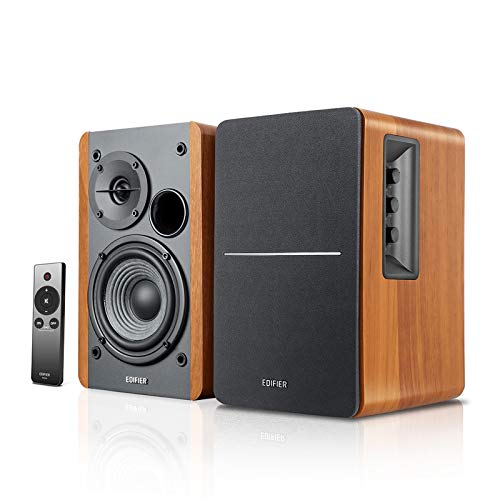
The Edifier R1280TS are 2.0 stereo powered bookshelf speakers designed for studio monitoring. They deliver 42W of continuous power through a 4-inch subwoofer unit and a 13mm silk dome tweeter. This configuration ensures strong bass and impactful sound. You can connect two devices simultaneously using dual RCA inputs. A subwoofer output allows for expansion. These speakers fit well on a desk or shelf for near-field listening.
- 42W continuous undistorted power output
- 4-inch subwoofer and 13mm silk dome tweeter
- Dual RCA inputs for two devices
- Subwoofer output with automatic detection
- Side panel controls for bass, treble, and volume
- 42W power is lower than the 110W RMS of the Edifier MR5
- 10.8 pounds weight is heavier than the Pioneer DM-40D
- No Bluetooth connectivity compared to the Mackie CR4.5BT
- You need a subwoofer output for expanded bass
- You want to connect two devices simultaneously
- You prefer physical side panel controls for EQ
- You require wireless Bluetooth connectivity
- You need more than 42W of power
- You want a lighter speaker for small desks
Verdict: Edifier R1280TS 4-inch Powered Bookshelf Speakers offer solid 42W power and dual inputs for stereo setups. They suit users who need wired connectivity and a subwoofer port for near-field monitoring.

Edifier MR5 3-Way Studio Monitor
Best for: Detailed near-field mixing and mastering
- Woofer Size
- 5"
- Total Wattage
- 110W RMS
- Audio Inputs
- XLR, TRS, RCA, AUX
- Bluetooth
- Bluetooth 6.0
- Frequency Response
- 46Hz–40kHz
- Acoustic Tuning
- Rear knobs, EDIFIER ConneX App
The Edifier MR5 is a 3-way active studio monitor with 110W RMS power and a 46Hz–40kHz frequency response. It features a 5-inch woofer, 3.75-inch mid driver, and 1-inch tweeter. You get Bluetooth 6.0 with LDAC support and physical rear knobs for room tuning. The white MDF cabinet measures 10.4 by 10.1 inches. This setup suits near-field monitoring where detailed sound staging matters.
- 3-way driver configuration for accurate reproduction
- 110W RMS Class D amplifier output
- Bluetooth 6.0 with LDAC Hi-Res support
- Physical rear knobs for room tuning
- Heavier at 22.9 pounds compared to lighter desktop options
- Larger footprint at 10.4 inches wide
- Higher price point than entry-level 2-way monitors
- You need detailed mid-range clarity for mixing
- You want physical knobs for quick adjustments
- You have space for a larger bookshelf monitor
- You require a compact 2-way design
- You prefer a lighter speaker under 15 pounds
- You only need basic stereo playback
Verdict: Edifier MR5 3-Way Studio Monitor delivers precise 3-way sound staging for critical listening. It fits producers who value physical tuning controls and detailed mid-range reproduction over compact size.
ADAM Audio D3V 3.5in Powered Desktop Monitor
Best for: desktop mixing with ribbon tweeter accuracy
- Woofer Size
- 3.5"
- Total Wattage
- 240 W
- Audio Inputs
- USB-C, balanced 1/4" TRS
- Frequency Response
- 45 Hz – 23 kHz
- Acoustic Tuning
- DSP-powered switches
- Tweeter Type
- 1.5" D-ART ribbon
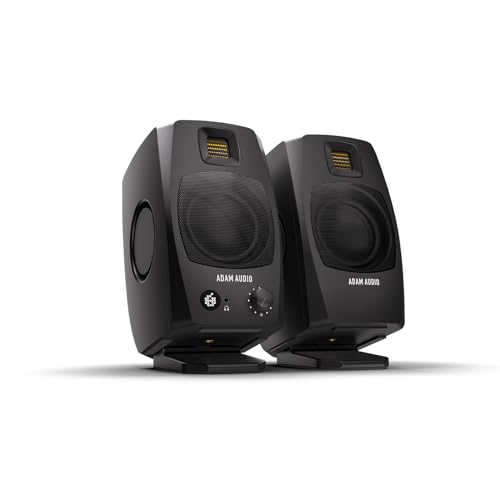
The ADAM Audio D3V is a powered desktop studio monitor featuring a 3.5-inch aluminum woofer and a 1.5-inch D-ART ribbon tweeter. It delivers 80 watts of power per driver and extends bass response down to 45 Hz using passive radiators. You can connect directly via USB-C or use balanced TRS inputs. The included stands angle the speakers 15 degrees toward your ears for precise monitoring.
- 80 W amplifier per driver for 3.5-inch woofers
- 1.5-inch D-ART ribbon tweeter for precise highs
- Extends low frequency response to 45 Hz
- Includes 15-degree angled monitor stands
- USB-C and balanced TRS connectivity options
- 3.5-inch woofer is smaller than the 4.5-inch or 5-inch drivers in other list picks
- 80 W per driver is lower power than the 110 W RMS rating of the Edifier MR5
- 7.89-pound weight is heavier than typical 4-inch desktop monitors
- You need ribbon tweeter detail for critical mixing
- You want direct USB-C connection to your computer
- You prefer included stands that angle toward your ears
- You require larger woofers for deeper bass extension
- You need higher power output for large rooms
- You prefer lighter speakers for easy desk movement
Verdict: ADAM Audio D3V Desktop Studio Monitor suits producers who value ribbon tweeter accuracy and direct USB-C connectivity. It fits small desktop setups where angled stands and precise high-frequency reproduction matter more than raw bass volume.
Specifications side by side
| Spec | PreSonus Eris Sub 8BT 8-Inch Desktop Subwoofer | Mackie CR4.5BT 4.5" Bluetooth Studio Monitor | JBL 305P MkII 5" Powered Studio Monitor | Yamaha HS5 5-Inch Studio Monitor | Pioneer DJ 4-inch Active Desktop Monitor Speakers | Edifier R1280Ts Powered Bookshelf Speakers | Edifier MR5 3-Way Studio Monitor | ADAM Audio D3V 3.5in Powered Desktop Monitor |
|---|---|---|---|---|---|---|---|---|
| Woofer Size | 8-inch | 4.5" | 5-inch | 5" | 4-inch | 4-inch | 5" | 3.5" |
| Total Wattage | 50W, 100 watt | – | Dual 41-Watt | 70W | – | 42 Watts RMS | 110W RMS | 240 W |
| Audio Inputs | ¼-inch TRS, RCA, ⅛-inch TRS aux | TRS, RCA, 3.5 mm | XLR/TRS | XLR, TRS phone jack | – | Dual RCA | XLR, TRS, RCA, AUX | USB-C, balanced 1/4" TRS |
| Bluetooth | Bluetooth 5.0 | Bluetooth | – | – | – | – | Bluetooth 6.0 | – |
| Frequency Response | – | – | – | 54Hz-30kHz | – | – | 46Hz–40kHz | 45 Hz – 23 kHz |
| Acoustic Tuning | High- and low-frequency tuning controls | Tone knob, location switch | Boundary EQ and HF Trim | Room Control, High TRIM | DSP | Side panel EQ knobs | Rear knobs, EDIFIER ConneX App | DSP-powered switches |
| Tweeter Type | – | Silk dome | – | 1" dome tweeter | – | 13mm silk dome | 1" silk dome | 1.5" D-ART ribbon |
| Speaker Type | Powered | Powered | Powered | Powered | Powered | Powered | Powered | Powered |
| Connectivity | Bluetooth | Bluetooth | – | – | – | – | Bluetooth, RCA, XLR, TRS | TRS |
| Use | Desktop | Studio Monitoring | – | Studio Monitoring | Desktop | Studio Monitoring | Studio Monitoring | Studio Monitoring, Desktop |
| Features | – | – | – | – | – | Subwoofer Output | Hi-Res Audio, Balanced Input | USB Recording, USB-C |
| Color | Black | Black | Black | Black | Black | Brown | White | Black |
| Driver Size | 8-Inch | – | – | – | – | – | – | – |
| Recommended Use | Music, Movies, Music Production | Mixing | – | – | – | Stereo | Music | – |
| Speaker Design | – | – | – | – | – | – | 3-Way | – |
| Placement | – | – | – | – | – | Bookshelf | Bookshelf | – |
| Design | – | – | 2-Way | – | – | – | – | – |
| Dimensions | 9.8 × 12.7 × 11.7 inches | 8.25 × 6.1 × 8.9 inches | 14 × 12.2 × 13.9 inches | 7 × 9 × 12 inches | 11 × 14.8 × 13 inches | 17 × 12.6 × 7.2 inches | 6.26 × 10.4 × 10.1 inches | 7.88 × 4.5 × 9.5 inches |
| Weight | 17.6 pounds | 12.1 pounds | 10.4 pounds | 12 pounds | 1 pounds | 10.8 pounds | 22.9 pounds | 7.89 pounds |
| Size | 8" Bluetooth Subwoofer | 4.5" Monitor | 5-inch Speaker | 5" | 14.60 x 13.80 x 11.10 in" | – | – | 8.50 |
| Model | Eris Sub 8BT | 2056262-00 | 305PMKIISET | HS5 | DM-40D | R1280TS | MR5 | AMS-D3V-Black |
For a related comparison, read studio headphones buying guide.
Frequently asked questions
What is the difference between a 5-inch and 8-inch studio monitor?
Driver size determines low-frequency extension and physical footprint. A 5-inch woofer, like the JBL 305P MkII, offers accurate near-field monitoring for small rooms. An 8-inch subwoofer, such as the PreSonus Eris Sub 8BT, extends bass response deeper. You choose based on room size and needed low-end depth.
Do studio monitors need Bluetooth connectivity?
Bluetooth is convenient but not essential for critical mixing. It allows wireless streaming from devices like phones or tablets. The Mackie CR4.5BT and PreSonus Eris Sub 8BT include this feature. For professional work, wired connections like XLR or TRS provide more stable signal integrity.
What does a ribbon tweeter offer in a desktop monitor?
A ribbon tweeter provides precise high-frequency reproduction with low distortion. The ADAM Audio D3V uses this technology for detailed imaging. It helps you hear subtle mix details clearly. This design suits small desktop setups where accurate highs matter more than raw bass volume.
Can I use bookshelf speakers as studio monitors?
Yes, if they offer flat response and wired connectivity. The Edifier R1280TS and MR5 support studio monitoring tasks. The MR5 includes balanced XLR inputs and physical tuning controls. These features allow you to adjust sound for accurate mixing, unlike standard entertainment bookshelf speakers.
How does a 3-way speaker design improve monitoring?
A 3-way design uses separate drivers for highs, mids, and lows. The Edifier MR5 uses this for detailed mid-range reproduction. It reduces distortion by splitting frequencies among dedicated components. This setup suits critical listening and mastering where precise staging and clarity are required.
What is the purpose of adjustable room controls?
Room controls correct acoustic anomalies in your space. The Yamaha HS5 includes adjustments for high and low frequency response. You use these to compensate for wall reflections or bass buildup. This ensures your mix translates well to other playback systems.
Are desktop monitors suitable for large mixing environments?
Desktop monitors are best for near-field use in small spaces. The Pioneer DJ DM-40D and ADAM Audio D3V are compact. They fit tight desk areas but lack the power for large rooms. You should choose larger 5-inch or 8-inch models for bigger studios.
Why choose a powered subwoofer over a passive one?
Powered subwoofers have built-in amplifiers for direct connection. The PreSonus Eris Sub 8BT connects via Bluetooth or line inputs. This simplifies setup by removing the need for a separate amp. It allows precise low-frequency management in desktop production environments.


