Cricut Joy, Explore or Maker? A Beginner’s Guide
As Amazon Associates, we earn from qualifying purchases. This means we may receive a small commission at no extra cost to you if you click through and make a purchase.
Cricut is the best-known name in home cutting machines. A Cricut connects to a phone or computer, reads a design you make in its free Design Space app, and then cuts it out of paper, vinyl, iron-on or other materials with a small blade. Crafters use them for greeting cards, labels, stickers, T-shirts and party decorations, which is why a Cricut is one of the most popular gifts for creative friends and family.
The lineup has three main families, and this guide explains what each one can do and what comes in each box. In one sentence: the Cricut Joy and Joy 2 are small machines for cards, labels and quick projects, the Explore 5 is the mid-size all-rounder here bundled with a heat press, and the Maker 4 cuts the widest range of materials and appears in three bundles aimed at general crafting, T-shirts and stickers.
Cricut Craft Machines Compared
| Bundle | Machine | Materials it cuts | Print-then-cut stickers | Heat press included |
|---|---|---|---|---|
| Cricut Joy and Digital Content | Joy | 50+ | Not listed | No |
| Cricut Joy 2 Essential Bundle | Joy 2 | 75+ | Yes | No |
| Maker 4 T-Shirt Making Bundle | Maker 4 | 300+ | Yes | Yes, EasyPress SE |
| Maker 4 Engagement Bundle | Maker 4 | 300+ | Yes | No |
| Maker 4 Ultimate Sticker Bundle | Maker 4 | 300+ | Yes | No |
| Cricut Explore 5 Essential Bundle | Explore 5 | 100+ | Not listed | Yes, EasyPress 9×9 |
Cricut Terms Explained for First-Time Crafters
Iron-on, also called HTV or heat transfer vinyl, is a material you cut into a design and then press onto fabric with heat, which is how most homemade T-shirts are made. A heat press, such as Cricut’s EasyPress, gives more even heat than a household iron. Adhesive vinyl is sticky-backed vinyl for decals on mugs, water bottles and walls.
Print-then-cut means you print a full-color design on your home inkjet printer, then the Cricut reads marks on the sheet and cuts neatly around the printed shapes, ideal for stickers. Smart Materials are Cricut materials with a stiff backing that feed through without a cutting mat, allowing long continuous cuts. A cutting mat is a sticky sheet that holds regular materials in place as the blade works.
Cricut Joy Machine and Digital Content for Cards and Labels

Cricut
Cricut Joy Machine & Digital Content Library Bundle
Price and specifications are read from the Amazon product page and can change.
Cricut Joy Machine & Digital Content
Best for: Card makers and label lovers on a desk
Pros
- Compact and portable
- Cuts 50+ materials
- Matless Smart Material cuts
- 30 bonus digital images
Cons
- Machine only, no materials
- Weight listed inconsistently
The Cricut Joy Machine & Digital Content bundle pairs the original Cricut Joy with a library of 30 digital images that are added to your account when you register. The Joy is a compact, portable cutter that cuts more than 50 materials, including cardstock, vinyl and iron-on, using the included blade and a StandardGrip Mat. It also makes super-long cuts with matless Smart Materials, and it can draw shapes and write in different styles.
It connects over Bluetooth to Design Space on iOS, Android, Windows and Mac, and Cricut says setup takes about 15 minutes. It carries a 1-year warranty. The listing gives its weight as 3.9 lbs in the features but 3.9 kg in the description; the lighter figure fits a compact machine. Note that the included components list only the machine and the digital bundle, so materials beyond what comes with the machine are not described.
This suits someone who mostly makes cards, pantry labels and simple decals. For a birthday party, handmade banners pair nicely with treats from a soft serve ice cream maker. If you also want stickers, the Joy 2 adds print-then-cut.
Cricut Joy 2 Essential Bundle for Stickers and Everyday Projects

Cricut
Cricut Joy 2 Essential Bundle + Rainbow Sampler
Price and specifications are read from the Amazon product page and can change.
Cricut Joy 2 Essential Bundle
Best for: Beginners wanting stickers and cards
Pros
- Print-then-cut stickers
- 75+ materials
- Materials and tools included
- Just over 2 lbs
Cons
- Compact size limits large projects
The Cricut Joy 2 Essential Bundle is the newer compact machine with a Rainbow Sampler. The Joy 2 weighs just over 2 pounds, stands about 4.5 inches, and works with 75 or more materials. It writes, draws, foils, scores and cuts, and it now works with your home inkjet printer to make full-color stickers.
The bundle includes Smart Vinyl, Smart Iron-On, Value Cardstock, Insert Card Sets and Printable Vinyl, plus tools and access to more than 400 projects and how-tos. Design Space connects over Bluetooth and offers step-by-step design flows, templates and AI image generation. The machine carries a 1-year limited warranty.
This is a strong first Cricut for a beginner who wants cards, labels and stickers right out of the box. For T-shirts on a regular basis, a bundle with a heat press makes more sense.
Cricut Maker 4 T-Shirt Making Bundle for Custom Apparel
Best for: Sticker makers and small shops
Pros
- Waterproof sticker paper included
- Adhesive vinyl sampler
- Print-then-cut on Maker 4
Cons
- Inkjet printer needed
- No heat press included

Cricut
Cricut Maker 4 – Smart Cutting Machine (Seashell) | Engagement Bundle
Price and specifications are read from the Amazon product page and can change.
Cricut Maker 4
Best for: Crafters wanting the most versatile machine
Pros
- 300+ materials incl. leather, wood
- Full starter tool kit
- Print-then-cut
- Up to 2x faster than previous model
Cons
- No heat press included
- Full image library needs subscription
Best for: Aspiring T-shirt and tote sellers
Pros
- Maker 4 plus EasyPress SE
- Vinyl and iron-on included
- Cuts 300+ materials
Cons
- Some Maker 4 tools sold separately
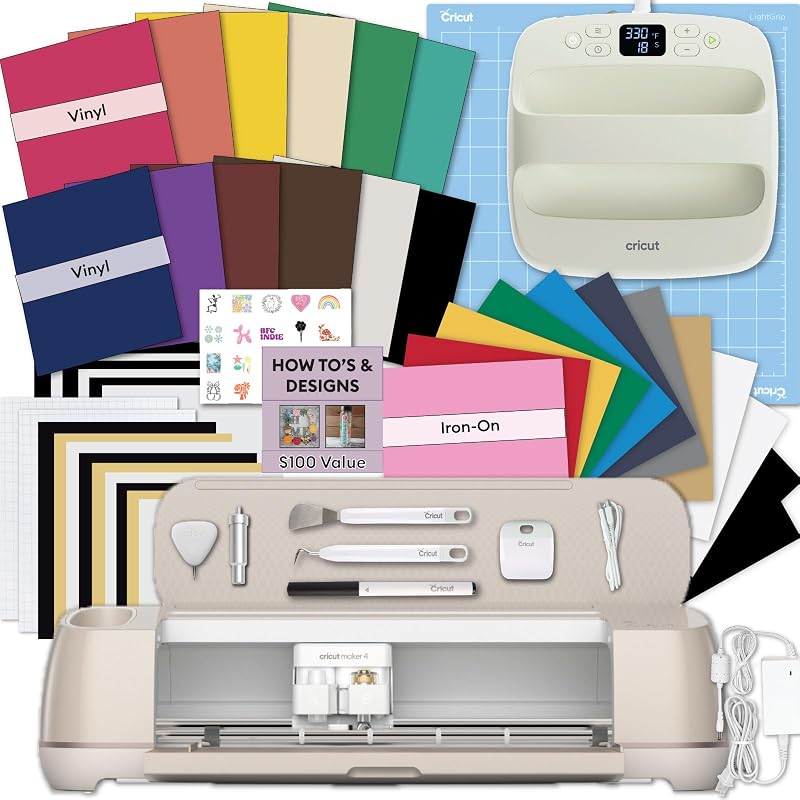
The Cricut Maker 4 T-Shirt Making Bundle combines the Maker 4 with an EasyPress SE heat press, vinyl and iron-on materials, tools and accessories. The idea is four steps: design, cut, press and apply, with no extra equipment. The EasyPress SE is described as giving consistent heat and pressure for transfers that resist peeling, cracking and fading, with auto shutoff and a heat base for safety.
The Maker 4 itself cuts more than 300 materials, including fabric, wood veneer and leather, works with 13 or more tools (some sold separately), cuts Smart Materials up to 12 feet without a mat, and supports print-then-cut stickers. It carries a 1-year warranty against manufacturer defects.
This suits someone planning custom shirts, hoodies and tote bags, including hobbyists who might sell on Etsy.
Cricut Maker 4 Engagement Bundle for the Most Versatile Crafting
The Cricut Maker 4 Engagement Bundle, in Seashell, is Cricut’s most capable machine with a full starter kit: Fine-Point Blade, Light Grip Mat, two Fine Point Pens, Mini Weeder, practice materials, Scoring Stylus, Scraper, Spatula, Weeder, Smart Iron-On, Smart Vinyl, Cardstock Sampler, Transfer Tape and 30 digital images.
It works with 300 or more materials, and besides cutting it draws, foils, scores, engraves, debosses and perforates. Cricut says it cuts up to twice as fast as the previous model and supports print-then-cut with most inkjet printers. The Design Space library holds over 1.5 million images, 1,000 fonts and 100,000 projects with the optional paid Cricut Access subscription.
This suits a crafter who wants room to grow into leather, wood and engraving. It does not include a heat press, so T-shirt makers may prefer the T-shirt bundle. For more on vinyl projects, see our Cricut vinyl cutter machine guide.
Cricut Maker 4 Cutting Machine Ultimate Sticker Bundle for Sticker Makers
The Cricut Maker 4 Cutting Machine Ultimate Beginner Sticker Making Bundle pairs a Seashell Maker 4 with printable sticker paper, waterproof sticker materials, an adhesive vinyl sampler, tools and project guidance. You print designs on an inkjet printer and the Maker 4 cuts around them.
It is aimed at water-bottle stickers, labels, packaging and phone-case or car decals, and at Etsy sellers. It shares the Maker 4’s 300-plus materials and 1-year warranty. You need your own inkjet printer. This suits a budding sticker shop owner.
Cricut Explore 5 Essential Bundle for an All-Round Gift
Best for: Gift-givers wanting an all-round starter kit
Pros
- Explore 5 plus EasyPress 9×9
- Cuts 100+ materials
- Mats, tools and materials included
Cons
- Fewer materials than Maker 4
The Cricut Explore 5 Essential Bundle pairs the new Explore 5 with an EasyPress 9×9 heat press that has a ceramic-coated heat plate, plus a Rainbow Sampler of Smart Vinyl, Smart Iron-On, printable vinyl, cardstock, insert cards, cutting mats and essential tools. The Explore 5 cuts more than 100 materials, including adhesive vinyl, HTV, cardstock, paper and felt, and connects to Design Space by Bluetooth.
It comes with access to over 400 project ideas and a 1-year limited warranty on the machine. This is a very complete gift for a beginner who wants to try cards, decals and shirts. For leather or wood, the Maker 4 goes further.
How to Choose the Right Cricut Craft Machine
Think about the main project. Cards and labels suit the Joy; stickers suit the Joy 2 or Maker 4 Sticker Bundle; T-shirts suit the Explore 5 bundle or Maker 4 T-shirt bundle; leather, wood and engraving need the Maker 4.
Next, check what is in the box. The Joy bundle is mostly the machine and images; the Joy 2, Explore 5 and Maker 4 bundles include materials, and two include heat presses. Finally, remember print-then-cut needs an inkjet printer.
FAQ
Which Cricut is best for beginners?
The Joy 2 Essential Bundle and the Explore 5 Essential Bundle both include materials and tools to start right away.
Do I need a subscription?
Design Space is free. The full image library needs the optional paid Cricut Access subscription.
Can a Cricut make T-shirts?
Yes, by cutting iron-on vinyl. The Maker 4 T-Shirt bundle and Explore 5 bundle include a heat press.
Can the Cricut Joy make stickers?
The Joy 2 works with an inkjet printer for full-color stickers; the original Joy listing does not mention print-then-cut.
Which Cricut should I buy for leather or wood?
The Maker 4, which lists 300+ materials including leather and wood veneer.


