HP Wireless All-in-One Printers: DeskJet, Envy or OfficeJet Pro?
As Amazon Associates, we earn from qualifying purchases. This means we may receive a small commission at no extra cost to you if you click through and make a purchase.
HP makes more home and office printers than most shoppers can keep track of, and almost every one is an “all-in-one”, meaning it prints, scans and copies in one box. Nearly all current models are also wireless, so you can print from a laptop or phone without a cable. The hard part of choosing an HP all in 1 printer wireless model is the series name: DeskJet, Envy and OfficeJet Pro each aim at a different kind of user.
Put simply, the two DeskJets are small, basic printers for light home use, the Envy adds photo-friendly color and 2-sided printing for families, and the three OfficeJet Pro models add speed, bigger paper trays, document feeders and, on two of them, fax for home and small offices.
HP Wireless All-in-One Printers Compared
| Model | Print speed (black / color) | Input tray | Auto document feeder | Fax |
|---|---|---|---|---|
| HP OfficeJet Pro 8139 | 20 / 10 ppm | 225 sheets | Yes, one-sided | Yes |
| HP DeskJet 2955 | Not listed | 60 sheets | No | Not listed |
| HP OfficeJet Pro 8125 | 20 / 10 ppm | 225 sheets | Yes, one-sided | Not listed |
| HP OfficeJet Pro 9125 | 22 / 18 ppm | 250 sheets | Yes, 2-sided | Yes |
| HP DeskJet 4355 | Not listed | 60 sheets | Yes, 35 sheets | Not listed |
| HP Envy 6155 | 10 / 7 ppm | 100 sheets | No | Not listed |
HP OfficeJet Pro 8139 Wireless All-in-One for Home Offices That Fax

HP
HP OfficeJet Pro 9125 Wireless All-in-One Color Inkjet Printer, Print, Scan, Copy, Fax, ADF, Duplex Print/scan, Best-for-Office, 3 Month Trial of Instant Ink Included, AI-Capable (C2VZ0A)
Price and specifications are read from the Amazon product page and can change.
HP OfficeJet Pro 9125 Wireless All-in-One
Best for: Small offices scanning stacks of paper
Pros
- 22 ppm black, 18 ppm color
- 2-sided scanning feeder
- 250-sheet input tray
- Fax included
Cons
- Heaviest at 20.5 pounds
- More than a student needs
Best for: Home offices that never fax
Pros
- 20 ppm black printing
- Auto 2-sided printing and ADF
- 7-inch touchscreen
Cons
- No fax
- Shorter 3-month ink trial

Best for: Home offices that still send faxes
Pros
- Print, scan, copy and fax
- Auto 2-sided printing and ADF
- 225-sheet input tray
- 1-year Instant Ink trial
Cons
- Heavy at 17.6 pounds
- One-sided document feeder
The HP OfficeJet Pro 8139 Wireless All-in-One is built for home offices printing reports, presentations and flyers. It prints up to 20 pages per minute (ppm) in black and 10 ppm in color, and the listing covers print, scan, copy and fax. It also has automatic 2-sided (duplex) printing, which saves paper by printing on both sides, and an automatic document feeder (ADF), a slot on top that pulls in a stack of pages to scan or copy without lifting the lid each time. The scanner is described as flatbed with a one-sided ADF.
Other details from the listing: a 225-sheet input tray, a 2.7-inch color touchscreen, dual-band Wi-Fi that detects and fixes connection problems, the HP app for printing and scanning from a phone, Quiet Mode, HP AI formatting that strips clutter from web pages and emails, and HP Wolf Essential Security for network protection. Prints are described as water, smear and fade resistant, and the body uses more than 45% recycled plastic. It weighs 17.6 pounds and comes with a one-year limited hardware warranty. The HP OfficeJet Pro 8139 is the only model here that includes a 1-year Instant Ink trial; Instant Ink is HP’s subscription that ships ink before you run out, and a monthly fee applies after the trial unless you cancel.
This is the pick for freelancers, remote workers and anyone who still sends signed forms by fax. If you never fax, the 8125 below is nearly identical without it.
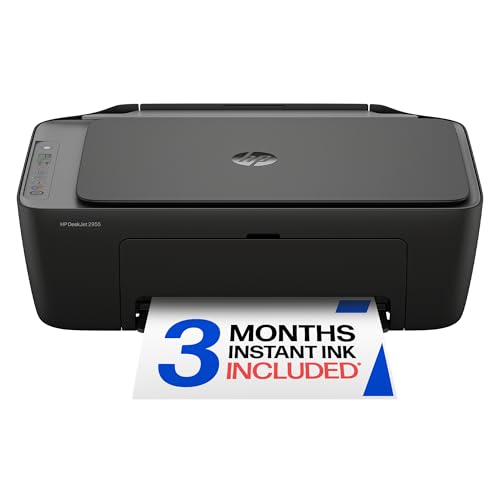
HP DeskJet 2955 Wireless All-in-One Color for Light Home Printing
HP
HP DeskJet 2955 Wireless All-in-One Color Inkjet Printer, Scanner, Copier, Best-for-Home, 3 Month Trial of Instant Ink Included, AI-Capable (A24HJA)
Price and specifications are read from the Amazon product page and can change.
HP DeskJet 2955 Wireless All-in-One Color
Best for: Students printing homework and recipes
Pros
- Light 7.6-pound build
- Dual-band Wi-Fi
- Flatbed scanner
Cons
- Slow 7.5 ppm black
- No auto document feeder
The HP DeskJet 2955 Wireless All-in-One Color printer is the simple starter model. HP pitches it for everyday color documents like to-do lists, letters, financial paperwork and recipes. It prints up to 7.5 ppm black and 5.5 ppm color, has a 60-sheet input tray and a flatbed scanner, and uses an icon LCD control panel instead of a touchscreen.
It shares the dual-band Wi-Fi, HP app and HP AI formatting of the bigger models and includes a 3-month Instant Ink trial. The HP app feature mentions fax from your phone, but fax is not among the printer’s listed functions, so do not count on it. The listing does not state a warranty. At 7.6 pounds and about 16.7 inches wide, it is easy to fit on a desk.
The HP DeskJet 2955 suits students, dorm rooms and households that print a few pages a week. It gives way to the DeskJet 4355 if you scan multi-page forms, or to the Envy if you want photos and 2-sided printing. For more small-footprint choices, see our compact HP wireless all-in-one printer guide.
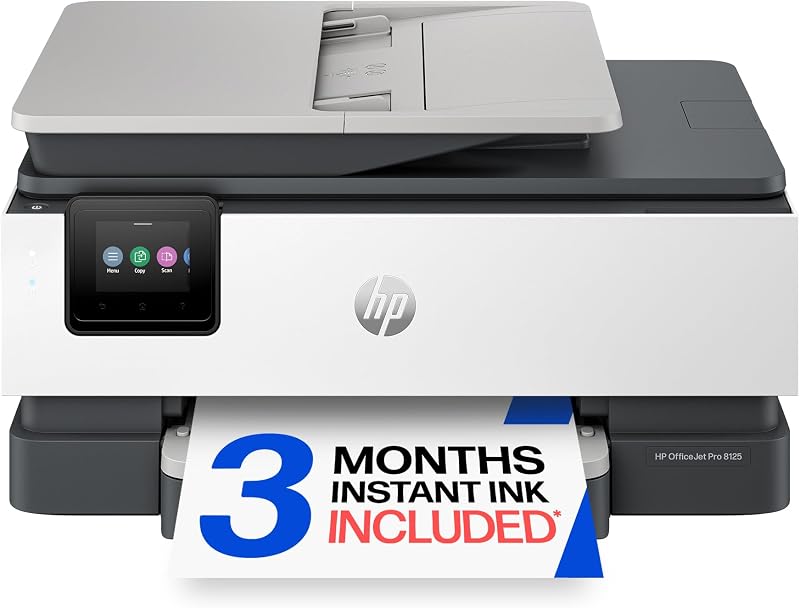
HP OfficeJet Pro 8125 Wireless All-in-One for Home Offices Without Fax
The HP OfficeJet Pro 8125 Wireless All-in-One is essentially the 8139 without fax. It matches the 8139 on speed (20 ppm black, 10 ppm color), the 225-sheet tray, auto 2-sided printing, the one-sided ADF, the 2.7-inch touchscreen, Quiet Mode, HP Wolf Essential Security and the one-year hardware warranty. Size and weight are also practically identical at 17.6 pounds.
The differences are fax, which is not listed for the 8125, and the Instant Ink trial, which runs 3 months instead of a year.
This suits home offices, side businesses and parents working from home who need fast, reliable printing and scanning but no fax line. Choose the 8139 if you fax, or the 9125 if you scan lots of 2-sided pages.
HP OfficeJet Pro 9125 Wireless All-in-One for Busy Small Offices
The HP OfficeJet Pro 9125 Wireless All-in-One is the fastest and most office-ready printer here, labeled best for office. It prints up to 22 ppm black and 18 ppm color and copies up to 21 ppm in black. Its document feeder is dual-pass and 2-sided, meaning it can scan both sides of a page in one go, and the scanner glass slides off for easy cleaning.
It includes print, scan, copy and fax, auto 2-sided printing and scanning, a 250-sheet input tray, Smart Advance Scan, a 2.7-inch touchscreen and HP Wolf Pro Security, a step up from the Essential version on the 8000-series models. It weighs 20.5 pounds, uses more than 40% recycled plastic and has a one-year limited hardware warranty and a 3-month Instant Ink trial.
The HP OfficeJet Pro 9125 suits small offices, busy home businesses and anyone who scans contracts or receipts in bulk. For a student or light home user, it is more printer than needed.
HP DeskJet 4355 Wireless All-in-One Color for Scanning Multi-Page Forms
Best for: Budget-minded home users scanning multi-page forms
Pros
- 35-sheet document feeder
- Light 6-pound build
- 2-year warranty listed
Cons
- No auto 2-sided printing listed
- Slow 5.5 ppm color
The HP DeskJet 4355 Wireless All-in-One Color printer builds on the basic DeskJet idea with one important extra: a 35-sheet auto document feeder. That makes it much easier to copy or scan tax forms, school paperwork and multi-page letters. It prints up to 8.5 ppm black and 5.5 ppm color, has a 60-sheet input tray, an icon LCD, dual-band Wi-Fi, HP AI formatting and a 3-month Instant Ink trial.
A few listing details are inconsistent. The ink color field says “Black” even though this is sold as a color printer, and the warranty field says 2 years while the other HP models here list one year. The listing does not mention automatic 2-sided printing. It weighs just 6 pounds.
This suits home users who print lightly but scan often. If you want photo printing and duplex, the Envy is the better fit. For comparing ink tank designs from other makers, see our guide to wireless ink tank all-in-one printers.
HP Envy 6155 Wireless All-in-One Color for Photos and Homework
Best for: Families printing photos and homework
Pros
- Borderless photo printing
- P3 true-to-screen color
- Auto 2-sided printing
- 4-inch touchscreen
Cons
- No document feeder
- No fax
The HP Envy 6155 Wireless All-in-One Color printer targets families printing homework and borderless photos, meaning photos printed edge to edge with no white frame. HP’s P3 true-to-screen technology aims to make prints look as vibrant as they do on screen. It prints up to 10 ppm black and 7 ppm color, with auto 2-sided printing and a 100-sheet input tray.
It has a 2.4-inch color touchscreen, a flatbed scanner, dual-band Wi-Fi, HP AI formatting, the HP app and a 3-month Instant Ink trial. Listed media include envelopes, labels, plain paper and transparencies. It weighs 11.2 pounds, comes in a Portobello color and carries a one-year limited hardware warranty. It has no document feeder and no fax.
The HP Envy 6155 suits families, crafters and gift-givers looking for a friendly, good-looking home printer. For heavy office scanning, an OfficeJet Pro is a better fit.
How to Choose the Right HP Wireless All-in-One Printer
Know the series. DeskJet means basic and light use, Envy means home and photos, OfficeJet Pro means speed and office features.
Count your pages. A few pages a week points to a DeskJet. Daily reports and flyers point to an OfficeJet Pro, whose 20-22 ppm speeds and 225-250 sheet trays save refills.
Decide on scanning and fax. An auto document feeder is worth it if you scan stacks; the DeskJet 4355 and all three OfficeJet Pros have one. Only the 8139 and 9125 list fax. If you mostly print text and want another technology entirely, our color laser all-in-one printer guide explains the trade-offs.
Plan for ink. Every model includes an Instant Ink trial. Remember to cancel before it ends if you prefer buying cartridges yourself.
FAQ
What is the difference between DeskJet, Envy and OfficeJet Pro?
DeskJets are basic home printers with icon screens and slower speeds. The Envy adds a touchscreen, duplex and photo-focused color. OfficeJet Pros add faster speeds, larger trays, document feeders and office security.
Which HP printer can fax?
The OfficeJet Pro 8139 and OfficeJet Pro 9125 list fax. The 8125, both DeskJets and the Envy do not.
What is HP Instant Ink?
A subscription that ships ink before you run out. Each printer includes a trial; after it, a monthly fee applies unless you cancel.
Can I print from my phone?
Yes. All six listings mention the HP app and dual-band Wi-Fi for printing and scanning from a smartphone.
Which HP printer is best for a student?
The DeskJet 2955 for light printing, or the Envy 6155 if photos and 2-sided pages matter.


