Lutron Caseta Dimmer Switch Guide: Where Should a Beginner Start?
As Amazon Associates, we earn from qualifying purchases. This means we may receive a small commission at no extra cost to you if you click through and make a purchase.
Lutron is the company that made the home dimmer switch popular, and Caseta is its smart lighting line for everyday homes. A Caseta dimmer replaces your normal wall switch, and once it is linked to the Lutron Smart Hub you can dim or switch your lights from your phone, your voice assistant, a schedule or a wireless Pico remote. The big selling point for beginners is that Caseta works with the bulbs you already own, so you do not have to buy smart bulbs, and many models install without a neutral wire, which older homes often lack.
The six products below differ mainly in style (the original Caseta push-button look versus the Diva paddle with a slider), what comes in the box (a lone switch, a two-pack, a wallplate or a full starter kit with the hub), and whether they dim lights or simply switch lights and fans on and off.
Lutron Caseta Dimmer Switches Compared
| Model | Style | What is in the box | Neutral wire | Hub included |
|---|---|---|---|---|
| Lutron Caseta Smart Dimmer Switch | Original Caseta dimmer | One dimmer | Not required | No |
| Lutron Caseta Diva Smart Dimmer Switch (2-pack) | Diva paddle, white | Two dimmers, wire labels | Not required | No |
| Lutron Caseta Diva Smart Dimmer Switch with Wallplate | Diva paddle | One dimmer, Claro wallplate | Not listed | No |
| Lutron Caseta Diva Smart Dimmer Switch (black) | Diva paddle, black | One dimmer | Not required | No |
| Lutron Caseta Smart Dimmer Starter Kit | Original Caseta dimmer | Dimmer, Pico, bracket, Smart Hub | Not listed | Yes |
| Lutron Caseta Smart Light Switch | On/off switch for lights and fans | One switch | Required | No |
Three Terms Every Caseta Beginner Should Know
The Smart Hub. Caseta switches talk to a small box called the Lutron Smart Hub, which plugs into your internet router. The listings say the hub works without relying on Wi-Fi for the switch connection, which is why Caseta is known for fast, stable response. Without the hub, the smart features (app, voice, schedules) do not work, so every product here except the starter kit says “Smart Hub required”.
The Pico remote. A Pico is a small battery-powered wireless remote you can mount on a wall like a switch or keep on a nightstand. It lets you add a second switch location, for example at the top and bottom of the stairs, without running new wires. That setup is called “3-way” control.
No-neutral wiring. A neutral wire is an extra white wire many smart switches need. Older homes often do not have one in the switch box. Caseta dimmers marked “no neutral required” avoid that problem, while the Caseta on/off switch for fans does require one.
Lutron Caseta Smart Dimmer Switch for Existing Caseta Owners
Best for: Ceiling fans and non-dimmable lights
Pros
- Controls lights and ceiling fans
- Up to 600W lighting loads
- Smart Away and geofencing
Cons
- Requires neutral wire
- On/off only, no dimming
Best for: True beginners starting from zero
Pros
- Smart Hub included
- Pico remote and bracket included
- Flicker-free LED dimming up to 150W
Cons
- Only one dimmer in kit
- Original style, not Diva paddle

Lutron
Lutron Caseta Smart Dimmer Switch (Smart Hub Required), No Neutral Required
Price and specifications are read from the Amazon product page and can change.
Lutron Caseta Smart Dimmer Switch
Best for: Adding a dimmer to an existing Caseta setup
Pros
- No neutral wire required
- Works with existing bulbs
- Pico remote compatible
Cons
- Smart Hub sold separately
- Wattage limits not in listing
The Lutron Caseta Smart Dimmer Switch is the original Caseta dimmer, the sleek push-button design that has been the core of the line. It requires no neutral wire and, according to the listing, installs in as little as 15 minutes. It works with your existing bulbs and can make several lights or fixtures on one circuit smart at once.
With the Smart Hub, it connects to Alexa, Apple HomeKit, Google Home, Ring, Sonos and more, and the Lutron app adds scenes, schedules, geofencing (lights react when your phone arrives home), Smart Away and timers. A Pico remote, not included, adds a wireless second switch, and the listing says you can create setups with up to 10 devices. The listing does not specify the maximum LED or incandescent wattage for this dimmer, so check the manual for your bulbs.
This suits someone who already owns a Caseta hub and wants to add another room. First-time buyers without a hub should look at the starter kit instead.
Lutron Caseta Diva Smart Dimmer Switch Two-Pack for Multiple Rooms

Lutron
Lutron Caseta Diva Smart Dimmer Switch (Smart Hub Required), No Neutral Req
Price and specifications are read from the Amazon product page and can change.
Lutron Caseta Diva Smart Dimmer Switch
Best for: Dark or modern decor schemes
Pros
- Black finish
- No neutral required
- Soft-glow light bar
Cons
- Wallplate sold separately
- Spec sheet looks inconsistent

Best for: A finished look in one box
Pros
- Claro wallplate included
- Paddle and slider with preset
- Smart Away lighting
Cons
- Hub sold separately
- Neutral needs not stated in title
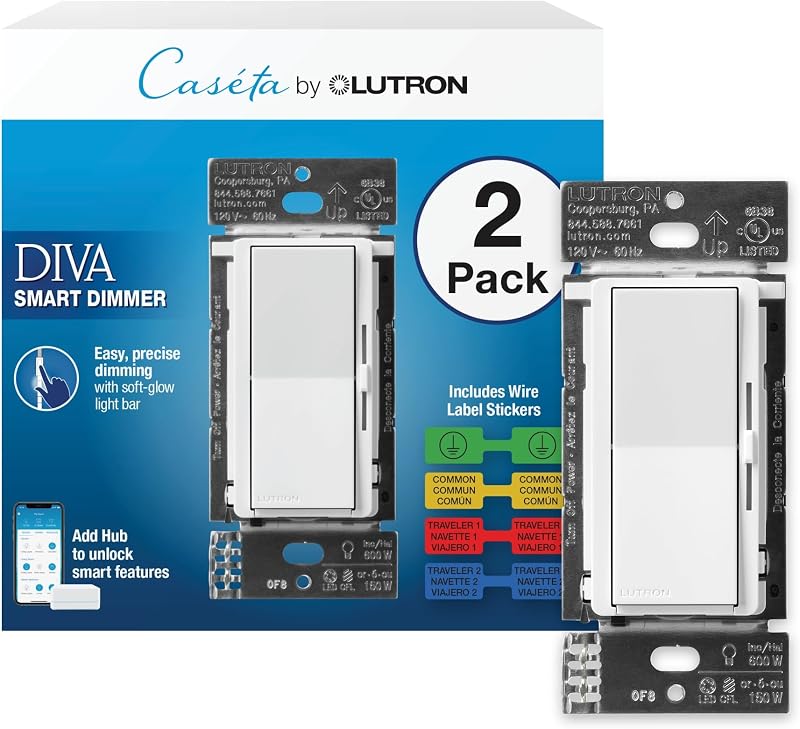
Best for: Doing two rooms at once
Pros
- Two Diva dimmers in one box
- Paddle with slider and light bar
- No neutral required
Cons
- Hub and wallplates sold separately
- Not for low-voltage lighting
The Lutron Caseta Diva Smart Dimmer Switch two-pack gives you two Diva dimmers with wire label stickers. Diva is Lutron’s paddle-style dimmer: you press a large rocker to turn lights on and off and slide a small slider to set brightness, with a soft-glow light bar showing the level. A preset feature brings lights back to your favorite level.
It handles up to 150W of dimmable LED or 600W of incandescent or halogen bulbs, and it is not rated for low-voltage track or landscape lighting. It requires no neutral wire, according to the title. With the hub (model L-BDG2-WH, sold separately), you get app control, voice control, schedules and Smart Away, which randomly turns lights on and off while you are away. Wallplates are sold separately.
Pick this if you plan to upgrade two rooms, such as a living room and bedroom. For one room with a finished look, the version with a wallplate is simpler.
Lutron Caseta Diva Smart Dimmer Switch with Wallplate for a Finished Look
The Lutron Caseta Diva Smart Dimmer Switch with wallplate includes one Diva dimmer and one coordinating Claro wallplate, the cover plate that goes around the switch. That means one box gets you a complete, matching result.
It shares the Diva features of the two-pack: paddle and slider, soft-glow light bar, preset, up to 150W dimmable LED or 600W incandescent and halogen, and full smart control through the hub. It supports single-pole and 3-way setups with a Claro smart accessory switch. The title of this listing does not repeat the “no neutral” note found on the other Diva listings, so confirm the wiring needs before buying if your switch box lacks a neutral.
This is a neat gift for someone who wants one room upgraded properly. Anyone doing several rooms will get more from the two-pack.
Lutron Caseta Diva Smart Dimmer Switch in Black for Modern Decor
The Lutron Caseta Diva Smart Dimmer Switch in black is the same Diva paddle dimmer in a dark finish, according to the description. It includes one dimmer, with the wallplate sold separately, and its title says no neutral is required.
The features match the other Diva models: slider with light bar, preset, 150W LED or 600W incandescent and halogen, and smart control with the hub. Some of its spec lines look inconsistent with the other Diva listings, for example a 50 milliamp current rating and “surface mount”, so rely on the feature list and product manual rather than those spec lines.
It suits a home with black fixtures or dark walls, where a white switch would stand out. If color is not important, the white two-pack covers more rooms.
Lutron Caseta Smart Dimmer Starter Kit for First-Time Buyers
The Lutron Caseta Smart Dimmer Starter Kit is where most beginners should start. It includes one original-style Caseta dimmer, a Pico remote, a mounting bracket for the Pico and the Caseta Smart Hub. Since the hub is the part every other Caseta device needs, this kit gets you going in one purchase.
The dimmer offers flicker-free dimming of up to 150W of dimmable LEDs down to low light levels. The hub adds the Lutron app with scenes, schedules, geofencing, Smart Away and timers, and connects with Alexa, Apple HomeKit, Google Home, Ring, Sonos and more. The description mentions automatic adjustment for spring and fall time changes. The Pico can control from up to 10 locations. The listing does not state the neutral wire requirement for this kit.
This is the best gift for someone new to smart homes. After it, adding single dimmers or Diva switches is easy. Our lutron caseta combo guide shows how kits and add-ons fit together.
Lutron Caseta Smart Light Switch for Lights and Ceiling Fans
The Lutron Caseta Smart Light Switch is not a dimmer. It is an on/off smart switch for lights and ceiling fans. That matters because you should never put a regular dimmer on a ceiling fan motor.
The feature list says it supports LED, CFL, incandescent and halogen bulbs up to 600W and ceiling fans up to 6A; the description mentions different figures (720W and 3.6A for general-purpose fans), so check the manual for your exact load. It requires a neutral wire. It offers Apple Home, Alexa and Google Assistant support, schedules based on sunrise and sunset, Smart Away and geofencing with the hub. A 3-way setup needs a Pico remote or a second Caseta switch.
Choose it for a ceiling fan, a porch light or bulbs that are not dimmable. For any light you want to dim, pick one of the dimmers above.
How to Choose the Right Lutron Caseta Dimmer Switch
Do you have the hub yet. If not, start with the starter kit, since every other product here needs the Smart Hub for smart features.
Check your wiring. Open your switch box with the power off. No neutral wire means choosing a dimmer listed as no neutral required, such as the original Caseta dimmer or the Diva two-pack and black models. The on/off switch for fans requires a neutral.
Pick a style. The original Caseta dimmer uses push buttons. Diva uses a paddle and slider that feel familiar to people used to traditional dimmers. Both work the same way in the app.
Plan extra switch spots. A Pico remote adds a switch without new wiring, handy for stairs, long hallways or bedside control. Read more in our lutron remote switch guide.
FAQ
Do Lutron Caseta dimmers need a hub?
Yes, for app, voice and schedule control. Every single-switch listing here says the Smart Hub is required, and only the starter kit includes it.
Which Caseta dimmer works without a neutral wire?
The original Caseta Smart Dimmer Switch and the Diva two-pack and black Diva listings state no neutral is required.
Can I use a Caseta dimmer with my existing bulbs?
Yes, as long as the bulbs are dimmable. The Diva listings name dimmable LED, incandescent and halogen, up to 150W LED or 600W incandescent.
What is a Pico remote?
A small wireless remote that works as a second switch without extra wiring. It is included in the starter kit and sold separately elsewhere.
Can a Caseta dimmer control a ceiling fan?
Use the Caseta Smart Light Switch for fans, not a dimmer. It is an on/off switch rated for ceiling fans.


