Building a Lutron Caseta Combo: Dimmers, Switches and Add-Ons
As Amazon Associates, we earn from qualifying purchases. This means we may receive a small commission at no extra cost to you if you click through and make a purchase.
Lutron is the name many electricians reach for when a homeowner asks for smart lighting that just works. Its Caseta line replaces your ordinary wall switches with smart ones that you can control from a phone, a voice assistant or the wall itself, and it keeps working with the bulbs you already own. The catch that confuses first-time buyers is that Caseta is a system. A lutron caseta combo usually means a mix of dimmers, on/off switches and add-on controls, all talking to one Lutron Smart Hub, which is sold separately and needed for app and voice control.
The six products here split into three roles: dimmers (the original Caseta Smart Dimmer and the newer Diva dimmers) for lights you want to brighten and soften, on/off switches (the original Caseta switch and the Claro switch) for fans and simple fixtures, and the Claro Accessory Switch, which adds a second wired switch location to a Diva or Claro.
Lutron Caseta Smart Switches Compared
Best for: Adding a wired second switch location
Pros
- No neutral required
- Up to 10 per circuit
- Doesn’t count toward hub limit
Cons
- Does not work alone
- Not for original Caseta models

Lutron
Lutron Caseta Smart Light Switch for Lighting and Fans (Smart Hub Required)
Price and specifications are read from the Amazon product page and can change.
Lutron Caseta Smart Light Switch
Best for: Controlling ceiling fans and non-dimmable lights
Pros
- Handles lights and ceiling fans
- Smart Away vacation mode
- Supports many bulb types
Cons
- Neutral wire required
- Wattage figures conflict in listing

Best for: Older homes without a neutral wire
Pros
- No neutral required
- Works with existing bulbs
- Scenes, schedules, geofencing via app
Cons
- Smart Hub required
- Pico remote not included
| Model | Type | Neutral Wire | Listed Load | In the Box |
|---|---|---|---|---|
| Lutron Caseta Smart Dimmer Switch | Dimmer (original Caseta design) | Not required | 1.25 A | 1 dimmer |
| Lutron Caseta Smart Light Switch | On/off for lights and fans | Required | 6 A; up to 600W bulbs (features) | 1 switch |
| Lutron Caseta Diva Smart Dimmer Switch (2-pack) | Dimmer with slider | Not required | 150W LED / 600W incandescent | 2 dimmers, wire labels |
| Lutron Caseta Diva Smart Dimmer Switch with Wallplate | Dimmer with slider | Not listed | 150W LED / 600W incandescent | 1 dimmer, 1 Claro wallplate |
| Lutron Caseta Claro Smart Switch | On/off for lights and fans | Required | 5A lighting / 3A fan | 2 switches, wire labels |
| Lutron Caseta Smart Claro Accessory Switch | Add-on 3-way switch | Not required | 5 A | 1 accessory switch |
Two quick definitions help. A neutral wire is an extra wire in the wall box, usually white, that many older homes do not have at the switch; products marked “no neutral required” are easier to install there. A 3-way setup means controlling one light from two places, such as the top and bottom of a staircase. Caseta handles that either with a wireless Pico remote or, for Diva and Claro, a wired accessory switch.
Lutron Caseta Smart Dimmer Switch for Homes Without a Neutral
The Lutron Caseta Smart Dimmer Switch is the original Lutron Caseta smart dimmer, and its biggest selling point for beginners is that no neutral wire is required. The listing says it installs in as little as 15 minutes and works with existing bulbs, so you do not need smart bulbs. With the hub, you get app control with scenes, scheduling, geofencing (lights reacting when your phone arrives home), Smart Away and timers.
The listing says the Smart Hub works without Wi-Fi, using its own connection for stable performance, and names compatibility with Alexa, Apple HomeKit, Google Home, Ring, Sonos and more. For a second control point, it pairs with the Pico remote, which is not included, for wireless 3-way control with up to 10 devices. The spec sheet lists a 1.25 A current rating and 120 volts. The listing does not give wattage limits, so check the product page for your bulbs.
This suits renters’ parents, older homes and anyone who wants to start a Caseta kit in a living room or bedroom. It does not pair with the wired Claro accessory switch, so if you want a wired second switch, the Diva is the better fit.
Lutron Caseta Smart Light Switch for Lights and Ceiling Fans
The Lutron Caseta Smart Light Switch is the original on/off switch. It controls lights and ceiling fans, which matters because dimmers are generally not meant for fan motors. It is certified for Apple Home, Amazon Alexa and Google Assistant through the hub, and supports schedules based on time or sunrise and sunset, Smart Away and geofencing.
Unlike the dimmer, it requires a neutral wire. The listing has conflicting numbers: the features say bulbs up to 600W and fans up to 6A, while the description says up to 720W incandescent and 3.6 Amp general-purpose fans. The spec sheet lists 6 A. Because these do not agree, check the product page or the manual before wiring a big fan or a heavy lighting load. The box contains one switch, with the wallplate sold separately.
This switch suits a bedroom fan or a closet light where dimming is not needed. For a newer Claro look, the Claro Smart Switch below is the alternative.
Lutron Caseta Diva Smart Dimmer Switch 2-Pack for Matching Rooms

Lutron
Lutron Caseta Diva Smart Dimmer Switch (Smart Hub Required), w Wallplate
Price and specifications are read from the Amazon product page and can change.
Lutron Caseta Diva Smart Dimmer Switch
Best for: A single room, ready to finish
Pros
- Claro wallplate included
- Preset light level
- Works with Claro accessory switch
Cons
- Only one dimmer
- Not for low-voltage lighting
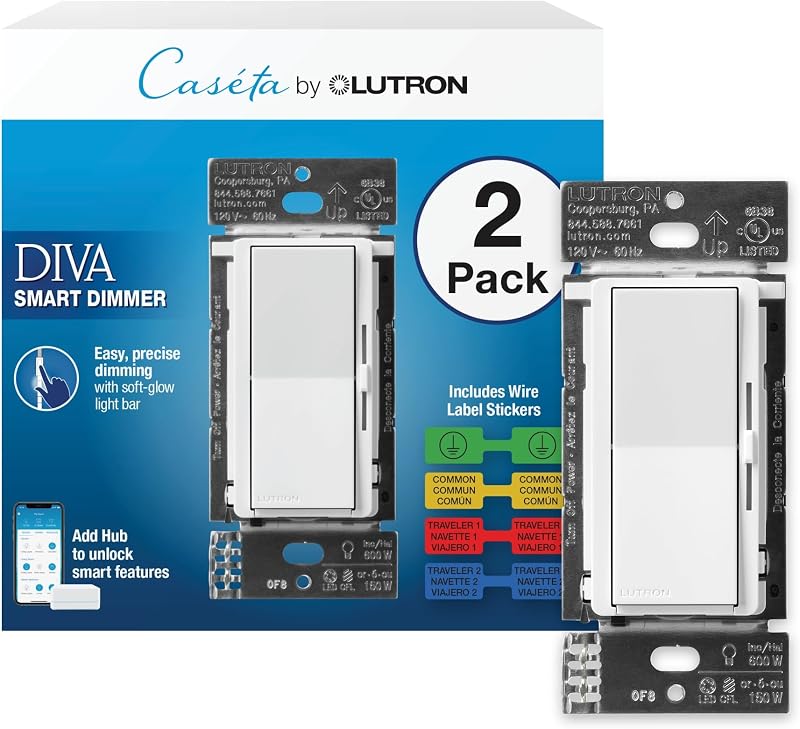
Best for: Outfitting two rooms with matching dimmers
Pros
- Two dimmers in the box
- Slider and soft-glow light bar
- No neutral required
Cons
- Wallplates sold separately
- 150W LED limit
The Lutron Caseta Diva Smart Dimmer Switch two-pack brings the paddle-style Diva design to Caseta. A soft-glow light bar and slider let you fine-tune brightness at the wall, and a preset feature turns lights on to your favorite level. The Lutron Caseta Diva dimmer works with up to 150W dimmable LED or 600W incandescent or halogen bulbs, and the listing warns it is not rated for low-voltage lighting such as track or landscape lights.
No neutral is needed according to the listing title. The box includes two Diva smart dimmers with wire label stickers; wallplates are sold separately. With the hub, you get app, voice and scene control, and you can add a Pico remote or the Claro accessory switch for 3-way control. The listing names compatibility with Alexa, Apple Home, Google Assistant, Ring, Serena shades and Sonos.
This is the best value way to start a lutron caseta combo in two rooms at once. If you only need one dimmer and want the finished look immediately, the single Diva with wallplate is simpler. For more on how the dimmer family compares, see our Caseta dimmer switch guide.
Lutron Caseta Diva Smart Dimmer Switch with Wallplate for a Finished Look
This single Lutron Caseta Diva Smart Dimmer Switch shares the Diva features: slider, soft-glow light bar, preset level, Smart Away, 150W LED or 600W incandescent/halogen capacity, and compatibility with the Claro accessory switch. What makes it different is the box: one Diva dimmer and one coordinating Claro wallplate, so it looks finished the day you install it.
One gap: unlike the two-pack, this listing’s title and features do not state whether a neutral wire is needed. Given the matching feature text, it is likely the same dimmer, but confirm on the product page. The spec sheet lists a paddle switch type.
It suits a single room upgrade or a gift for someone trying Caseta for the first time who does not want to hunt down a wallplate. Buyers covering several rooms get more from the two-pack.
Lutron Caseta Claro Smart Switch for Porches, Garages and Fans
Best for: Porch, garage and fan on/off control
Pros
- Two switches in the box
- Classic Claro look
- 5A lighting, 3A fan
Cons
- Neutral wire required
- Wallplates sold separately
The Lutron Caseta Claro Smart Switch is the newer on/off switch in Lutron’s popular Claro style. The Lutron Caseta Claro switch handles 5A of lighting or a 3A fan and requires a neutral wire. The listing highlights it for exterior lights such as a garage or porch, where scheduling and Smart Away are handy.
The box includes two Claro smart switches with wire labels, and wallplates are sold separately. For 3-way control, you can mount a Pico remote with a wall bracket sold separately, or pair the Claro Accessory Switch below. The listing also says the hub keeps lights working when Wi-Fi is down.
This suits homeowners with neutral wires who want on/off smart control in a couple of places. Older homes without a neutral should stick with the dimmers.
Lutron Caseta Smart Claro Accessory Switch for Wired 3-Way Control
The Lutron Caseta Smart Claro Accessory Switch is the Lutron Caseta accessory switch that turns an existing Diva dimmer or Claro switch into a multi-location setup. It does not work alone, and it does not work with the original Caseta dimmer or switches. You can add up to 10 accessory switches, and they do not count toward your hub’s device limit.
With a Diva, a single tap brings lights to your preset level, a double tap goes to full brightness, and press-and-hold starts a slow fade to off. The listing says no neutral is required and the wallplate is sold separately. It suits stairways and long hallways where you want a real switch on the wall rather than a remote. For wireless alternatives, read our Lutron remote switch guide.
How to Choose the Right Lutron Caseta Smart Switches
First, open a switch box (with the power off) and check for a neutral wire. No neutral points you to the original dimmer, the Diva dimmers and the accessory switch. With a neutral, the on/off switches become options.
Second, decide dimmer or on/off. Dim living and dining room lights; use on/off for fans, porch lights and closets.
Third, plan 3-way spots. The original models use Pico remotes. Diva and Claro can use Pico or the wired Claro accessory switch.
Finally, remember the Lutron Caseta smart hub. The listings make clear that app control, voice control and automations need it, and it is sold separately. A good starter lutron caseta kit is a hub, a Diva two-pack and one accessory switch.
FAQ
Do Lutron Caseta switches work without the hub?
They work at the wall, but the listings say smart features such as app, voice and schedules require the Lutron Smart Hub.
Which Lutron Caseta smart switches should I buy for an older home?
Look at the no-neutral options: the original Smart Dimmer, the Diva two-pack and the Claro accessory switch.
Can I control a ceiling fan with Caseta?
Yes, with the Smart Light Switch or the Claro Smart Switch, both listed for fans.
Does the Claro accessory switch work with the original Caseta dimmer?
No. The listing says it only works with the Diva smart dimmer or Claro smart switch.
Do I need smart bulbs?
No. The listings say Caseta works with existing bulbs, including dimmable LED, incandescent and halogen.
Are wallplates included?
Only with the single Diva with Wallplate. The others list wallplates as sold separately or do not include one.


