Philips Smart Door Locks: Keypad, Fingerprint or Wi-Fi?
As Amazon Associates, we earn from qualifying purchases. This means we may receive a small commission at no extra cost to you if you click through and make a purchase.
Philips is a household name in lighting and electronics, and its smart door locks bring that familiarity to the front door. The idea of a keyless entry door lock is simple: instead of carrying a key, you unlock with a code, your fingerprint, your phone or your voice. Philips locks cover all of those options, and every model here also keeps a traditional key as a backup, which is reassuring for first-time buyers who worry about dead batteries.
The six locks below differ mainly in how you unlock them and whether they connect to Wi-Fi: four Wi-Fi models with handle sets, one Wi-Fi deadbolt with an ergonomic fingerprint reader, and one standalone fingerprint deadbolt with no app at all.
Philips Keyless Entry Door Locks Compared
| Model | Unlock methods | Wi-Fi and app | Handle included | Door thickness |
|---|---|---|---|---|
| WiFi Keypad Deadbolt with Handle (4200 Series) | Fingerprint, PIN, app, voice | Built-in 2.4GHz | Yes | Not listed |
| Fingerprint Keyless Entry Door Lock (1000 Series) | Fingerprint, touchscreen PIN, key | None | No, deadbolt only | 1-3/8 to 2 inch or 1-3/4 inch (listing conflicts) |
| Upgraded Wi-Fi Smart Front Door Lock Set | Fingerprint, app, PIN, key, voice | Built-in 2.4GHz | Yes | 1-3/8 to 2 inch |
| WiFi Keypad Door Lock (Satin Nickel) | Fingerprint, PIN, app, voice | Built-in 2.4GHz | Yes | 1-3/8 to 1-3/4 inch |
| WiFi Keypad Door Lock (Physical Buttons) | Voice, key, PIN, app | Built-in Wi-Fi | Yes, two lever handles | 1-3/8 to 2 inch |
| Wi-Fi Smart Lock for Front Door | Fingerprint, PIN, app, voice, key | Built-in 2.4GHz | Not listed | 1-3/8 to 2 inch |
Philips WiFi Keypad Deadbolt with Handle for Full Smart Control
Best for: Renters wanting physical keypad buttons
Pros
- Physical buttons, not touchscreen
- IP54 and -31°F to 150°F
- Up to 100 passwords
- Wrong-code alarm
Cons
- No fingerprint reader
- Battery life figures conflict

Philips
Philips WiFi Keypad Door Lock with Handle, Built-in WiFi, APP Remote Control, Voice & Fingerprint Unlock, Smart Locks for Front Door with Auto Lock, Keyless Entry Deadbolt, Satin Nickel
Price and specifications are read from the Amazon product page and can change.
Philips WiFi Keypad Door Lock
Best for: Satin nickel doors needing Wi-Fi lock
Pros
- Satin nickel finish
- Built-in Wi-Fi, no hub
- Fingerprint and voice unlock
- Handle set included
Cons
- Needs 8 AA batteries, not included
- Door thickness up to 1-3/4 inch
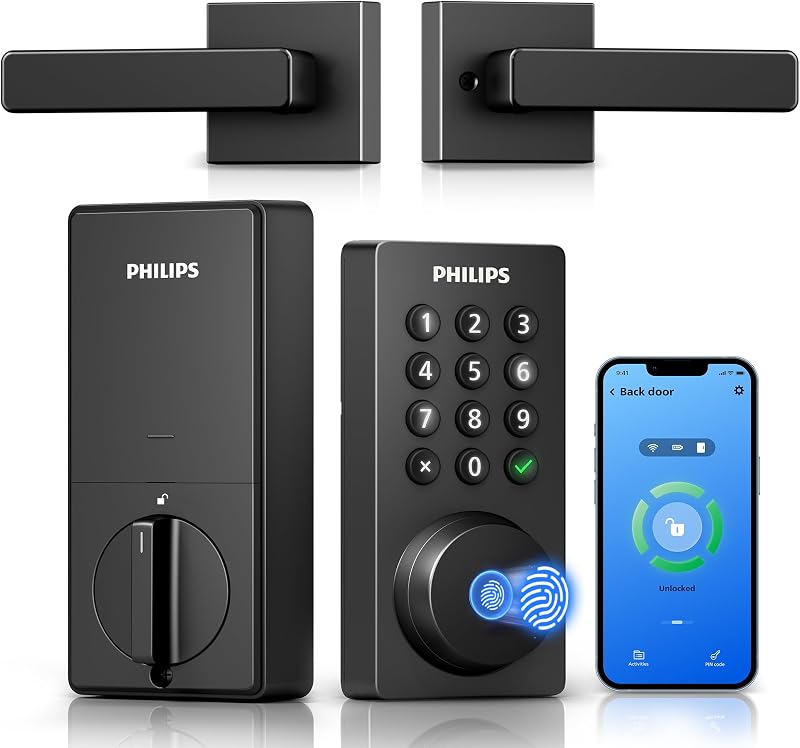
Best for: Wi-Fi control with a matching handle
Pros
- Built-in 2.4GHz Wi-Fi, no hub
- 3s fingerprint unlock
- Handle set included
- Alexa and Google Assistant
Cons
- Batteries not included
- Keep within 33 ft of router
The Philips WiFi Keypad Deadbolt with Handle is part of the Philips 4200 Series. It connects straight to your home’s 2.4GHz Wi-Fi with no hub or bridge, which is an extra box some smart locks need to reach the internet. Philips asks you to keep the lock within 33 feet of your router for a stable connection. Through the Philips Home Access app you can lock and unlock remotely, manage codes and fingerprints, check whether the door is locked and view the access history.
Unlocking options include a fingerprint reader that works in 0.3 seconds, PIN codes that can be permanent, one-time, periodic or recurring, and voice commands through Alexa or Google Assistant. Auto-lock can be set from 0 to 180 seconds in the app, but it is off by default, so switch it on during setup. The keypad is back-lit, and the listing mentions anti-drill protection and an anti-peeping password feature, which lets you type extra random digits around your real code so onlookers cannot learn it. Battery life is up to six months with a low-battery alert; batteries are not included.
The box includes the lock, two door levers, a latch assembly and mounting hardware, so you can replace both your deadbolt and your knob in one go. This suits homeowners who want every feature in one matching set. If you do not need Wi-Fi, the 1000 Series fingerprint deadbolt is simpler.
Philips Fingerprint Keyless Entry Door Lock for Simple, App-Free Entry

Philips
Philips Fingerprint Keyless Entry Door Lock, Electronic Door Lock with Touchscreen, Long-Lasting Battery, Auto Locking, One-Time Code, Keypad Deadbolt, One-Touch Locking, Matte Black
Price and specifications are read from the Amazon product page and can change.
Philips Fingerprint Keyless Entry Door Lock
Best for: Simple fingerprint lock without Wi-Fi
Pros
- 3s fingerprint recognition
- Unlimited one-time PIN codes
- Voice-guided setup in 3 languages
- 24-month electronic warranty
Cons
- No app or Wi-Fi
- Conflicting door thickness figures
The Philips Fingerprint Keyless Entry Door Lock belongs to the Philips 1000 Series and comes in matte black. It is a standalone deadbolt, meaning it works entirely at the door with no Wi-Fi or app; the listing states it has no connection protocols. Its fingerprint scanner recognizes a print in 0.3 seconds with an accuracy of up to 99.99%, and it also has a touchscreen keypad and a mechanical key.
You can create unlimited one-time PIN codes for guests or deliveries. Auto-lock is adjustable from 30 to 180 seconds, and one-touch locking lets you press and hold any number for two seconds to lock immediately. Voice-guided programming in English, French or Spanish walks you through setup without a manual. It installs with a screwdriver and comes with two keys, an adjustable latch and hardware. The listing gives door thickness as 1-3/8 to 2 inches in one place and 1-3/8 to 1-3/4 inches in another, so measure your door and ask the seller if yours is thicker than 1-3/4 inches. It carries a 24-month electronic warranty with phone and email support.
This suits anyone who wants keyless entry without connecting a lock to the internet, such as a first-time buyer or a less tech-minded relative. For remote access or unlock alerts, choose a Wi-Fi model.
Philips Upgraded Wi-Fi Smart Front Door Lock Set for Guest Management

Philips
Philips Upgraded Wi-Fi Smart Front Door Lock Set, Fingerprint Keyless Entry Deadbolt, Keypad Lock with Handle, App Remote Control, IP53 Waterproof, Auto Lock, Anti-Peeping Password, Easy Install
Price and specifications are read from the Amazon product page and can change.
Philips Upgraded Wi-Fi Smart Front Door
Best for: Airbnb hosts wanting unlock alerts
Pros
- Five unlock methods
- Up to 100 timed codes
- IP53 weather resistance
- Unlock notifications by user
Cons
- Wi-Fi is 2.4GHz only
- Battery details not listed
The Philips Upgraded Wi-Fi Smart Front Door Lock Set pairs an electronic deadbolt with a matching exterior handle and interior lever. It offers five unlock methods: fingerprint in 0.3 seconds, the app, passcode, backup keys, and voice through Alexa or Google Assistant. Built-in 2.4GHz Wi-Fi means no hub.
What makes it stand out for hosts is guest management. You can create up to 100 unique, time-sensitive codes that expire after a set period, and you receive a notification every time the door is unlocked, including which user unlocked it. Auto-lock runs from 10 to 180 seconds after the door closes. The title lists IP53 waterproofing, which resists dust and spraying water, and anti-peeping passwords. It fits standard left- or right-handed US doors with a 1-1/2 or 2-1/8 inch cross bore and 1-3/8 to 2 inch thickness. The cross bore is the large round hole where the lock body sits. The listing does not state battery type or life.
Pick this for rental properties, Airbnb hosts or families who want to know when kids get home. For the same idea with physical buttons, see the lock below it.
Philips WiFi Keypad Door Lock in Satin Nickel for a Classic Finish
This Philips WiFi Keypad Door Lock is another 4200 Series Wi-Fi lock, in a satin nickel finish. Its features closely match the first pick: built-in 2.4GHz Wi-Fi with no hub, app control with access history, voice control through Alexa and Google Assistant, a 0.3-second fingerprint reader, permanent, one-time, periodic and recurring PIN codes, and auto-lock from 0 to 180 seconds. It also lists anti-drill, a back-lit keypad and anti-peeping passwords.
It includes two door levers, a latch assembly and mounting hardware. It uses eight AA alkaline batteries, not included. The listing gives door thickness as 1-3/8 to 1-3/4 inches, narrower than several other models here, so measure first.
Choose this over the first pick if satin nickel matches your other door hardware better. If your door is thicker than 1-3/4 inches, look at a model rated to 2 inches.
Philips WiFi Keypad Door Lock with Physical Buttons for Reliable Everyday Use
This Philips WiFi Keypad Door Lock (DDL242X-15HW-L) takes a slightly different approach. It has no fingerprint reader. Instead it offers four ways to unlock, voice, keys, passcode and app, and Philips says its physical keypad buttons are simpler and more reliable than a touchscreen, which some people prefer in cold or wet weather or when wearing gloves.
You can create up to 100 passwords that are permanent, one-time or timed. Auto-lock runs from 10 to 180 seconds. It is rated IP54, works from -31°F to 150°F, resists 2200N of pressure, and sends an alarm after several wrong passwords. It runs on eight AA batteries, not included, and beeps below 10% battery. The listing is inconsistent on battery life: one heading says nine months while the text says up to six months at 20 to 30 uses a day. It fits 1-1/2 or 2-1/8 inch cross bores and doors 1-3/8 to 2 inches thick, comes with two lever handles and has a 2 year warranty.
This suits renters, landlords or anyone who wants dependable buttons over biometrics. If fingerprint entry matters, choose another model here.
Philips Wi-Fi Smart Lock for Front Door with an Ergonomic Fingerprint Reader
Best for: Large families storing many fingerprints
Pros
- Stores up to 50 fingerprints
- Ergonomic top-mounted sensor
- Offline one-time passcodes
- Fits left or right doors
Cons
- Needs 8 AA batteries, not included
- Handle set not listed
The Philips Wi-Fi Smart Lock for Front Door (DDL-241-BK) is a Wi-Fi deadbolt focused on comfortable fingerprint access. The fingerprint sensor sits at the very top of the panel with a 7.17° tilt, so you reach and unlock in one motion, and it stores up to 50 fingerprints, enough for a large household.
It has five unlock methods: fingerprint, PIN, app, voice with Alexa or Google, and a physical key. It connects to 2.4GHz Wi-Fi with no hub and sends unlock notifications with an activity log. You get 100 passcodes that can be permanent, recurring weekly, date-range or offline one-time codes, which work even if Wi-Fi drops. Auto-lock runs 10 to 180 seconds, and you can lock by holding any key, tapping the check button or using your fingerprint. It fits left- or right-handed doors from 1-3/8 to 2 inches thick and needs eight AA alkaline batteries, sold separately. The listing does not mention a handle set.
This suits families who want a deadbolt only and plan to keep their existing handle. For an all-in-one set, pick one of the handle models above. For a different kind of biometric entry, our Philips palm recognition smart lock guide is worth a look.
How to Choose the Right Philips Keyless Entry Door Lock
Wi-Fi or not. If you want remote locking, alerts and guest codes from your phone, choose a Wi-Fi model. If you only want to stop carrying keys, the 1000 Series fingerprint deadbolt is simpler.
Fingerprint or buttons. Most models here include fingerprint unlock. The physical-button lock skips it for simpler, glove-friendly buttons.
Deadbolt or full set. Handle sets replace both your deadbolt and your knob. Deadbolt-only models keep your existing handle.
Measure your door. Check thickness and cross bore. Several listings stop at 1-3/4 inches while others go to 2 inches. If you are still comparing brands, our look at a Wi-Fi keyless entry lock from another maker shows how features compare.
FAQ
Do Philips smart locks need a hub?
No. The Wi-Fi models connect directly to 2.4GHz home Wi-Fi without a hub or bridge.
Can I still use a key?
Yes. Every model here lists a key or backup key option in its features or included parts.
What batteries do Philips locks use?
Several listings specify eight AA alkaline batteries, not included. Check each listing, as the Upgraded lock set does not say.
Which Philips lock is best for Airbnb?
The Upgraded Wi-Fi lock set and the Wi-Fi Smart Lock for Front Door both offer up to 100 time-limited codes and unlock notifications.
Will a Philips lock fit my door?
Most fit 1-3/8 to 2 inch doors with standard cross bores, but the satin nickel model lists up to 1-3/4 inches. Measure before buying.


