Philips Smart Locks and the Palm Recognition Question
As Amazon Associates, we earn from qualifying purchases. This means we may receive a small commission at no extra cost to you if you click through and make a purchase.
Philips is a household name in lighting and electronics, and its smart door locks bring that familiar brand to the front door with fingerprint readers, touch keypads, app control and voice assistant support. Many shoppers search for a Philips palm recognition smart lock, hoping to open the door by holding up a hand. Here is the honest answer first: none of the six Philips listings below mentions palm recognition. What they do offer is fingerprint unlock, which is the closest hands-on biometric option in this lineup, plus passcodes, keys, phone apps and voice control.
The six models differ mostly in how they connect and what comes in the box: some have Wi-Fi built in, two rely on an included gateway, and several come with matching handles while one is a deadbolt only. Below we explain every term in plain words, compare what each listing actually includes and help you pick the right Philips keyless entry lock for your home or as a gift.
Philips Smart Locks Compared
Best for: Deadbolt-only upgrade with Bluetooth backup
Pros
- Wi-Fi via bridge plus Bluetooth
- Touchscreen keypad
- Weather-resistant build
Cons
- No handle set included
| Model | Wi-Fi connection | Unlock methods | Handles included | Auto-lock |
|---|---|---|---|---|
| Fingerprint Door Lock (DDL240X-1HW-L) | Built-in 2.4GHz | Fingerprint, PIN, key, app, voice | Yes, 2 levers | Yes, needs door fully closed |
| Upgraded Wi-Fi Smart Front Door (DDL242X-1HW-H-NEW) | Built-in 2.4GHz | Fingerprint, app, passcode, key, voice | Yes, exterior handle and interior lever | 10 to 180 seconds |
| WiFi Smart Lock with Handle | Built-in | Fingerprint, passcode, app, voice | Yes, handle set | Adjustable timer |
| Wi-Fi Smart Deadbolt with 2 Handles | Via included gateway | App, fingerprint, PIN, key, voice | Yes, 2 handles | 30 to 180 seconds |
| Smart Lock with WiFi Gateway (240X-1HBG) | Via included bridge, plus Bluetooth | Fingerprint, touchscreen code, app, voice | Not listed | Yes (timer not listed) |
| Wi-Fi Door Lock with Handle | Wi-Fi | Fingerprint, app, passcode, key, voice | Handle named in title | 10 to 180 seconds |
Philips Fingerprint Door Lock for a Complete Lever Set

Philips
Philips Fingerprint Door Lock, WiFi Front Door Lock Set with Touchscreen
Price and specifications are read from the Amazon product page and can change.
Philips Fingerprint Door Lock
Best for: Families wanting a full lever set
Pros
- Up to 50 fingerprints
- Built-in 2.4GHz Wi-Fi
- Two lever handles
- 8 AA batteries included
Cons
- No door sensor for auto lock
- No palm recognition
The Philips Fingerprint Door Lock is sold as the Philips 4000 Series WiFi Smart Door Lock, model DDL240X-1HW-L, in ink black. It comes with two lever handles, eight AA batteries, mounting screws and hardware and a user manual, so it replaces both the deadbolt and the handle in one project. There are four core unlock methods listed: fingerprints, PIN codes, keys and the app, plus voice control through Alexa or Google Assistant.
The lock has built-in Wi-Fi that works on a 2.4GHz home network with no hub needed, so you can lock and unlock from anywhere, share access and get instant alerts. It stores up to 50 fingerprints, 100 user PINs and unlimited one-time PINs that delete themselves after use. The listing adds that timed and recurring PINs can be shared with a Philips WiFi Gateway sold separately, which is a little confusing next to the no-hub claim; basic remote control appears to work without it.
Auto-lock is included, but the listing says the lock has no door sensor, so it will only lock properly if the door is fully closed. This model suits a family that wants a matching lever set and lots of fingerprint slots. If you want an adjustable auto-lock timer, the Upgraded model below states one clearly.
Philips Upgraded Wi-Fi Smart Front Door Lock for Guest Access

Philips
Philips Upgraded Wi-Fi Smart Front Door Lock Set, Fingerprint Keyless Entry Deadbolt, Keypad Lock with Handle, App Remote Control, IP53 Waterproof, Auto Lock, Anti-Peeping Password, Easy Install
Price and specifications are read from the Amazon product page and can change.
Philips Upgraded Wi-Fi Smart Front Door
Best for: Rental hosts managing guest codes
Pros
- 3s fingerprint unlock
- IP53 water resistance
- 10-180s auto-lock
- Anti-peeping passcode
Cons
- No palm recognition
The Philips Upgraded Wi-Fi Smart Front Door Lock Set, model DDL242X-1HW-H-NEW, pairs a heavy-duty electronic deadbolt with a matching exterior handle and interior lever. It includes two backup keys. The listing highlights a fingerprint sensor that recognizes a print in 0.3 seconds and five unlock methods: fingerprint, app, passcode, backup key and voice.
It has built-in 2.4GHz Wi-Fi, an IP53 rating, an anti-peeping password and an auto-lock timer you can set from 10 to 180 seconds after the door closes. IP53 is a protection rating: the “5” means some dust protection and the “3” means resistance to spraying water, so it can handle rain on an exposed door. An anti-peeping password lets you type extra random digits around your real code so anyone watching cannot copy it. You can create up to 100 time-sensitive codes for family, pet sitters or short-term rental guests and see which user unlocked the door.
The listing gives clear fit details: standard left- or right-handed US doors with a 1-1/2 or 2-1/8 inch cross bore and a door thickness of 1-3/8 to 2 inches. This is the pick for rental hosts and busy households. Buyers who only need a deadbolt should look at the 240X-1HBG instead.
Philips WiFi Smart Lock with Handle for Dark Doorways
Philips
Philips WiFi Smart Lock with Handle Set, APP Remote Control, Voice Control
Price and specifications are read from the Amazon product page and can change.
Philips WiFi Smart Lock with Handle
Best for: Low-light entrances
Pros
- Backlit keypad
- Anti-drill feature
- One-touch locking
- Built-in Wi-Fi
Cons
- Door must be flush for latch
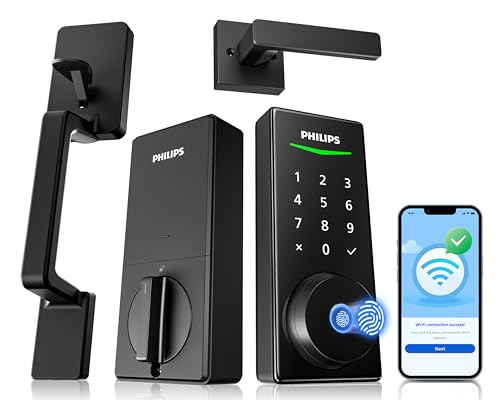
The Philips WiFi Smart Lock with Handle set connects directly to Wi-Fi without an extra gateway. You get app control, real-time alerts on every lock and unlock, a detailed access history and voice control with Alexa or Google Assistant. The fingerprint reader also unlocks in 0.3 seconds, and you can create permanent, temporary or one-time codes.
Its backlit keypad lights up so you can enter a code at night, and the listing names an anti-drill feature, an anti-peeping password, one-touch locking and a customizable auto-lock timer. It comes with a complete handle set. The listing warns that the door and frame must be flush, because misalignment adds friction to the latch and shortens the handle’s life. Philips phone support hours are listed along with 24/7 email help.
This model suits a front door with poor lighting. The listing does not give fingerprint storage numbers or door thickness, so check those details before buying if they matter.
Philips Wi-Fi Smart Deadbolt with 2 Handles and Gateway
Philips
Philips Wi-Fi Smart Deadbolt with 2 Handles, Front Lock Set with Gateway
Price and specifications are read from the Amazon product page and can change.
Philips Wi-Fi Smart Deadbolt with 2
Best for: Buyers wanting a gateway in the box
Pros
- Gateway included
- 99% fingerprint accuracy claim
- Fits 1-3/8 to 2 in. doors
Cons
- Voice needs gateway connected
- Optional screw needs drilling
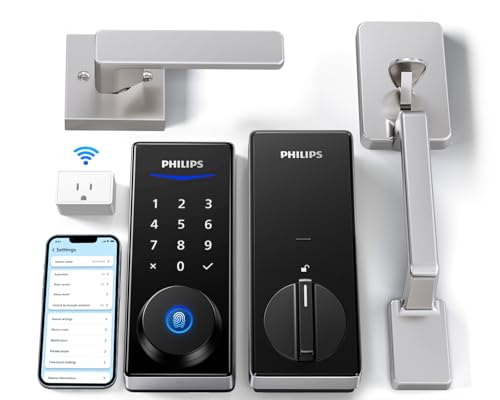
The Philips Wi-Fi Smart Deadbolt with 2 Handles is a Philips smart deadbolt set that includes a gateway, a small plug-in device that links the lock to your Wi-Fi. The listing says you need to connect the gateway first to use the app and voice commands. Five unlock methods are listed: app, fingerprints, PIN codes, keys and voice via Alexa or Google Assistant.
The fingerprint reader is listed at 0.3 seconds with a claimed 99.99% accuracy. You can set unlimited one-time PINs or up to 100 user codes, including temporary, permanent and recurring ones. Auto-lock engages after 30 to 180 seconds. It fits doors 1-3/8 to 2 inches thick (35 to 50 mm), installs with a screwdriver and offers optional screws for weak or warped doors, which require drilling a 19/32-inch hole.
This set suits buyers who want the gateway included from day one rather than buying it separately. If you prefer Wi-Fi built into the lock itself, choose one of the built-in models above.
Philips Smart Lock with WiFi Gateway for a Deadbolt-Only Upgrade
The Philips Smart Lock, model 240X-1HBG, includes the lock and a Wi-Fi bridge adaptor. The bridge connects the lock to Wi-Fi for remote access, while Bluetooth gives quick local control from your phone when you are nearby. The included components list no handle set, so this is the choice for keeping your existing door handle.
You can unlock by fingerprint or by entering a code on a responsive, backlit touchscreen keypad. The app offers unlock notifications, access history, management of multiple locks and Alexa or Google Assistant voice control. The listing mentions auto-lock and weather-resistant construction and says installation uses common household tools. It does not specify fingerprint capacity or the number of passcodes.
This model suits apartments and rental properties that just need a smart deadbolt. Anyone wanting a matching handle should pick a handle set above.
Philips Wi-Fi Door Lock with Handle for Straightforward Smart Entry
Best for: Simple all-round smart entry
Pros
- Five unlock methods
- Up to 100 passcodes
- 10-180s auto-lock
Cons
- Sparse listing details
The Philips Wi-Fi Door Lock with Handle covers the essentials: fingerprint unlock, app control, passcodes, physical keys and voice commands. It supports up to 100 passcodes, including one-time or scheduled codes, and an auto-lock you can set from 10 to 180 seconds. You get remote control, notifications and activity records through the app.
The listing is short on details. It confirms Wi-Fi connectivity and a deadbolt lock type and says it stores multiple fingerprints without giving a number. It does not list the model number, included parts or door dimensions.
This lock suits someone who wants a Philips smart lock with handle and the standard features without extra setup steps. Buyers who need detailed fit information will find it in the Upgraded model’s listing.
How to Choose the Right Philips Smart Lock
Start with the palm recognition question. None of these listings offers it, so fingerprint unlock is the closest option. Every model here includes a fingerprint reader. For more models in this family, see our full guide to the Philips keyless entry door lock range.
Next, decide on Wi-Fi style. Built-in Wi-Fi means fewer devices to set up. A gateway model adds a small plug-in box but, in the 240X-1HBG’s case, also offers Bluetooth for local control.
Then decide whether you want handles. Four of these include handles, while the 240X-1HBG is deadbolt only. If a matching handle matters, our guide to the Philips smart lock with handle goes deeper.
Finally, check your door. The listings that give measurements call for doors 1-3/8 to 2 inches thick, and the Upgraded model names 1-1/2 or 2-1/8 inch cross bores. Measure before you buy, especially for a gift.
FAQ
Does Philips make a palm recognition smart lock?
None of the six listings here mentions palm recognition. They use fingerprint recognition instead, along with codes, keys, app and voice.
Do I need a hub for a Philips WiFi smart lock?
Three models list built-in Wi-Fi with no hub. The Smart Deadbolt with 2 Handles and the 240X-1HBG include a gateway or bridge in the box.
How many fingerprints can a Philips fingerprint door lock store?
The DDL240X-1HW-L lists up to 50 fingerprints. The other listings do not give a number.
Can I give guests temporary codes?
Yes. Several models offer one-time, temporary or scheduled codes, and most list up to 100 user codes.
Which Philips smart lock should I buy for a rental?
The Upgraded Wi-Fi Smart Front Door Lock stands out for its time-sensitive codes, IP53 rating and alerts showing which user unlocked the door.
Will these locks auto-lock the door?
All of them list auto-lock. The DDL240X-1HW-L notes it has no door sensor, so the door must be fully closed first.


