xTool 20W Lasers Explained: M2, F1 Ultra and S1 Modules
As Amazon Associates, we earn from qualifying purchases. This means we may receive a small commission at no extra cost to you if you click through and make a purchase.
xTool is one of the best-known names in desktop laser engravers for home crafters and small shops. The brand sells two kinds of products that often get mixed up: complete machines, which arrive as a boxed engraver ready to use, and laser modules, which are swappable laser heads for its S1 engraver. When people search for an xTool 20W laser module, they are usually trying to figure out which of these they actually need.
In short, the M2 20W and M2 10W are enclosed craft machines, the F1 Ultra is a dual-laser machine built for metal and wood, the S1 40W and S1 1064nm infrared modules are upgrade heads that only work inside an S1 you already own, and the handle set is a third-party S1 accessory.
xTool Laser Engravers and Modules Compared
| Model | Type | Laser power | Best materials per listing | Needs an S1 |
|---|---|---|---|---|
| xTool M2 20W Laser Engraver | Complete machine | 20W diode | Wood, leather, felt, fabric, paper | No |
| xTool F1 Ultra 20W Fiber and Diode | Complete machine | 20W fiber and 20W diode | Metals, wood, acrylic, rock | No |
| Laser Module Handles for xTool S1 | Third-party accessory | None | Not applicable | Yes |
| xTool S1 40W Laser Module | Swap-in laser head | 40W | Wood, dark acrylic, thin stainless steel | Yes |
| xTool M2 10W Laser Engraver | Complete machine | 10W diode | Wood, leather, felt, fabric, paper | No |
| xTool S1 1064nm Infrared Laser Module | Swap-in laser head | Not listed | Metals, plastic, acrylic, leather | Yes |
xTool M2 20W Laser Engraver for Home Gift Makers

xTool
xTool M2 20W Laser Engraver, Built-in Dual Cameras, Class 1 Enclosed Safe Laser Engraving Machine for DIY Craft on Wood, Leather, Felt, Fabric, Paper
Price and specifications are read from the Amazon product page and can change.
xTool M2 20W Laser Engraver
Best for: Home crafters making personalized gifts
Pros
- 20W diode laser
- Built-in dual cameras
- Class 1 enclosed design
- Beginner templates in xTool Studio
Cons
- Inkjet and rotary sold separately
- Heavy at 35.9 pounds
The xTool M2 20W Laser Engraver is a complete, fully enclosed machine that comes standard with a 20W diode laser. “Watts” here means the laser’s optical output (the listing states 20000mW), and more watts generally means faster engraving and the ability to cut thicker material. A diode laser is the most common type in home engravers and works best on wood, leather, paper and similar organic materials.
The listing highlights built-in dual cameras that show a live preview of your workspace, so you can place a coaster or a leather tag and see exactly where the design will land. xTool calls this “Place and Go.” It runs on xTool Studio software, which the listing describes as beginner-friendly with hundreds of templates and a built-in AI image generator. The machine is rated Class 1, the safest laser class, thanks to its enclosed design and real-time monitoring, which matters in a home with kids or pets. You can later add a CMYK Inkjet module for full-color printing or a 3W IR laser for fine engraving on metal and plastic, but both are sold separately, as is the RA3 Lite rotary for round items.
This is the one to buy for someone who wants to make personalized gifts, stickers, home decor or start a small side hustle, without dealing with an open-frame laser. At 35.9 pounds it needs a sturdy table. If you mainly work with paper and fabric, the 10W version below may be enough.
xTool F1 Ultra 20W Fiber and Diode for Metal and Small Business

xTool
xTool F1 Ultra 20W Fiber & Diode Dual Laser Engraver
Price and specifications are read from the Amazon product page and can change.
xTool F1 Ultra 20W Fiber &
Best for: Small businesses engraving metal and wood
Pros
- 20W fiber plus 20W diode
- Engraves all common metals
- 16MP smart camera
- 3D embossing and deep engraving
Cons
- Small 220 x 220 mm area
- Conveyor sold separately
The xTool F1 Ultra 20W Fiber & Diode Dual Laser Engraver has two lasers in one machine. The 20W fiber laser handles metals, and the listing names gold, silver, copper, stainless steel, brass and titanium. The 20W diode laser covers wood, acrylic and similar materials. xTool says speeds reach up to 10,000mm/s, and both lasers support multi-level 3D embossing and deep engraving on metal, wood and rock.
It has a 16MP smart camera, a working area of 220mm x 220mm (about 8.7 inches square), which expands to 220mm x 500mm with the separately sold Auto Conveyor for batch jobs. For cutting, the diode laser handles up to 15mm wood and 12mm black acrylic, while the fiber laser cuts only thin metal: 0.3mm stainless steel, 0.4mm brass and 0.2mm aluminum. Safety features include a fully enclosed cover that filters strong light, smoke extraction, a fire safety alarm and an emergency stop. It weighs 43.8 pounds.
This machine suits a jewelry seller, a market stall doing on-the-spot customization, or anyone whose main material is metal. For larger wooden signs, the small bed is limiting and the M2 is the more relaxed fit. If you are also curious about joining metal rather than marking it, see our look at the xTool MetalFab laser welder.
Laser Module Handles for xTool S1 for Frequent Head Swaps
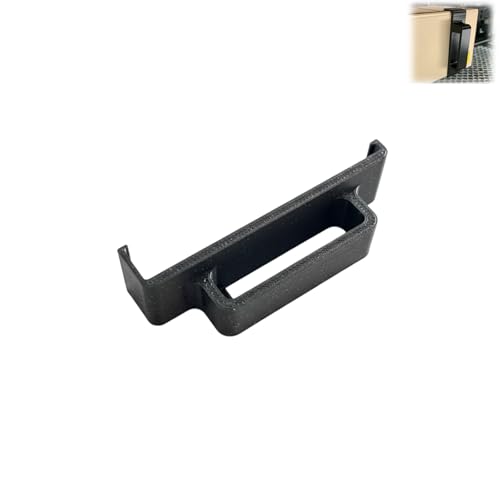
Laser Module Handles for xTool S1, Ergonomic Pulling Handles, Quick-Install Upgrade, Safe and Easy Laser Head Movement, Compatible with 2W/10W/20W/40W Modules (2W)
Price and specifications are read from the Amazon product page and can change.
Laser Module Handles for xTool S1
Best for: S1 owners swapping laser heads often
Pros
- Tool-free snap-on install
- Protects cables and focus probe
- Fits 2W to 40W heads
Cons
- Third-party, not made by xTool
- Accessory only, no laser
The Laser Module Handles for xTool S1 are made by a generic third-party seller, not by xTool, and they are sold “for” the S1. They are simple pull handles that snap onto an S1 laser head so you can lift and move it without grabbing the cables or the focus probe, the small sensor that measures distance to your material.
The listing says they fit 2W, 10W, 20W and 40W S1 laser heads, install in under a minute with no tools, and have a curved grip. The version in this listing is marked 2W in its size field, so check that you select the handle that matches your module before ordering. It is a small black part, about 3.5 by 1 inches.
This is only for someone who already owns an S1 and switches modules often, for example between a 20W head and the 40W head below. It makes a thoughtful stocking-stuffer for an S1 owner, but it does nothing on its own.
xTool S1 40W Laser Module for Cutting Thick Wood
xTool
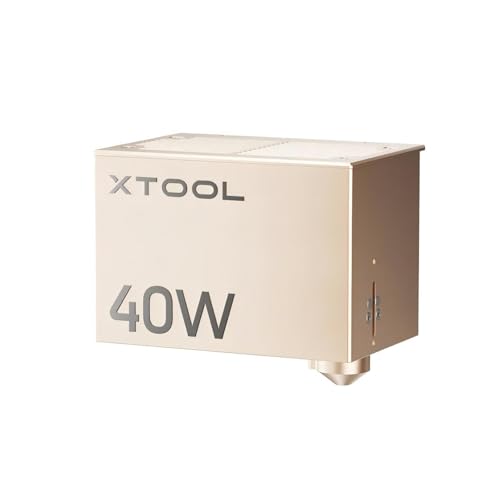
xTool S1 40W Laser Module for xTool S1 Laser Engraver, Laser Module Laser Output 40W (40000mW), High Power Cutting Efficiency, 18mm Wood, One-Pass Cut
Price and specifications are read from the Amazon product page and can change.
xTool S1 40W Laser Module
Best for: S1 owners who cut thick wood
Pros
- 40W output
- Cuts 18mm wood in one pass
- Up to 600mm/s speed
Cons
- Works with S1 only
- No engraver included
The xTool S1 40W Laser Module is a swap-in laser head, and its listing is clear that it is compatible with the S1 laser engraver only. The idea is simple: rather than buying a second machine, you replace the laser head in your existing S1 and gain more power.
The listing names a 40W output (40000mW), speeds up to 600mm/s, and one-pass cuts through 18mm cherry wood, 15mm dark opaque acrylic and 0.1mm stainless steel. “One pass” means the laser cuts all the way through on the first trip, which saves time and gives cleaner edges than going over the line several times. The module weighs 6.45 pounds per the specifications.
Choose it if you own an S1 and mostly cut thick wood or acrylic for signs, boxes or furniture parts. It is not the right purchase if you do not have an S1, and it is not a metal engraver; for that, look at the F1 Ultra or the infrared module.
xTool M2 10W Laser Engraver for Gentle Materials
Best for: Gentle crafts on paper and fabric
Pros
- 10W diode laser
- Built-in dual cameras
- Class 1 enclosed design
Cons
- Half the power of M2 20W
- Add-ons sold separately
The xTool M2 10W Laser Engraver is the same enclosed M2 machine as the 20W version, but it comes standard with a 10W diode laser (10000mW per the listing). It shares the dual cameras, the “Place and Go” preview, xTool Studio with templates and AI image generation, and Class 1 safety.
The add-ons are the same too: a CMYK Inkjet module, a 3W IR laser and the RA3 Lite rotary are all sold separately. The listing gives a weight of 36.2 pounds. With half the power of the 20W model, it will generally engrave more slowly and cut thinner material, which is the usual trade-off with lower-wattage diode lasers.
This version fits a paper crafter, card maker or someone who works on felt, fabric and thin leather. Anyone planning to cut thicker wood should step up to the M2 20W.
xTool S1 1064nm Infrared Laser Module for Jewelry
Best for: Jewelry makers engraving fine metal
Pros
- 03mm laser spot
- Engraves gold, silver, platinum
- Good on plastic and acrylic
Cons
- Works with S1 only
- Cuts only very thin metal
The xTool S1 1064nm Infrared Laser Module is another S1-only laser head. “1064nm” is the wavelength of the light, which sits in the infrared range and is absorbed well by metal, which is why it can mark materials a regular diode laser struggles with.
The listing says it engraves gold, silver, platinum and copper, can cut aluminum, copper and stainless steel up to 0.05mm thick, and works on leather, plastic, acrylic, glass and stone. It highlights a very fine 0.03mm laser spot with 0.01mm motion precision, an engraving speed of 600mm/s, better results on plastic and acrylic, and leather engraving with minimal burn marks. The listing does not specify the output power.
This module suits an S1 owner who wants to personalize rings, bracelets and necklaces or small plastic items. For thick cutting, the 40W module is the better head.
How to Choose the Right xTool Laser Engraver or Module
Start by asking whether you already own an S1. If you do not, the S1 modules and the handles are useless to you, and your choice is between the M2 20W, the M2 10W and the F1 Ultra. If you do, a module is often the smarter upgrade than a new machine.
Next, decide on your main material. Wood, leather, paper and fabric point to an M2 or an S1 diode head. Metal points to the F1 Ultra with its fiber laser, or to the S1 1064nm infrared module.
Then think about watts. Higher power means faster work and thicker cuts: the 40W module cuts 18mm wood in one pass, the M2 20W sits in the middle, and the M2 10W is for lighter jobs.
Finally, consider safety and space. The M2 models are Class 1 enclosed machines, and the F1 Ultra has an enclosed cover, alarm and emergency stop, so all three suit a home workspace. For bigger cutting jobs in a dedicated shop, our guide to the xTool CO2 laser cutter covers another type of machine.
FAQ
Is the xTool M2 20W a module or a full machine?
It is a full, enclosed machine that comes with a 20W diode laser installed. You do not need an S1 or any other engraver to use it.
Can I use the xTool S1 40W module on another xTool machine?
No. The listing states it is compatible with the S1 laser engraver only. The same applies to the S1 1064nm infrared module.
Which xTool laser engraves metal?
The F1 Ultra’s fiber laser engraves metals including gold, silver and stainless steel, and the S1 1064nm infrared module engraves gold, silver, platinum and copper. The M2 can engrave metal only with the separately sold 3W IR laser.
Are the S1 handles made by xTool?
No. They are a generic third-party accessory designed to fit xTool S1 laser heads from 2W to 40W.
Is the M2 safe to use at home?
The listing describes it as a Class 1 laser with a fully enclosed design and real-time monitoring, aimed at home crafters and families. Always follow the manual’s ventilation advice.
Does the M2 include the color printing module?
No. The CMYK Inkjet module and the RA3 Lite rotary are sold separately for both the 20W and 10W M2.


