Yale Electronic Door Locks: Keypad Only or Smart Connected?
As Amazon Associates, we earn from qualifying purchases. This means we may receive a small commission at no extra cost to you if you click through and make a purchase.
Yale has been making locks since 1840, and today its electronic line is where many people buy their first keyless front door lock. A Yale electronic door lock replaces your existing deadbolt, the thick bolt that slides into the door frame, with one you open using a code, your phone, a fingerprint or a key. The big question for first-time buyers is how “smart” the lock should be: a simple keypad that works on its own, or a connected lock you can check and control from anywhere.
These six models range from non-connected keypad locks (the Assure touchscreen and Assure SL), through Bluetooth-only models (the Assure Lock 2 and the fingerprint Assure Lock 2 Touch), to fully connected locks with Wi-Fi (the Yale WiFi Smart Lock) or a Wi-Fi bridge (the Nest x Yale Lock).
Yale Electronic Door Locks Compared
| Model | Connection | Ways to unlock | Backup key | Finish |
|---|---|---|---|---|
| Yale WiFi Smart Lock Deadbolt | Built-in Wi-Fi | Keypad, phone, Apple Watch, auto-unlock, key | Yes (one key) | Black Suede |
| Yale Assure Deadbolt Lock with Touchscreen | Non-connected (upgrade kit sold separately) | Touchscreen code, key | Yes (two keys) | Satin Nickel |
| Yale Security Home Assure Lock 2 | Bluetooth (no Wi-Fi) | Keypad, phone, Apple Watch, auto-unlock | Not listed | Black Suede |
| Yale Assure Lock 2 Touch Deadbolt | Bluetooth (no Wi-Fi) | Fingerprint, keypad, phone, Apple Watch, auto-unlock | Not listed | Satin Nickel |
| Yale Assure Deadbolt Lock (Assure SL) | Non-connected (upgrade kit sold separately) | Touchscreen code | Not listed | Black Suede |
| Google Nest x Yale Lock | Wi-Fi via included Nest Connect | Keypad, phone app | Not listed | Satin Nickel |
Yale WiFi Smart Lock Deadbolt for Full Control From Anywhere

Yale Security
Yale WiFi Smart Lock Deadbolt with Keypad, Keyless Entry, Black Suede
Price and specifications are read from the Amazon product page and can change.
Yale WiFi Smart Lock Deadbolt
Best for: Full remote control without a hub
Pros
- Built-in Wi-Fi, 2.4 or 5 GHz
- DoorSense and Auto-Lock
- Unlimited scheduled codes
- BHMA Grade 2
Cons
- Needs home Wi-Fi
- Electronics warranty one year
The Yale WiFi Smart Lock Deadbolt is the Yale Assure Lock 2 with Wi-Fi, model YRD410-WF1-BSP, in Black Suede. This Yale wifi smart lock connects straight to your 2.4 or 5 GHz home Wi-Fi without a hub or bridge, which means no extra box to plug in. Through the free Yale Access app (US and Canada only), you can lock up, let someone in and get real-time alerts from anywhere.
It offers the most ways in: a backlit push-button keypad, your smartphone, Apple Watch, auto-unlock when it recognizes you are home, and a backup key. You can create unlimited codes and schedule them, for example a dog walker on Tuesdays or a guest code that expires at checkout. DoorSense, a small sensor that knows when the door is fully closed, works with Auto-Lock so the bolt only throws when the door is shut. It is BHMA Grade 2 certified, a durability rating used across the lock industry, is rated from -22°F to 140°F and sends low-battery alerts. The warranty is lifetime limited on finish and mechanical parts and one year on electronics.
Pick this if you want a true smart lock with nothing extra to buy. If you do not have reliable Wi-Fi at the door or just want a keypad, a non-connected Assure is simpler.
Yale Assure Deadbolt Lock with Touchscreen for Keypad Beginners
Best for: Slim, simple code-only front doors
Pros
- Slimmest Yale Assure design
- 4-8 digit codes
- Tap keypad to lock
- Batteries included
Cons
- No app without upgrade
- No backup key listed
Yale
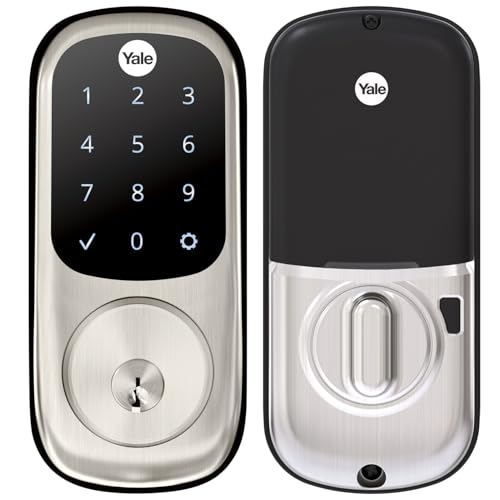
Yale Assure Deadbolt Lock with Touchscreen, Satin Nickel Digital Non-Connected Entry Door Lock with Electronic Keypad and Back-Up Key, YRD226NR619
Price and specifications are read from the Amazon product page and can change.
Yale Assure Deadbolt Lock with Touchscreen
Best for: Keypad beginners who may upgrade later
Pros
- Backlit touchscreen keypad
- Auto-Lock
- Two backup keys and batteries included
Cons
- No app without upgrade kit
- Thin doors need extra kit
The Yale Assure Deadbolt Lock with Touchscreen (YRD226-NR-619) is a non-connected Yale assure touchscreen deadbolt in Satin Nickel. “Non-connected” means it works entirely at the door: you enter a code on the backlit touchscreen, and there is no app or remote control unless you add the Yale Access Upgrade Kit, sold separately.
You can create unique codes for friends and family and delete them when needed, and Auto-Lock relocks the door for you. It is Grade 2 certified and comes with 4 AA batteries, two keys, the strike and mounting hardware, and a door template for installation. The listing says it fits doors 1-3/4 to 2-1/4 inches thick and that doors under 1-3/8 inches need a thin door kit; it does not explain doors between those two sizes, so measure first. Warranty is lifetime limited on finish and mechanical parts and one year on electronics.
This suits renters’ parents, older relatives and anyone who simply wants to stop carrying keys. Choose a Wi-Fi or Bluetooth model if you already know you want phone control.
Yale Security Home Assure Lock 2 for Bluetooth Phone Access

Yale Security
Yale Security Home Assure Lock 2 Deadbolt, Black Suede Keyless Entry Door Lock with Digital Touchscreen Keypad and Bluetooth Connectivity (No Wi-Fi), YRD430-BLE-BSP
Price and specifications are read from the Amazon product page and can change.
Yale Security Home Assure Lock 2
Best for: Phone unlocking without remote access
Pros
- Bluetooth app and Apple Watch
- Optional Auto-Unlock
- DoorSense included
Cons
- No Wi-Fi, no away control
- Warranty listed as 1 year
The Yale Security Home Assure Lock 2 (YRD430-BLE-BSP) is the Yale Assure Lock 2 with Bluetooth only, in Black Suede with a digital touchscreen keypad. Bluetooth works over short range, so your phone controls the lock when you are near the door, not from across town.
You can unlock with the keypad, the Yale Access app on your phone or Apple Watch, or optional Auto-Unlock as you arrive. Auto-Lock with DoorSense is included, and you can send custom entry codes to family and service people. The listing mentions enhanced app security features. To control it away from home or by voice assistant, the description says you add a Yale Smart Module. The warranty is listed as 1 year limited, and the listing does not mention batteries or a backup key.
It sits between the keypad-only and Wi-Fi models: a good first smart lock if you want phone unlocking now and remote access later. If you want the remote control out of the box, the WiFi Smart Lock is the better choice.
Yale Assure Lock 2 Touch Deadbolt for Fingerprint Entry

Yale Security
Yale Assure Lock 2 Touch Deadbolt, Satin Nickel Keyless Entry Door Lock with Touch Digital Keypad and Fingerprint Scanner, (No Wi-Fi), YRD450-F-BLE-619
Price and specifications are read from the Amazon product page and can change.
Yale Assure Lock 2 Touch Deadbolt
Best for: Households wanting fingerprint entry
Pros
- Fingerprint scanner
- Hands-free Auto-Unlock
- Matte fingerprint-resistant keypad
- Batteries and DoorSense included
Cons
- No Wi-Fi out of box
- Warranty not listed
The Yale Assure Lock 2 Touch Deadbolt (YRD450-F-BLE-619) adds a fingerprint scanner to the Assure Lock 2 in Satin Nickel. The listing claims 99% accuracy and under 0.5 seconds recognition time. Like the model above, it uses Bluetooth and has no Wi-Fi built in.
Besides fingerprint, you can unlock with a code, the app, Apple Watch or hands-free Auto-Unlock as you approach. The listing mentions two-factor authentication, biometric verification and matte keypads that resist fingerprint smudges. You can share virtual keys through the Yale Access App. It includes 4 AA batteries, DoorSense, mounting hardware and the deadbolt. The listing does not state the warranty.
It is ideal for families with kids who forget codes, or anyone who wants the fastest possible entry. If fingerprint is not important, the regular Assure Lock 2 covers the same Bluetooth features.
Yale Assure Deadbolt Lock SL for a Slim Keypad-Only Look
The Yale Assure Deadbolt Lock here is the Assure Lock SL (YRD256-NR-BSP) in Black Suede, which Yale calls its slimmest electronic lock. It is non-connected and entirely key free: you enter a 4 to 8 digit code to unlock and tap the keypad to lock. The listing does not mention a backup key cylinder.
Auto-Lock is included, and you can share unique codes. The listing says it fits doors 1-3/8 to 2-1/4 inches thick. It also lists Wi-Fi, Bluetooth and Z-Wave as connectivity protocols, but these apply only after adding a Yale Access Upgrade Kit or Smart Module, sold separately. It ships with 4 AA batteries, and the warranty matches the touchscreen model. If you like push buttons instead of a touchscreen, compare it with our guide to the Yale push button deadbolt.
Choose the SL for a sleek, modern door and a fully keyless routine. If you want a physical key as a backup, the touchscreen Assure above includes two.
Google Nest x Yale Lock for Google Nest Homes
Best for: Google Nest app households
Pros
- Nest Connect included
- Privacy Mode disables keypad
- Tamper alerts
- Scheduled passcodes
Cons
- Remote features need Wi-Fi
- Measure backset before buying
The Google Nest x Yale Lock is a co-branded lock sold under the Google brand, built with Yale. The nest x yale lock replaces your existing deadbolt and is described as tamper-proof, with an LED keypad and chimes that confirm locking, unlocking and Privacy Mode.
It comes with Nest Connect, which links the lock to Wi-Fi so you can check status, lock and let people in with the Nest app. You can give scheduled passcodes, get alerts when someone locks, unlocks or tampers with the lock, and use Privacy Mode to disable the keypad. Auto-lock and one-touch locking are included, along with 4 AA batteries. Remote features need working internet and Wi-Fi, and the listing advises measuring your door’s backset, cross bore and thickness first.
It suits homes already using the Nest app. If you prefer the Yale Access app or want Apple Watch control, the Yale WiFi Smart Lock fits better.
How to Choose the Right Yale Electronic Door Locks
First, pick your connection level. Non-connected locks (both Assure touchscreen models) are simplest: codes only, nothing to pair. Bluetooth locks add phone and watch unlocking nearby. Wi-Fi locks (the WiFi Smart Lock, or the Nest x Yale with Nest Connect) let you control and monitor the door from anywhere.
Second, think about who uses the door. Scheduled codes help with cleaners and guests, fingerprint helps kids, and auto-unlock helps anyone arriving with full hands. Many people pair a smart lock with a doorbell camera to see who is at the door.
Third, measure your door. Listings give thickness ranges, and the Nest listing asks you to check backset and cross bore. Finally, decide on a backup key: only the WiFi Smart Lock and the touchscreen Assure list keys in the box.
If you are still comparing brands, our guide to a keyless entry door lock covers another popular option.
FAQ
What is the difference between connected and non-connected Yale locks?
Non-connected locks work only at the keypad. Connected locks talk to your phone by Bluetooth or Wi-Fi, allowing app control, alerts and virtual keys.
Can I upgrade a non-connected Yale Assure lock later?
Yes. Both non-connected models say a Yale Access Upgrade Kit, sold separately, adds phone control.
Does the Yale Assure Lock 2 work without Wi-Fi?
Yes. The Bluetooth versions work with the keypad and nearby phone without Wi-Fi. Remote control needs a Yale Smart Module or the Wi-Fi version.
Do Yale electronic locks come with batteries?
The touchscreen Assure, Assure SL, Assure Lock 2 Touch and Nest x Yale list 4 AA batteries. The other two listings do not say.
Is the Nest x Yale lock made by Yale?
It is sold under the Google brand as a Nest and Yale collaboration and uses the Nest app.