Yale Electronic Push Button Deadbolt: Keypad, Touchscreen or Smart?
As Amazon Associates, we earn from qualifying purchases. This means we may receive a small commission at no extra cost to you if you click through and make a purchase.
Yale has made locks since 1840, and today it is one of the most familiar names in electronic deadbolts. An electronic push button deadbolt replaces the key on the outside of your door with a keypad. You type a code, a small motor slides the bolt back, and you walk in. When you leave, one press locks it again. From there, Yale adds layers: touchscreens instead of buttons, Bluetooth so your phone can act as a key, and Wi-Fi so you can open the door for a guest while you are at work.
The six locks below differ mainly in how “smart” they are, from the Yale Code and Key Free keypad that never touch an app, to the Assure touchscreen and push-button models you can upgrade later, to the Assure Lock 2 with Bluetooth and the fully connected Wi-Fi version.
Yale Electronic Deadbolts Compared
| Model | Keypad type | Connection | Physical key | Door thickness listed |
|---|---|---|---|---|
| Yale WiFi Smart Lock (Assure Lock 2 with Wi-Fi) | Backlit push button | Wi-Fi built in | One backup key | Not listed |
| Yale Security Assure Lock (YRD216) | Backlit push button | None, module optional | Two keys | 1-3/4″ to 2-1/4″ |
| Yale Assure Touchscreen (YRD226) | Backlit touchscreen | None, upgrade kit optional | Two keys | 1-3/4″ to 2-1/4″ |
| Yale Assure Lock 2 Bluetooth (YRD430) | Touchscreen | Bluetooth | Not listed | Not listed |
| Yale Key Free Keypad (YRD137) | Backlit push button | None | None | 1-3/8″ to 2-1/4″ |
| Yale Code (YED210) | Backlit keypad | None | Not listed | Not listed |
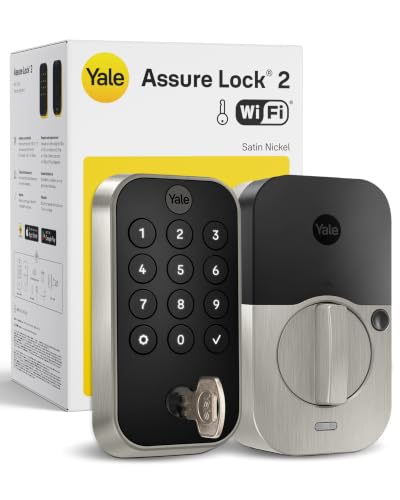
Yale WiFi Smart Lock Deadbolt for Complete Remote Control
Yale Security
Yale WiFi Smart Lock Deadbolt with Keypad, Keyless Entry, Satin Nickel
Price and specifications are read from the Amazon product page and can change.
Yale WiFi Smart Lock Deadbolt
Best for: Full smart control from anywhere
Pros
- Built-in Wi-Fi, no hub
- Unlimited, schedulable codes
- DoorSense with Auto-Lock
- Auto-unlock when you arrive
Cons
- App control US and Canada only
- One-year electronics warranty
The Yale WiFi Smart Lock Deadbolt is the Yale Assure Lock 2 with a Wi-Fi module included, in satin nickel. It has a backlit push-button keypad outside and connects directly to 2.4 or 5 GHz home Wi-Fi without a hub or bridge. With the Yale Access app (US and Canada only), you can lock and unlock from anywhere and get alerts when someone opens the door. It also works with your smartphone and Apple Watch, and it can recognize when you arrive home and unlock automatically.
You can create unlimited codes and schedule them, for example a Tuesday-only code for a dog walker or a code for a rental guest that expires at checkout. DoorSense, a small sensor in the door frame, knows when the door is fully closed, so Auto-Lock only locks when it should. The lock is BHMA Grade 2 certified, rated from -22°F to 140°F, sends low-battery alerts and includes one backup key. Warranty is lifetime limited on finish and mechanical parts and one year on electronics.
This lock suits busy households, rental hosts and anyone who wants to see and control the door from their phone. If you are happy with codes and no app, the Yale Code or Key Free keypad keep things far simpler.
Yale Security Assure Lock Push Button Keypad in Brass

Yale
Yale Security Assure Lock – Keypad Door Lock in Brass
Price and specifications are read from the Amazon product page and can change.
Yale Security Assure Lock
Best for: Brass hardware and simple codes
Pros
- Backlit push-button keypad
- Two keys and 4 AA included
- Quiet motorized Grade 2 deadbolt
- Optional Smart Module upgrade
Cons
- No app out of the box
- Fits 1-3/4 in doors and up
The Yale Security Assure Lock (YRD216) is a non-connected push-button keypad deadbolt in polished brass, a classic gold tone that matches traditional door hardware. You unlock with a code on the backlit keypad and lock by pressing any button, or you can turn on Auto Relock so it locks itself behind you.
The deadbolt is fully motorized, described as super quiet and certified BHMA Grade 2. It fits standard doors 1-3/4 to 2-1/4 inches thick and installs with a screwdriver, with the free BILT app walking you through each step. The box includes two keys, four AA batteries, mounting hardware and a door template. You can add unique codes for people you trust and delete them any time. Yale notes that you can add a Yale Smart Module later to bring it into your smart home.
This lock suits homeowners who like physical buttons and brass finishes and want the option to go smart later. For a modern touchscreen look, the YRD226 is the sibling to consider.
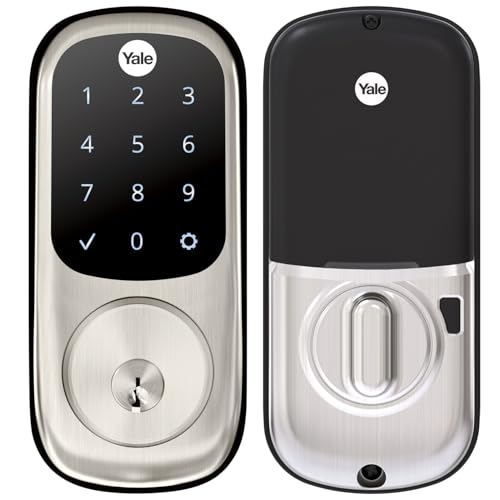
Yale Assure Deadbolt Lock with Touchscreen for an Upgradeable Setup
Yale
Yale Assure Deadbolt Lock with Touchscreen, Satin Nickel Digital Non-Connected Entry Door Lock with Electronic Keypad and Back-Up Key, YRD226NR619
Price and specifications are read from the Amazon product page and can change.
Yale Assure Deadbolt Lock with Touchscreen
Best for: Touchscreen fans planning to upgrade
Pros
- Backlit touchscreen keypad
- Auto-Lock
- Two keys and batteries included
- Upgrade kit adds phone control
Cons
- Upgrade kit sold separately
- Door thickness wording unclear
The Yale Assure Deadbolt Lock with Touchscreen (YRD226) in satin nickel swaps buttons for a smooth, backlit touchscreen. The numbers light up when you touch the panel, and the flat glass surface gives a sleek look. Auto-Lock secures the door every time you leave or go to bed.
It is non-connected out of the box, but the Yale Access Upgrade Kit, sold separately, adds phone control and smart-home features whenever you are ready. It includes two keys, four AA batteries and mounting hardware, and it is Grade 2 certified. The listing says it fits doors 1-3/4 to 2-1/4 inches thick and that doors under 1-3/8 inches need a thin door kit, which leaves doors in between unclear, so measure and check with Yale if yours falls in that range.
This lock suits buyers who want a touchscreen now and a smart lock later. If you want phone control from day one, the Assure Lock 2 Bluetooth or Wi-Fi models are ready to go. Our wider guide to Yale electronic door locks covers more of the range.
Yale Security Home Assure Lock 2 with Bluetooth for Phone Entry at Home

Yale Security
Yale Security Home Assure Lock 2 Deadbolt, Black Suede Keyless Entry Door Lock with Digital Touchscreen Keypad and Bluetooth Connectivity (No Wi-Fi), YRD430-BLE-BSP
Price and specifications are read from the Amazon product page and can change.
Yale Security Home Assure Lock 2
Best for: iPhone users happy with Bluetooth
Pros
- Touchscreen, app and Apple Watch
- Optional Bluetooth Auto-Unlock
- DoorSense and Auto-Lock
- Black suede finish
Cons
- No Wi-Fi without a module
- Remote access needs add-on
The Yale Security Home Assure Lock 2 (YRD430-BLE) in black suede has a digital touchscreen keypad and Bluetooth, but no Wi-Fi. Bluetooth is a short-range wireless link, so your phone connects when you are near the door. That enables unlocking with the Yale Access app on your phone or Apple Watch, and optional Auto-Unlock as you arrive home.
You can send custom codes to family and service people, and Auto-Lock with DoorSense makes sure the door is closed and locked. The listing mentions enhanced app security features. To control the lock from away or by voice assistant, Yale says you add a Yale Smart Module. The warranty is listed as 1 year limited, and the listing does not mention a physical key or door thickness.
This model suits people who want phone and watch entry at home without putting the lock on Wi-Fi. If you need to let visitors in remotely, the Wi-Fi version is the better match.
Yale Key Free Keypad Deadbolt for a Truly Keyless Door
Best for: Keyless homes wanting no app
Pros
- 100% key free, no cylinder
- 9V battery jump if power dies
- Fits 1-3/8 to 2-1/4 in doors
- Wear-proof backlit keypad
Cons
- No app or smart upgrade listed
The Yale Key Free Keypad Deadbolt (YRD137) in black suede has no key cylinder at all. Yale says that makes it more secure than a standard deadbolt, because there is no keyhole for someone to pick. It is also impossible to lose a key you do not have.
There is no app: you program codes directly on the lock. The backlit keypad wakes with any press, locks with a single touch and has numbers that will not wear off. If the batteries die, you hold a 9V battery to the terminals under the keypad for a temporary charge, so you are not locked out. It fits doors 1-3/8 to 2-1/4 inches thick, the widest range here, is BHMA Grade 2 certified and carries a lifetime finish and mechanical warranty with one year on electronics.
This lock suits households that are ready to give up keys completely. If you prefer a backup key, the Assure push-button or touchscreen models include two.
Yale Code Keypad Deadbolt for Keyless First-Timers
Best for: First-timers new to keypad locks
Pros
- Up to 20 entry codes
- All settings on the lock
- Auto-Lock and sound settings
- Low-profile design
Cons
- Non-connected, no app
- Batteries not listed in box
The Yale Code Keypad Deadbolt for Keyless front door entry is Yale’s beginner-friendly, entry-level keypad lock in black suede. It is non-connected, and every setting happens on the lock itself, including adding and removing codes, turning on Auto-Lock and adjusting sounds.
It stores up to 20 entry codes, has a backlit keypad and a low-profile design, and installs without professional help. The listing does not specify BHMA grade, door thickness, batteries in the box or whether a key is included.
The Yale Code suits first-time keypad users and gift-givers helping a parent or new homeowner try keyless entry. If you need a grade and fit range spelled out, the Key Free keypad lists both. For more front-door ideas, see our Yale smart locks for front doors guide.
How to Choose the Right Yale Electronic Deadbolt
Choose your level of smart. No app: Yale Code or Key Free. Upgradeable later: Assure push-button or touchscreen. Phone at the door: Assure Lock 2 Bluetooth. Control from anywhere: the Wi-Fi model.
Pick buttons or touchscreen. Push buttons give a physical click and work well with gloves. A touchscreen looks sleek and is easy to wipe clean.
Decide whether you want a key. The Key Free has none, the Assure models include two, and the Wi-Fi lock includes one backup key.
Measure your door thickness before ordering, and match the finish to your handles: satin nickel, polished brass or black suede.
FAQ
What is a push button deadbolt?
It is a deadbolt you open by typing a code on physical buttons instead of turning a key.
Do I need Wi-Fi for a Yale keypad lock?
No. The Yale Code, Key Free and Assure keypad models work without any app or network.
What happens if the batteries die?
The Key Free keypad can be powered briefly with a 9V battery. The Assure models include backup keys, and the Wi-Fi lock sends low-battery alerts.
Can I upgrade a Yale Assure lock to Wi-Fi later?
Yes. The Assure listings mention a Yale Smart Module or Yale Access Upgrade Kit, sold separately.
How many codes can I store?
The Yale Code stores up to 20, and the Wi-Fi lock offers unlimited codes through the app.


