Yale Front Door Smart Locks: Which One Fits Your Home?
As Amazon Associates, we earn from qualifying purchases. This means we may receive a small commission at no extra cost to you if you click through and make a purchase.
Yale has been making locks since 1840, and today it is one of the names people see most when they start shopping for smart locks for the front door. Yale’s approach is simple to explain: take a sturdy deadbolt, add a keypad, and then give you different ways to connect it to your phone or smart home. If you are a first-time buyer, the tricky part is not the lock itself but the words on the box, such as Bluetooth, Wi-Fi, bridge, Matter and Thread.
The six Yale models below all replace a standard deadbolt and all have a keypad, but they differ mainly in how they talk to your phone: one runs on the Nest app, one uses Bluetooth only, two use Wi-Fi in different ways, one starts as a plain keypad lock you can upgrade later, and one uses Matter for Google Home.
Yale Front Door Smart Locks Compared
| Model | How it connects | Main app | Backup key | Door-closed sensor |
|---|---|---|---|---|
| Google Nest x Yale Lock | Nest Connect (included), Wi-Fi for remote use | Nest app | Not listed | Not listed |
| Yale Assure Lock 2 with Bluetooth | Bluetooth only, no Wi-Fi | Yale Access app | Not listed | Not listed |
| Yale WiFi Smart Lock Deadbolt | Built-in Wi-Fi module, 2.4 or 5 GHz | Yale Access app | Yes, one key | DoorSense |
| Yale Assure Deadbolt Lock with Touchscreen | None out of the box, upgrade kit sold separately | None until upgraded | Yes, two keys | Not listed |
| Yale Assure Lock 2 Keypad Smart | Yale Connect Wi-Fi Bridge (included), 2.4 GHz | Yale Access app or partner apps | Yes | DoorSense |
| Yale Keyed Deadbolt Smart Lock | Matter over Thread, hub needed for remote | Google Home app | Yes | DoorSense |
Google Nest x Yale Lock for Nest App Households

Google Nest x Yale Lock – Tamper-Proof Smart Lock for Keyless Entry – Keypad Deadbolt Lock for Front Door – Satin Nickel
Price and specifications are read from the Amazon product page and can change.
Google Nest x Yale Lock
Best for: Homes already using the Nest app
Pros
- Nest Connect included
- Privacy Mode disables keypad
- Tamper alerts
- Scheduled guest passcodes
Cons
- Remote control needs Wi-Fi and Nest Connect
- No backup key mentioned in listing
The Google Nest x Yale Lock is a joint product sold under the Google brand, and it is built to live inside the Nest app. It replaces the deadbolt you already have and gives you an LED keypad for keyless entry. The keypad plays chimes to confirm what just happened, such as locking, unlocking, or switching Privacy Mode on or off. Privacy Mode is worth understanding: when it is on, the keypad is disabled, so no passcode can open the door, which is handy at night or when you do not want to be disturbed.
The box includes the lock, four AA batteries, mounting hardware, an installation guide and a small plug-in device called Nest Connect, which links the lock to your home internet. The listing notes that mobile alerts and remote control require working internet and Wi-Fi. Once connected, you can unlock the door for a guest from anywhere, give each person a unique passcode with a schedule, get alerts when someone locks, unlocks or tampers with the lock, and use auto-lock. The listing also asks you to measure your door’s backset, cross bore and thickness before buying, which is good advice for any lock on this page.
This model suits someone who already uses Nest cameras or thermostats and wants everything in one app. The listing does not mention a backup key or a door-closed sensor, so if either matters to you, the Yale Keyed Deadbolt Smart Lock further down is the closer fit for a Google home.
Yale Assure Lock 2 with Bluetooth for Simple Keyless Entry
Best for: Vacation rental hosts
Pros
- Wi-Fi Bridge included
- Temporary guest codes
- DoorSense Auto-Lock
- Backup key included
Cons
- Bridge works on 2.4 GHz only
- Bridge needs a power outlet

Yale Security
Yale Assure Lock 2 with Bluetooth – Oil Rubbed Bronze Smart Lock for Front Door with Keypad and Deadbolt – Secure Keyless Entry Door Lock (No Wi-Fi), YRD430-BLE-0BP
Price and specifications are read from the Amazon product page and can change.
Yale Assure Lock 2 with Bluetooth
Best for: Simple keypad lock without Wi-Fi
Pros
- Auto-Unlock via Bluetooth
- Apple Watch support
- Back-lit keypad
- Battery indicator
Cons
- No Wi-Fi, no remote access
- Few included items listed
The Yale Assure Lock 2 with Bluetooth is the most basic connected option here. Bluetooth is a short-range wireless link, so your phone talks to the lock only when you are near the door. The listing clearly says “No Wi-Fi”, which means you cannot unlock the door from work or get alerts while you are away. In return, you get a simple setup with fewer moving parts.
You can open it with the back-lit keypad, the Yale Access app on your phone or Apple Watch, or the optional Auto-Unlock feature, which uses Bluetooth to open the door as you arrive home. Auto-Lock locks it behind you, and you can send custom entry codes to family and service people. The specifications list a battery indicator, a zinc body and a compact size of 0.88 x 2.5 x 3.75 inches. This version comes in an oil rubbed bronze finish.
Pick this one if you mostly want to stop carrying keys and do not need remote control. If you later wish you could let someone in while you are out, the Wi-Fi models below are the natural step up.
Yale WiFi Smart Lock Deadbolt for Control Without a Hub

Yale Security
Yale WiFi Smart Lock Deadbolt with Keypad, Keyless Entry, Black Suede
Price and specifications are read from the Amazon product page and can change.
Yale WiFi Smart Lock Deadbolt
Best for: Remote control with no hub
Pros
- Direct 2.4 or 5 GHz Wi-Fi
- DoorSense with Auto-Lock
- BHMA Grade 2
- Unlimited scheduled codes
Cons
- Yale Access app US and Canada only
The Yale WiFi Smart Lock Deadbolt is the Yale Assure Lock 2 Wi-Fi version, and its big selling point is that it connects directly to your home Wi-Fi on either 2.4 or 5 GHz without a hub or bridge. That means one fewer gadget to plug in. With the Yale Access app, which the listing says works in the US and Canada only, you can lock up, let someone in and get real-time alerts from anywhere.
It is also the most complete package in this roundup for a Yale Wi-Fi smart lock with keypad. It can recognise when you arrive and unlock automatically, and it offers a push-button backlit keypad, phone and Apple Watch control, and a backup key. DoorSense is a small sensor that knows when the door is fully closed, and Auto-Lock then locks it for you. You can create unlimited codes and schedule them, for example a dog walker who only gets Tuesday access. The listing states BHMA Grade 2 certification, an operating range from -22°F to 140°F, low-battery alerts, and a lifetime limited warranty on finish and mechanical parts with one year on electronics.
This is the best all-round choice for a first-time buyer who wants remote access with the least extra hardware. Rental hosts may still prefer the Keypad Smart version below, which is set up around guest check-ins.
Yale Assure Deadbolt Lock with Touchscreen for Upgrading Later
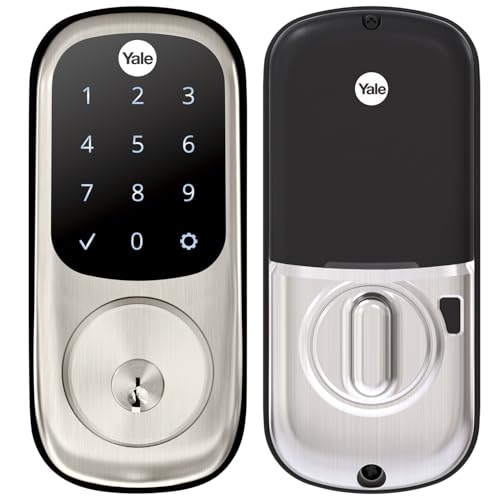
Yale
Yale Assure Deadbolt Lock with Touchscreen, Satin Nickel Digital Non-Connected Entry Door Lock with Electronic Keypad and Back-Up Key, YRD226NR619
Price and specifications are read from the Amazon product page and can change.
Yale Assure Deadbolt Lock with Touchscreen
Best for: Keypad first, smart features later
Pros
- Backlit touchscreen keypad
- Two keys included
- Auto-Lock
- Grade 2 certified
Cons
- Not connected out of the box
- Upgrade kit sold separately
The Yale Assure Deadbolt Lock with Touchscreen is a digital lock that is not connected out of the box. You unlock it by typing your code on a backlit touchscreen keypad, and you can give unique codes to people you trust and remove them when you like. Auto-Lock is included, so the door locks itself after you leave. The listing states Grade 2 certification and says it fits standard doors from 1¾ to 2¼ inches thick, with a thin door kit needed for doors under 1⅜ inches.
If you want phone control or smart home features later, you need the Yale Access Upgrade Kit, which is sold separately. The box includes the lock, deadbolt strike, mounting hardware, four AA batteries, a manual with door template and two keys. The warranty matches the Wi-Fi model: lifetime on finish and mechanical, one year on electronics.
This touchscreen deadbolt suits someone buying a gift for a less techy relative, or anyone who wants a keypad now and a smart lock later. If you already know you want app control, one of the connected models will save you buying a second part. For more on non-connected keypad models, see our guide to the Yale electronic door lock range.
Yale Assure Lock 2 Keypad Smart for Vacation Rental Hosts
The Yale Assure Lock 2 Keypad Smart is aimed squarely at hosts on platforms like Airbnb. Through the Yale Access app or compatible partner apps, you can send each guest a temporary, unique code that works only for the length of their stay. That removes lockbox codes and key handovers, and guests cannot let themselves back in after checkout.
Unlike the direct Wi-Fi model above, this one comes with a Yale Connect Wi-Fi Bridge, a small box you plug into a power outlet near the door. The listing says the bridge gives you app access from anywhere and extended battery life for the lock, and that it works with 2.4 GHz Wi-Fi in the US and Canada. DoorSense and Auto-Lock lock the door once it is closed. Because the lock runs on batteries, guests still get in during a power or Wi-Fi outage, and a backup key is included if the batteries run out.
Choose this one if you manage a rental or often have visitors on a schedule. For a regular family home, the Yale WiFi Smart Lock Deadbolt does the same core jobs without a separate bridge.
Yale Keyed Deadbolt Smart Lock for Google Home and Matter
Best for: Google Home and Matter households
Pros
- Matter over Thread
- Google Assistant voice control
- Adapter for 1.5 inch bores
- 2-year warranty
Cons
- Remote access needs Matter hub
The Yale Keyed Deadbolt Smart Lock is the Yale keyed smart lock with Matter. Matter is a shared smart home standard that lets devices from different brands work together, and Thread is the low-power wireless network it uses here. The listing says Matter over Thread means fewer battery changes. The catch is important: remote access requires a Matter-enabled hub, and the listing names compatible Google devices such as Google TV (4K), Nest Hub (2nd Gen), Nest Hub Max and Nest Wi-Fi Pro.
Day to day, you manage it through the Google Home app: create and share codes, see who comes and goes, and lock by voice with Google Assistant. You can enter with a code, the app or the included physical key. The box has DoorSense, four AA batteries, a strike plate and an adapter for smaller 1½-inch bore holes. The listing describes it as weather-resistant with a 2-year warranty, and the design is meant to match the Nest Doorbell. If you are adding a doorbell or camera too, our front door camera guide covers what to look for.
This is the pick for Google Home households that already own a Matter hub. Without one, you only get local control, so the Nest x Yale Lock or the direct Wi-Fi model may be easier.
How to Choose the Right Yale Front Door Smart Lock
Decide if you need remote access. If you only want to skip keys at the door, the Bluetooth Assure Lock 2 or the Touchscreen deadbolt is enough. If you want to let people in while you are away, you need Wi-Fi, a bridge or a hub.
Match your app. Nest app users should look at the Google Nest x Yale Lock. Google Home users with a Matter hub should look at the Keyed Deadbolt with Matter. Everyone else will use the Yale Access app on the Wi-Fi, Bluetooth or Keypad Smart models.
Count the extra hardware. The Yale WiFi Smart Lock Deadbolt connects straight to Wi-Fi. The Keypad Smart includes a plug-in bridge, the Nest x Yale includes Nest Connect, and the Matter lock needs a hub you may already own.
Think about backup keys and door sensors. The Wi-Fi, Keypad Smart, Touchscreen and Matter models list a key. DoorSense is listed on the Wi-Fi, Keypad Smart and Matter models, so Auto-Lock only fires when the door is truly shut.
Measure your door first. Check thickness, backset and bore size. The Touchscreen listing gives the 1¾ to 2¼ inch range, and the Matter model includes a small-bore adapter.
FAQ
Which Yale lock should I buy as a beginner?
For most first-time buyers who want app control from anywhere, the Yale WiFi Smart Lock Deadbolt is the easiest, because it connects straight to Wi-Fi with no bridge. If you do not need remote access, the Bluetooth Assure Lock 2 is simpler.
What is the difference between the Yale Assure Lock 2 and the Assure Lock 2 Wi-Fi?
The Bluetooth version only works with your phone nearby and has no Wi-Fi. The Wi-Fi version adds remote locking, alerts and access from anywhere through the Yale Access app.
Does the Google Nest x Yale Lock work without Wi-Fi?
The keypad works for entering codes, but the listing says mobile notifications and remote control require working internet and Wi-Fi, connected through the included Nest Connect.
Do I need a hub for the Yale Matter lock?
For remote access, yes. The listing states it requires a Matter-enabled hub, such as a Nest Hub (2nd Gen) or Nest Wi-Fi Pro.
Can I turn the Yale Assure Touchscreen Deadbolt into a smart lock?
Yes. The listing says the Yale Access Upgrade Kit, sold separately, lets you use your phone as your key and connect to a smart home system.
What happens if the batteries die?
The Keypad Smart listing notes you can use the included backup key, and the Wi-Fi model and Bluetooth model both list battery warnings so you can swap batteries before that happens.


