Philips Smart Locks With Handles: Keypad or Fingerprint?
As Amazon Associates, we earn from qualifying purchases. This means we may receive a small commission at no extra cost to you if you click through and make a purchase.
Philips sells a range of Wi-Fi smart locks for US doors, and many of them come as a complete set with a matching handle. A smart lock replaces the part of your door you normally unlock with a key, and lets you open it with a code, your fingerprint, your phone or your voice instead. Buying one with a handle set included is helpful for a first-time buyer: the handle, lever and lock are designed to fit together and look the same, so you do not need to hunt for matching hardware, and the whole front of your door gets a cleaner, coordinated look.
The six Philips locks below split into two groups. Four have fingerprint readers alongside a keypad, and two are keypad-only models with physical buttons. They also differ in water resistance, battery setup, whether a Wi-Fi gateway is included and whether the fingerprint sits on the lock or on the handle itself. We compared the Amazon listings and explain each term so first-time buyers and gift-givers can choose with confidence.
Philips Smart Locks With Handles Compared
| Model | Unlock methods | Auto-lock timer | Weather rating | Handle hardware listed |
|---|---|---|---|---|
| 4200 Series WiFi Keypad Deadbolt (DDL242X-1HW-L) | Fingerprint, PIN, app, voice | 0 to 180 seconds | Not listed | Two door levers and latch |
| Upgraded Wi-Fi Smart Lock with Handle (DDL220X-1HW-MB) | Fingerprint, app, PIN, voice, key | 5 to 180 seconds | Not listed | Fingerprint on handle; no separate set listed |
| Upgraded Wi-Fi Smart Front Door Lock Set (DDL242X-1HW-H-NEW) | Fingerprint, app, PIN, key, voice | 10 to 180 seconds | IP53 | Exterior handle and interior lever |
| Wi-Fi Smart Deadbolt with Gateway (DDL240X-1HBG-H) | App, fingerprint, PIN, key, voice | 30 to 180 seconds | Not listed | Title says 2 handles; parts list says 1 |
| WiFi Keypad Door Lock (DDL242X-15HW-L) | PIN, app, voice, key | 10 to 180 seconds | IP54 | Two lever handles |
| Wi-Fi Smart Front Door Lock Set (DDL242X-15HW-H-MB) | PIN, app, voice, key | 10 to 180 seconds | Not listed | Long-handle set |
Philips 4200 Series WiFi Keypad Deadbolt with Handle for Busy Families
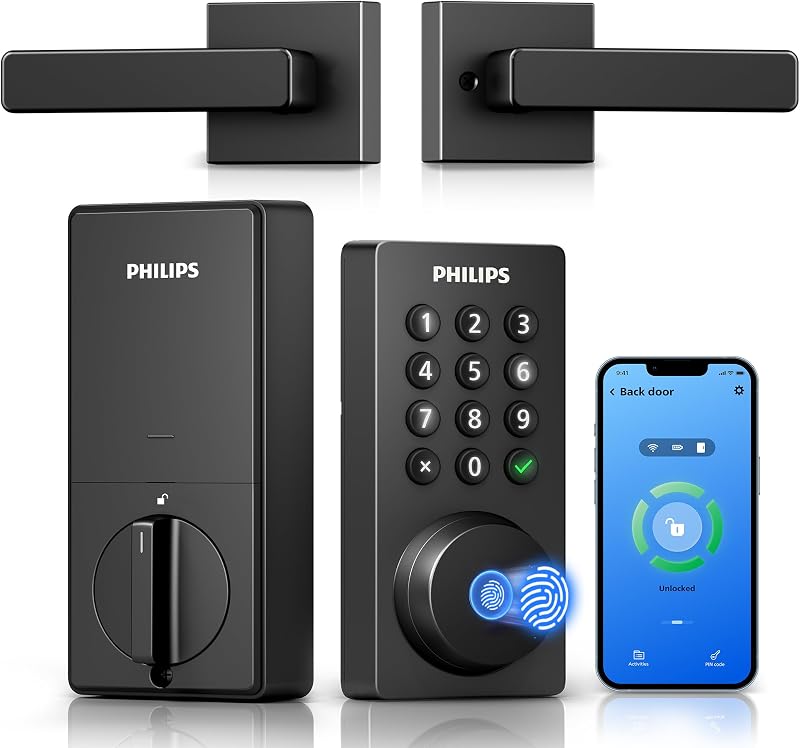
The Philips WiFi Keypad Deadbolt with Handle is the Philips 4200 Series lock, and it combines a keypad, a fingerprint reader and a complete handle set. A deadbolt is the thick metal bolt that slides into the door frame for security, separate from the latch that holds the door closed. Here the box includes the smart deadbolt, two door levers, a latch assembly and mounting hardware, so your whole entry matches.
It connects directly to 2.4GHz Wi-Fi with no hub, but Philips asks you to keep it within 33 ft of your router. Through the Philips Home Access app you can lock and unlock remotely, manage codes and fingerprints, check lock status and see access history. It supports permanent, one-time, periodic and recurring PIN codes, which suits housekeepers or short-term rental guests, and a fingerprint unlocks it in 0.3 seconds. Auto-lock can be set from 0 to 180 seconds, though it is off by default. Voice control works with Alexa or Google Assistant for locking and status checks. Battery life is listed at up to 6 months with a low-battery alert, and batteries are not included. Extra features include anti-drill design, a back-lit keypad and an anti-peeping password, which lets you type extra random digits around your real code so onlookers cannot learn it.
This is a strong Philips fingerprint smart lock for a family front door where the router is nearby. If your router is far away, the gateway model below is more forgiving.
Philips Upgraded Wi-Fi Smart Lock with Fingerprint Handle for Interior Doors

Philips
Philips Upgraded Wi-Fi Smart Front Door Lock Set, Fingerprint Keyless Entry Deadbolt, Keypad Lock with Handle, App Remote Control, IP53 Waterproof, Auto Lock, Anti-Peeping Password, Easy Install
Price and specifications are read from the Amazon product page and can change.
Philips Upgraded Wi-Fi Smart Front Door
Best for: Exposed front doors in wet weather
Pros
- IP53 water resistance
- Five unlock methods
- Up to 100 time-limited codes
Cons
- Battery life not listed
- Warranty length not listed

Best for: Bedrooms, offices and interior doors
Pros
- Fingerprint reader on the handle
- Up to 50 fingerprints
- Passage Mode for open days
Cons
- Separate handle set not listed
- Deadbolt role unclear in listing
The Philips Upgraded Wi-Fi Smart Lock with Handle takes a different approach: the fingerprint reader sits on the handle itself. You place your thumb on the lever, it reads your print in 0.3 seconds, and the door opens as you turn. It stores up to 50 fingerprints and up to 100 passcodes, which can be permanent, scheduled or temporary.
It offers five ways in: fingerprint, the app, PIN code, voice through Alexa or Google Assistant, and a physical key as backup. Built-in 2.4GHz Wi-Fi connects to the Philips HomeAccess app without a hub, with push notifications when the door opens and an activity log. Auto-lock can be set from 5 to 180 seconds, and a Passage Mode, turned on with a 3-second hold, keeps the door unlocked all day. The warranty is 2 years. The listing recommends it for bedrooms, offices and interior doors as well as front doors. Its title mentions both a smart door knob and a keypad deadbolt with lever, while the parts list names only the smart lock, keys and screws, so the exact hardware configuration is not fully clear.
This model suits a home office, a teen’s bedroom or a rental unit door where a lever-style lock makes sense. For a classic front door with a separate deadbolt and handle, the other sets fit better.
Philips Upgraded Wi-Fi Smart Front Door Lock Set for Rain and Weather
The Philips Upgraded Wi-Fi Smart Front Door Lock Set is a Philips front door lock set built with weather in mind. It carries an IP53 waterproof rating. IP ratings measure resistance to dust and water; IP53 means some dust protection and resistance to water spray, helpful on a door without a porch roof.
It pairs a heavy-duty electronic deadbolt with a matching front door handle, and the box includes an exterior handle, an interior lever, the smart lock and two keys. It supports fingerprint unlocking in 0.3 seconds, the app, passcodes, backup keys and voice control via Alexa and Google Assistant. You can generate up to 100 time-sensitive codes that expire, and auto-lock runs from 10 to 180 seconds after the door closes, with notifications showing which user unlocked it. It replaces a standard deadbolt and knob on doors 1-3/8 to 2 inches thick with 1-1/2 or 2-1/8 inch cross bores, installing with a screwdriver. The listing does not specify battery life or warranty length.
Pick this one for an exposed front door or a busy family with guests and pet sitters. If your Wi-Fi signal is weak at the door, the gateway model may connect more reliably.
Philips Wi-Fi Smart Deadbolt with Gateway for Distant Routers
Best for: Stylish entry with long-handle look
Pros
- Long-handle front door set
- Backlit keypad
- 24-month warranty
Cons
- No fingerprint reader
- 8 AA batteries not included

Philips
Philips Wi-Fi Smart Deadbolt with 2 Handles, Front Lock Set with Gateway
Price and specifications are read from the Amazon product page and can change.
Philips Wi-Fi Smart Deadbolt with 2
Best for: Homes with weaker Wi-Fi at the door
Pros
- Gateway and 4 batteries included
- 99% fingerprint accuracy claim
- Unlimited one-time PINs
Cons
- Handle count listed inconsistently
- Auto-lock starts at 30 seconds
The Philips Wi-Fi Smart Deadbolt with 2 Handles and Gateway is the only kit here that includes a gateway, a small plug-in hub that helps the lock talk to your network, and the listing notes that voice control relies on it. It also lists 4 batteries in the box, unlike the others. Philips suggests keeping it within 65 ft of your router, double the 4200 Series guidance.
It unlocks five ways: app, fingerprint, PIN codes, keys and voice via Alexa or Google Assistant. The fingerprint reader unlocks in 0.3 seconds, and Philips claims 99.99% accuracy. You can create up to 100 user codes plus unlimited one-time PINs that expire after one use, which is handy for deliveries. Auto-lock runs from 30 to 180 seconds. It fits doors 1-3/8 to 2 inches thick with a 2-1/8 inch cross bore, 1 inch edge bore and 2-3/8 or 2-3/4 inch backset. The title says it comes with 2 handles, while the parts list names 1 handle, so confirm the set on the product page.
This lock suits a home where the front door sits far from the router. If you want the shortest auto-lock option, the 4200 Series starts at 0 seconds.
Philips WiFi Keypad Door Lock for Simple Button Entry
Best for: Rentals wanting simple physical buttons
Pros
- Physical keypad buttons
- IP54 and -31°F to 150°F
- 24-month warranty
Cons
- No fingerprint reader
- Battery life listed two ways
Best for: Families wanting fingerprint plus keypad
Pros
- 3-second fingerprint unlock
- Two matching door levers included
- Recurring and one-time PIN codes
Cons
- Batteries not included
- Keep within 33 ft. of router
The Philips WiFi Keypad Door Lock with Handle is a Philips WiFi keypad deadbolt with handle that skips the fingerprint reader. Philips notes its physical buttons are simpler and more reliable than a touchscreen, which some older users and gift recipients prefer. It unlocks four ways: passcode, app, voice with Alexa or Google Assistant, and a key. The box includes the lock and two lever handles.
You can create up to 100 passwords that are permanent, one-time or timed, and set auto-lock from 10 to 180 seconds. It runs on 8 AA batteries (not included). The title says 9 months of battery life while the feature text says up to 6 months at 20 to 30 uses a day, so plan on the lower figure. It beeps below 10% battery and sends app alerts. It is rated IP54, works from -31°F to 150°F, resists 2200N of pressure and alarms after repeated wrong codes. It fits standard US deadbolt holes and installs in about 15 minutes, with a 24-month warranty, phone support and 24/7 email support.
This lock suits a rental, a side door or a relative who prefers pressing buttons. For fingerprint entry, choose one of the first four models instead.
Philips Wi-Fi Smart Front Door Lock Set with Long Handle for Curb Appeal
The Philips Wi-Fi Smart Front Door Lock Set focuses on looks. Its long-handle front door handle and deadbolt set has an extended grip that makes a statement at the entry, and the backlit keypad is easy to read at night.
It unlocks by voice via Alexa or Google Assistant, password, key or app, without a fingerprint reader. Built-in 2.4GHz Wi-Fi works without a hub, with real-time notifications and access history. You can create up to 100 permanent, one-time or time-based passwords and set auto-lock from 10 to 180 seconds. It uses 8 AA alkaline batteries (not included), fits standard US deadbolt holes and doors 1-3/8 to 2 inches thick, and installs in under 20 minutes. It carries a 24-month warranty with phone and 24/7 email support. The listing does not specify battery life or a weather rating.
This is the pick for someone who wants their front door to look upscale and is happy with a keypad. For a similar keypad model with a stated weather rating, the WiFi Keypad Door Lock lists IP54.
How to Choose the Right Philips Smart Lock With Handle
Start with the entry type. Fingerprint locks, the 4200 Series, the Upgraded Smart Lock, the Upgraded Front Door Set and the Gateway model, are fastest when your hands are full. Keypad-only locks, the WiFi Keypad Door Lock and the long-handle Front Door Set, are simpler and suit people who prefer buttons.
Next, check your Wi-Fi. All six connect on 2.4GHz only. The 4200 Series should sit within 33 ft of the router, while the Gateway model allows 65 ft and includes a hub. If your door is far from the router, the Gateway kit is the safest bet.
Then look at weather and hardware. The Upgraded Front Door Set lists IP53 and the WiFi Keypad Door Lock lists IP54. Measure your door thickness and the hole sizes; most of these fit 1-3/8 to 2 inch doors. If you are still exploring, our guide to the Philips palm recognition smart lock covers another hands-free entry style.
Finally, think about who uses the door. For large families or rentals, look at code capacity: several models store up to 100 codes. Our broader guide to every Philips keyless entry door lock can help you compare even more options.
FAQ
Which Philips smart lock with handle should I buy first?
For most front doors near a router, the 4200 Series with fingerprint and two matching levers is a well-rounded choice. If your router is far away, pick the Gateway model.
Do Philips smart locks need a hub?
Most connect directly to 2.4GHz Wi-Fi without a hub. The Wi-Fi Smart Deadbolt with Gateway includes one, and its listing says voice control uses it.
Are batteries included with Philips smart locks?
Only the Gateway model lists 4 batteries in the box. The 4200 Series, WiFi Keypad Door Lock and long-handle Front Door Set say batteries are not included.
Can I still use a key?
Yes, five of the six listings name a physical key as a backup method. The 4200 Series listing does not mention a key.
Can I give guests temporary codes?
Yes. All six support temporary or one-time codes through the app, and the Gateway model supports unlimited one-time PINs.


