Yale Code Keypad Deadbolt Guide: Simple Code or Smart Lock?
As Amazon Associates, we earn from qualifying purchases. This means we may receive a small commission at no extra cost to you if you click through and make a purchase.
Yale is one of the oldest names in locks, and today it makes a wide range of keypad deadbolts, from simple code-only locks you program with the buttons to fully connected smart locks you control from your phone anywhere in the world. A deadbolt is the sturdy bolt that slides deep into the door frame above your handle; a keypad version lets you open it with a number code instead of, or as well as, a key. For a first-time buyer or a thoughtful housewarming gift, a Yale code keypad deadbolt is one of the easiest home upgrades there is.
These six options differ mainly in how connected they are: two are non-connected code locks with no app, three are Assure Lock 2 smart deadbolts with Bluetooth or Wi-Fi, and one is a fingerprint keypad accessory that adds touch entry to a compatible Yale smart lock you already own.
Yale Keypad Deadbolts Compared
| Model | Connection | Entry Methods | Codes | Backup Access |
|---|---|---|---|---|
| Yale Code Keypad Deadbolt | None, no app | Keypad | Up to 20 | Not listed |
| Yale WiFi Smart Lock Deadbolt (Assure Lock 2 with Wi-Fi) | Built-in Wi-Fi | Keypad, phone, Apple Watch, auto-unlock, key | Unlimited | Key |
| Yale Keypad Touch | Bluetooth to a smart lock | Fingerprint, code | Set in app | Depends on paired lock |
| Yale Assure Lock 2 Keypad with Wi-Fi Bridge | Wi-Fi via included bridge | Keypad, app | Temporary guest codes | Key |
| Yale Key Free Keypad Deadbolt (YRD137) | None, no app | Keypad | Programmed on lock | 9V battery jump-start |
| Yale Assure Lock 2 Touchscreen (Bluetooth) | Bluetooth, Wi-Fi with added module | Touchscreen, phone, Apple Watch, auto-unlock | Custom codes | Not listed |
Yale Code Keypad Deadbolt for Simple Keyless Entry

Yale
Yale Code Keypad Deadbolt for Keyless Front Door Entry, Black Suede
Price and specifications are read from the Amazon product page and can change.
Yale Code Keypad Deadbolt for Keyless
Best for: First-time keyless entry without any app
Pros
- Up to 20 entry codes
- No app or phone setup
- Auto-Lock set on the lock
- Backlit keypad
Cons
- No remote access
- Listing omits BHMA grade
The Yale Code Keypad Deadbolt for Keyless Front Door Entry is Yale’s entry-level, non-connected keypad lock. “Non-connected” means it does not talk to your phone or Wi-Fi at all. Everything, from adding and removing codes to turning on Auto-Lock (which relocks the door after a set time) and adjusting sounds, happens right on the lock in a few seconds.
You can store up to 20 entry codes, so family, housemates, caretakers and friends each get their own. The backlit keypad is easy to read at night, and the low-profile design comes in Black Suede. Installation is DIY with no professional help needed, and the box includes the deadbolt, strike plate, mounting hardware and manual.
This is the easiest Yale key free keypad deadbolt for a beginner or a gift for a relative who does not want another app. If you want to unlock the door from work or get alerts, one of the Assure Lock 2 models is the upgrade.
Yale WiFi Smart Lock Deadbolt for Full Remote Control
Yale Security
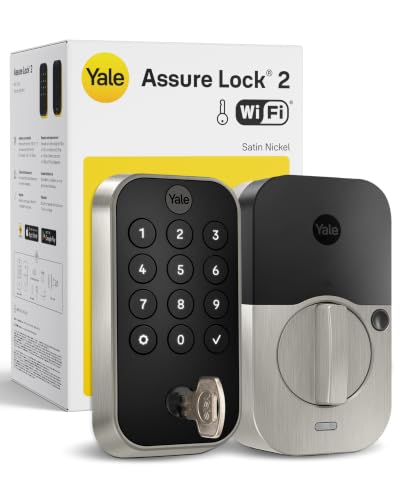
Yale WiFi Smart Lock Deadbolt with Keypad, Keyless Entry, Satin Nickel
Price and specifications are read from the Amazon product page and can change.
Yale WiFi Smart Lock Deadbolt
Best for: Tech-savvy homeowners wanting remote control
Pros
- Built-in Wi-Fi, no hub needed
- Auto-unlock and DoorSense Auto-Lock
- Unlimited, scheduled codes
- BHMA Grade 2
Cons
- More setup than code-only locks
The Yale WiFi Smart Lock Deadbolt with Keypad is the Yale Assure Lock 2 with a built-in Wi-Fi module, in Satin Nickel. It connects directly to 2.4 or 5 GHz home Wi-Fi without a separate hub, so you can lock, unlock and get real-time alerts from the Yale Access app (US and Canada) wherever you are.
It offers many ways in: the keypad, your phone, Apple Watch, auto-unlock when it recognizes you are home, and a backup key. You can create unlimited codes and schedule them, like Tuesday-only access for a dog walker. DoorSense, a small sensor, knows when the door is fully closed so Auto-Lock can secure it. It is BHMA Grade 2 certified (a durability standard from the Builders Hardware Manufacturers Association), works from -22°F to 140°F and sends low-battery alerts. The warranty is lifetime on finish and mechanical parts and one year on electronics.
This suits a homeowner who wants the most complete Yale smart deadbolt in one box. If you do not need remote access, the Bluetooth Assure Lock 2 is simpler.
Yale Keypad Touch for Fingerprint Entry

Yale
Yale Keypad Touch, Fingerprint Door Lock, Keyless Entry, Smart deadbolt, Pin Code Entry – Does Not Include Required Smart Lock
Price and specifications are read from the Amazon product page and can change.
Yale Keypad Touch
Best for: Adding fingerprint entry to a Yale smart lock
Pros
- Unlocks by fingerprint in under 0.5s
- Mounts anywhere within Bluetooth range
- One-Touch Locking
- Includes 4 AAA batteries
Cons
- Requires separate compatible smart lock
- Remote access needs Wi-Fi setup
The Yale Keypad Touch is not a lock on its own. The title clearly says it does not include the required smart lock. It is a separate fingerprint and code keypad that pairs over Bluetooth with a compatible Yale smart lock, and you mount it on the door frame, an outside wall or the door itself.
The fingerprint scanner unlocks in under 0.5 seconds, and the listing claims 99% accuracy. You can add fingerprints or custom codes for family, guests and service people through the Yale Access App, and One-Touch Locking secures the door with a tap. Remote access requires a Wi-Fi connection. It comes with 4 AAA batteries, adhesive and mounting hardware. Yale advises checking its website for the latest compatibility list.
The Yale Keypad Touch fingerprint accessory suits someone who already owns a compatible Yale smart lock and wants to skip codes entirely. First-time buyers should start with a lock instead. For more on electronic options, see our Yale electronic door lock guide.
Yale Assure Lock 2 Keypad Smart Deadbolt for Vacation Rental Hosts

Yale
Yale Assure Lock 2 Keypad Smart Deadbolt with Wi-Fi, Black Suede
Price and specifications are read from the Amazon product page and can change.
Yale Assure Lock 2 Keypad Smart
Best for: Vacation rental hosts managing guest codes
Pros
- Temporary codes per booking
- Wi-Fi bridge included
- DoorSense Auto-Lock
- Backup key included
Cons
- Bridge works on 2.4 GHz only
- Needs outlet near door for bridge
The Yale Assure Lock 2 Keypad Smart Deadbolt with Wi-Fi, in Black Suede, is packaged for vacation rental hosts. It lets you share a temporary, unique code with each guest through the Yale Access app or compatible partner apps, active only for the length of their stay, so there are no keys to return or lockbox codes to change.
Instead of built-in Wi-Fi, it includes a Yale Connect Wi-Fi Bridge that plugs into a nearby outlet and connects to 2.4 GHz Wi-Fi, which the listing says also extends battery life. DoorSense and Auto-Lock make sure the door locks after guests leave. Because the lock runs on batteries, guests can still get in during a power or Wi-Fi outage, and a backup key is included.
This is the Yale Assure Lock 2 keypad for hosts and landlords. For a family home, the built-in Wi-Fi version is tidier with no bridge to plug in.
Yale Key Free Keypad Deadbolt for a Truly Keyless Door
Best for: Renters and families wanting no keys at all
Pros
- 100% key free, no cylinder to pick
- 9V battery jump-start if dead
- BHMA Grade 2, lifetime mechanical warranty
- Batteries included
Cons
- No app or remote access
- No backup key option
The Yale Key Free Keypad Deadbolt, model YRD137, is 100% key free. There is no keyhole at all, which the listing says makes it more secure than standard deadbolts because there is no cylinder to pick, and there are no keys to lose.
It replaces an existing deadbolt on doors 1-3/8″ to 2-1/4″ thick with just a screwdriver. You program codes directly on the lock with no app. Press any button to wake the backlit keypad, or to lock the door behind you. If the batteries die, you hold a 9V battery to terminals under the keypad for a temporary charge. It is BHMA Grade 2 certified with a lifetime warranty on finish and mechanical parts and one year on electronics. Batteries are included.
This suits families tired of lost keys and anyone who wants a code-only lock with a stronger durability rating listed. If you would rather have a backup key, the Assure Lock 2 models include one. Our Yale push button deadbolt guide covers a physical-button alternative.
Yale Security Home Assure Lock 2 Touchscreen for Bluetooth Smart Features
Best for: Smart features on a budget of complexity
Pros
- Touchscreen keypad
- Bluetooth app and Apple Watch control
- Auto-Unlock and Auto-Lock with DoorSense
Cons
- No Wi-Fi without extra module
- Bluetooth range only for app
The Yale Security Home Assure Lock 2 Deadbolt with Digital Touchscreen Keypad connects by Bluetooth only (no Wi-Fi out of the box). Bluetooth works when your phone is nearby, so you can unlock from the Yale Access app on your phone or Apple Watch, or use optional Auto-Unlock as you arrive.
It offers custom entry codes for loved ones and service people, Auto-Lock with DoorSense, and enhanced app security. The listing says you can add a Yale Smart Module later for remote and voice assistant control. It comes with DoorSense, strike plate and hardware, and a one-year limited warranty.
This suits someone who wants smart features without Wi-Fi setup today, with room to upgrade later. If remote access matters now, choose the Wi-Fi version.
How to Choose the Right Yale Keypad Deadbolt
Code-only or smart. The Yale Code and YRD137 are non-connected: simple, private and app-free. The Assure Lock 2 models add phone control, alerts and auto-unlock.
Do you need remote access. For locking or unlocking from anywhere, pick the Wi-Fi model or the version with the Wi-Fi bridge. Bluetooth works only nearby.
Keys or no keys. The YRD137 has no keyhole; the Assure Lock 2 Wi-Fi models include a backup key.
Fingerprints. The Keypad Touch adds fingerprint entry but needs a compatible smart lock.
Check your door. Measure door thickness; the YRD137 fits 1-3/8″ to 2-1/4″ doors.
FAQ
Which Yale keypad deadbolt is best for beginners?
The Yale Code is the simplest, with up to 20 codes and no app.
Does the Yale Keypad Touch work alone?
No. It pairs with a compatible Yale smart lock, which is sold separately.
What happens if the batteries die?
The YRD137 can be jump-started with a 9V battery. The Assure Lock 2 Wi-Fi models include a backup key.
Can I install a Yale keypad deadbolt myself?
Yes. The Yale Code and YRD137 listings describe DIY installation, the YRD137 with just a screwdriver.
Do I need Wi-Fi for a Yale smart lock?
Only for remote control. The Bluetooth Assure Lock 2 works from your phone nearby, and a module can add Wi-Fi later.


